ISBT Labels

Principle:

ISBT labels are ONLY GENERATED THROUGH MEDINFO HEMATOS IIG SOFTWARE.  We do not buy preprinted labels or have a separate label-generating program.  ISBT labels are only attached to blood components after production of new or modification of existing blood components and are only printed if the Good Manufacturing Process GMP criteria are met and confirmed by the software.
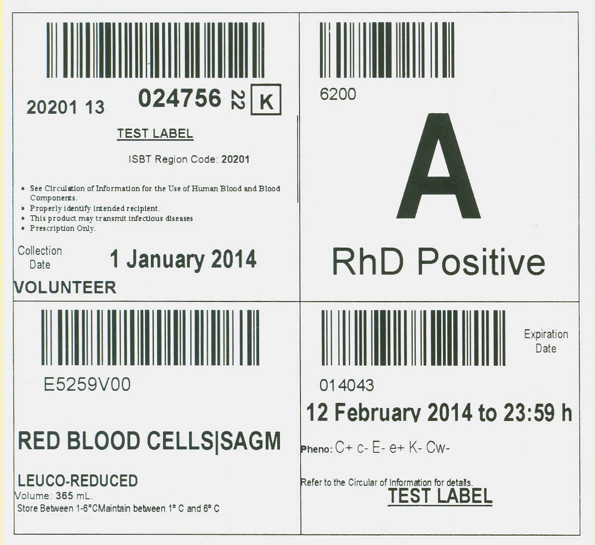
The ISBT component label measures 10 x 10 cm and is divided into FOUR quadrants:

  1. Upper left:  Donor Unit number:  20201 (site location) then two digits for the year (e.g. 13) followed by the donor encounter number followed by a check digit.  Reference is made to the Circular of Information, patient identification, risk of disease transmission, and prescription-only status.
  2. Upper right:  ABO/D type
  3. Lower left:  E code corresponding to the component type specification, the designation of origin (volunteer vs directed vs autologous vs paid donation) plus the division number.  E codes are taken from the ISBT master database.  We use CE-approved codes (NOT US FDA).
  4. Lower right:  Expiration date and time using 24 hour system plus any other phenotype data and other testing.

ISBT Specimen Labels:

ISBT specimen labels are used for all samples at the time of donor collection and include a separate check digit to confirm that the barcode is properly read.  ISBT specimens can be used in all parts of Medinfo Hematos IIG software;  however, non-Medinfo systems not complying with the safety features of the Council of Europe (worst case scenario is Cerner Millennium and all other American software) may not be able to read them.

Since we do not preprint ISBT labels, there are no phase-out of labels, they are only printed immediately upon need.  As component production changes frequently, the actual ISBT designation from the ISBT database for the new component is used by Medinfo.

Policy:

  1. All blood components and solvent-detergent treated plasma SDP must be labelled with ISBT labels.
  2. All donor specimen labels must meet the ISBT standard, including the check-digit.
  3. No blood components may be dispensed to patients unless there is an ISBT label corresponding to the final component, including ALL modifications (aliquoting, irradiation, washed, pathogen-inactivated, etc.)
  4. No one should write anything on an ISBT label:  If there has been a change in the component, perform the modification through Medinfo HIIG and reprint the label.
  5. Do NOT attach any other labels to an ISBT label.
  6. Ensure that the final ISBT label at the time of dispensing is on-top of all other ISBT labels.
  7. The ISBT sequences will be reset each year at 2359 hours on 31 December by the Medinfo software engineer.
  8. The choice of E codes is made by the Division Head, Transfusion Medicine/LIS using the ISBT master database.

References:

  1. Guide to the Preparation, Use, and Quality Assurance of Blood Components, European Committee (Partial Agreement on Blood Transfusion, CD-P-PS, Current Edition
  2. Standards for Blood Banks and Transfusion Services, Current Edition, AABB, Bethesda, MD, USA
  3. TRM.43600 and 43625 CAP Checklist, 2016
Opinion: Advantages of Using Both the Medinfo Donor and Patient Modules

The donor module of Medinfo includes recruitment, logistics, registration, donor screening, collection, marker testing, donor immunohematology, and component production.  There is also a module for inter-depot transfer of blood units from the donor center to the hospital end-users.

The patient module includes patient testing (ABO/D typing, antibody screen, antibody identification), direct antiglobulin test, elution, component modification (washing, aliquoting, pooling), allocation/reservation of blood components for a patient, release of blood components, and their return.

Some sites elect to use their laboratory system’s blood bank module in conjunction with Medinfo donor module.  In this case, they receive each and every unit into their laboratory blood bank module and do all patient activities in it.  There is no link between patient and donor module.  They will have to monitor and transfer inventories in their laboratory system.

At a site using integrating both the donor and patient modules of Medinfo, they will be able to track units across the system to any hospital blood bank.  They will have access to the rules-based system to generate algorithms for use of blood components based on user-defined criteria.  They can instantly perform look back of donor units associated with adverse effects, and be able to rapidly quarantine components subject to recall from the manufacturer or product incidents.  Here are some examples of this functionality:

Example 1:  The hematologists want all their patients to receive leukodepleted irradiated RBCs and platelets at a site not using pathogen-inactivation.  Medinfo can prepare an algorithm by site, clinical diagnosis, or other criteria which will block release of those components that are not irradiated and leukodepleted.  Blood Bank staff will not be able to release anything else.  The donor module can prepare customized component or modification can take place in the hospital blood bank.

Example 2:  During production, it is discovered that units prepared in one of the centrifuges (or automated component equipment Reveos) became contaminated with a foreign substance.  In Medinfo.  In Medinfo, all units prepared during the affected time interval can be immediately quarantined across the system including all hospital blood banks and thus prevent their being transfused.

Example 3:  A patient has developed hepatitis C after transfusion.  Using the transfusion history, one can retrieve data on all transfused units.  The entire production process can be reviewed for each unit, including donor marker testing.  If a unit is implicated, then all patients receiving other components from that donor can be immediately identified for follow-up.

If a disaster occurs, one can quickly check Medinfo’s cumulative stock display of all components at all sites—donor unit and all hospital blood banks.  One can initiate transfer of units from unaffected sites to the disaster location.  This can be updated as frequently as needed—within seconds!

There are probably ways to accomplish this by using the laboratory information system, but it will be slower and require separate communication to the Medinfo donor site.  There will be no seamless integration and delay.

In summary, there are many advantages to using both donor and patient Medinfo modules.  Even at sites where there was separate transfusion service functionality, I elected to use both modules together for seamless integration.  It would be very time-consuming to manually check between the laboratory and Medinfo donor module.  Medinfo’s patient module offers has strong safeguards to prevent release of untested or partially tested units (example:  release of Kell-untested RBCs to a patient with anti-Kell) and a very robust electronic (computer) crossmatch.

11/10/20

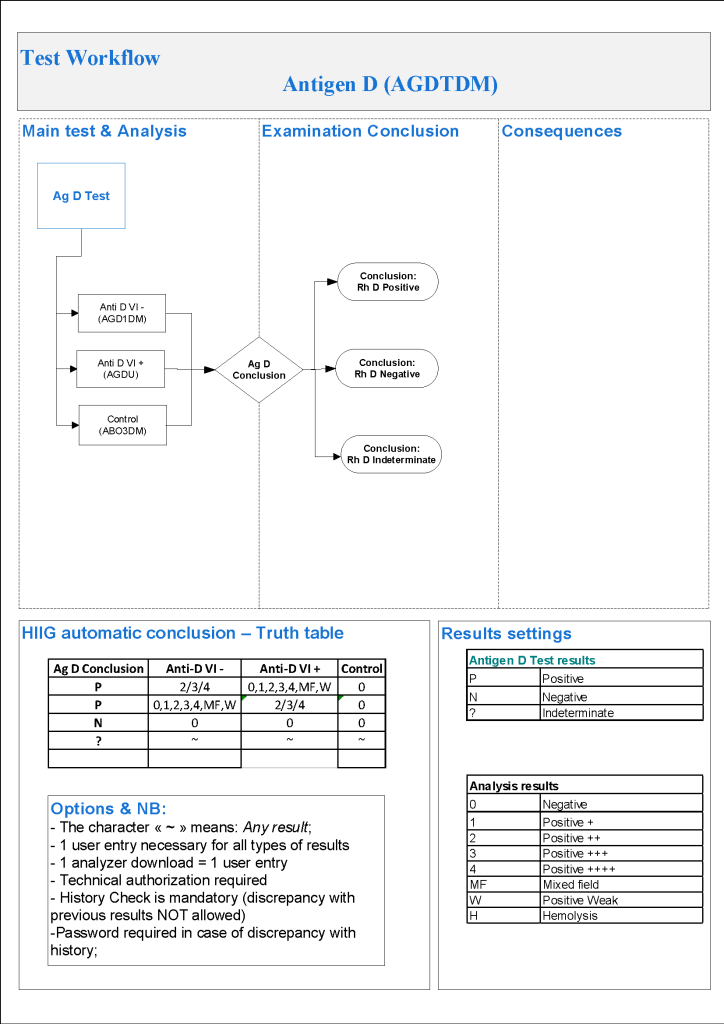
Processes and Software Building 51: Donor D Typing

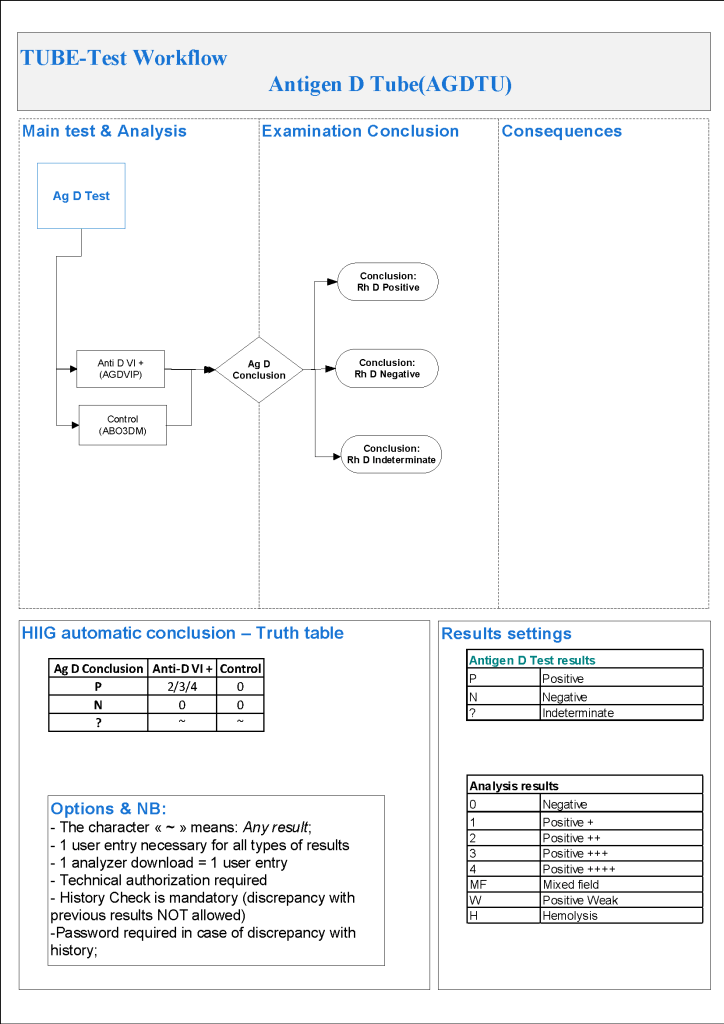
For donor D typing, I always had both automated and manual methods set up on the blood bank computer system Medinfo Hematos IIG.  The automated method had a bidirectional interface between Medinfo and the instrument.   Medinfo did not need a separate middleware.  A truth table was prepared for acceptable results for automatic interpretation.  Other results had to be manually interpreted by someone with the appropriate security level.

For donors, I wanted reagents sensitive for partial or mosaic D types since any D epitopes are potentially immunogenic.  With some reagents, this meant using a DVI+ reagent and others both DVI+ and DVI- reagents.

The manual testing option is structured similarly.  Within Medinfo, it is easy to change the methodology if the system is so built.  Thus, if the analyzer for D typing is down, the staff can select the manual methodology.  Likewise, if one testing center goes off-line, the world can be completed at another site—no need to repeat testing already completed from the first site.  This flexibility can apply to any test in system.

The manufacturer’s recommendations for the particular reagents in use were strictly followed.  One used the range {0, 1, 2, 3, 4, Mixed Field, Weak} as acceptable.  Another used {0, 2, 3, 4}.  Controls were included.  Most importantly, Medinfo can be configured for any set of reagent values.

The attached flows show two different testing systems as examples of what can be built in the Medinfo system.

9/10/20

Opinion: Blood Bank Software Design Should Be Based on Technical, Medical, and Nursing Experience

In my career directing laboratory and blood bank software, I have encountered software that had major features which were difficult to find (hidden in a nested menu system) or named ambiguously.  To this day, I wonder what feedback was provided from the potential end-users—or if any had been requested by the developers.  I will give some examples.

Example 1:

A major hospital system wanted to implement a third-party add-on to a new software covering all major disciplines.  It would provide evidence-based diagnostic assistance (e.g. what algorithm to follow in diagnosing crushing chest pain).  A lot of time was devoted to focusing it for local practices—physicians in many disciplines were involved.  However, the end-users were not engaged in how this expert system was to be accessed.  The end result was that only few physicians actually used the system.  Even in the training period for the new hospital system, this important detail was not emphasized so most physicians did not know how to access it!!

Example 2:

A major hospital system including laboratory and nursing modules had nursing design/build the transfusion reporting system, i.e. recording the actual transfusion information:  component type, start/end and frequency of transfusion.  The nursing informatics staff did not understand anything about ISBT codes or frequency of transfusion.  The transfusing nurses could type anything into the component type, ISBT field, specify frequencies of transfusion from one second to many years, and record different ABO/D types each time they checked the patient’s vital signs—and not compare to the historical or current blood types.  We also discovered that the system could not read ISBT codes at all!

The system had been built without consulting Transfusion Medicine.  We only discovered the errors it was demonstrated when we considered building therapeutic apheresis reporting into it.  I refused to allow my apheresis nurses to use it, and eventually it was scrapped.

Conclusion:

In my builds with Medinfo Hematos IIG, I early engaged my staff (medical, technical, and nursing) to review and critique—and help with the actual build construction to maximize its usability.  This is very important when the staff have many primary languages to ensure that the everyone understands the wording properly.

The presentation of the data is very important to optimize pattern recognition and make proper decisions.  If the data is scattered over many pages, interpretation is impeded.  This is why I prefer a summary dashboard of information for both donor and patient data to facilitate my decision making.

In summary, make certain end-users with the appropriate background are engaged in the building/design process.  They are not there for database design, but to promote usability.  This will greatly improve the final product and facilitate patient and donor care.

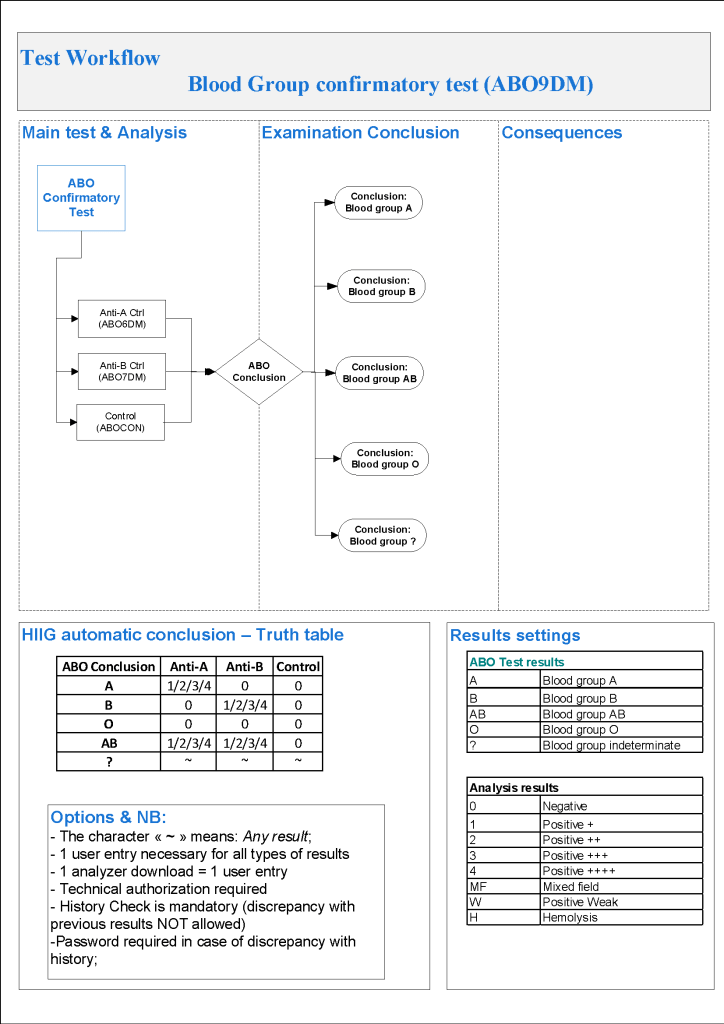
Processes and Software Building 50: Donor ABO Confirmatory Typing

For donor ABO confirmatory typing, I always had both automated and manual methods set up on the blood bank computer system Medinfo Hematos IIG.  The automated method had a bidirectional interface between Medinfo and the instrument.   Medinfo did not need a separate middleware.  A truth table was prepared for acceptable results for automatic interpretation.  Other results had to be manually interpreted by someone with the appropriate security level.

The manual testing option is structured similarly.  Within Medinfo, it is easy to change the methodology if the system is so built.  Thus, if the analyzer for ABO typing is down, the staff can select the manual methodology.  Likewise, if one testing center goes off-line, the world can be completed at another site—no need to repeat testing already completed from the first site.  This flexibility can apply to any test in system.

The manufacturer’s recommendations for the particular reagents in use were strictly followed.  One used the range {0, 1, 2, 3, 4} as acceptable.  Another used {0, 2, 3, 4}.  Controls were included.  Most importantly, Medinfo can be configured for any set of reagent values.  Refer to the following flow diagram.

Confirmatory testing also includes D typing.  That will be considered in a future post.

6/10/20

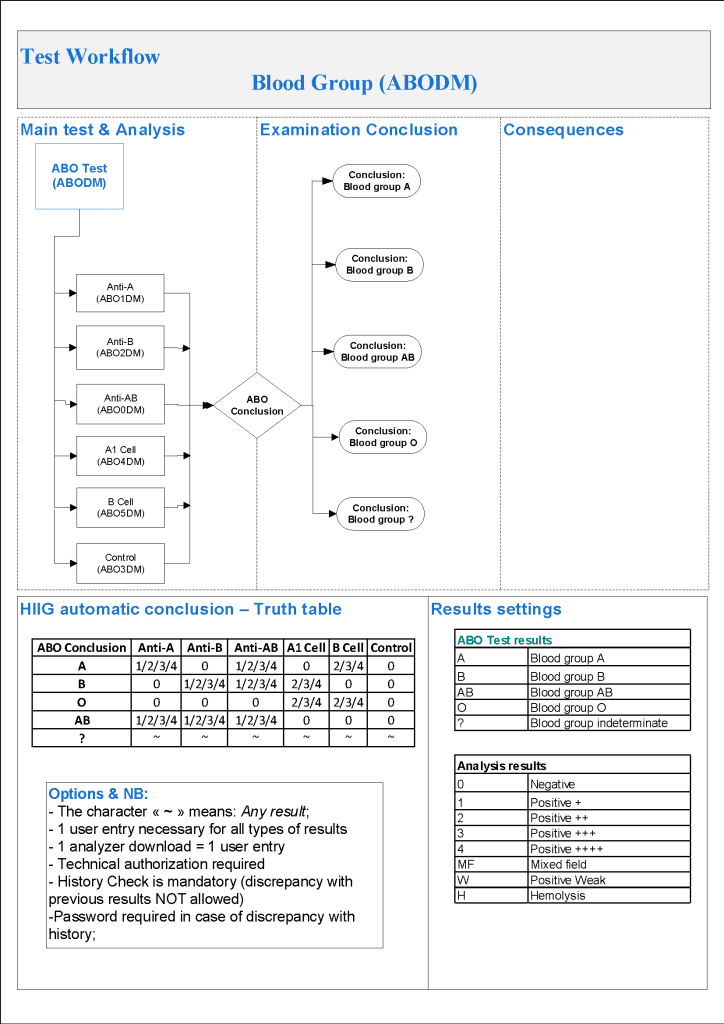
Processes and Software Building 49: Donor Automated ABO Typing

For donor ABO typing, I always had both automated and manual methods set up on the blood bank computer system Medinfo Hematos IIG.  The automated method had a bidirectional interface between Medinfo and the instrument.   Medinfo did not need a separate middleware.  A truth table was prepared for acceptable results for automatic interpretation.  Other results had to be manually interpreted by someone with the appropriate security level.

The manufacturer’s recommendations for the particular reagents in use were strictly followed.  One used the range {0, 1, 2, 3, 4} as acceptable.  Another used {0, 2, 3, 4}.  Controls were included.  Refer to the following flow diagram.

Most importantly, Medinfo could be configured for any set of reagent values.

2/10/20

Processes and Software Building 48: Donor Immunohematology Testing

Donor immunohematology testing of components in progress is similar to patient immunohematology testing.  The tests include:

ABO forward and reverse testing

D typing by multiple monoclonal cocktails

ABO/D confirmatory testing

Antibody screening

Antibody identification

Truth tables are prepared for each test type with interpretations.  Results falling outside these ranges will require manual review and manual interpretation by a user with an appropriate level of privilege (usually senior technologist, supervisor, or transfusion physician.)

Unlike patient D typing, we want to detect partial or variant D types as D-positive since theoretically even a few epitopes of D present may be immunogenic to the patient.  In patient D typing, we can call partial D types as D-negative and use D-negative RBCs.  We don’t want to use partial D RBCs for D-negative women of child-bearing age!

This series will show several different test algorithms including both manual and automated methods.  The criteria for acceptability of the reactions are based on the manufacturers’ recommendations. 

Reflex ordering of antibody identification will occur if the antibody screen is non-negative.

28/9/20

Opinion: Selecting a Site to Assess a Candidate Software

You have already sent out an RFP (request for proposal) for a laboratory software and have received several responses.  Regardless what the vendor provides, you need to contact a comparable site to your own and assess how well the solution is working.

The key word is COMPARABLE.  The site should have similar functionality (breadth of test and process menus), test and activity volume.  If you have multiple sites, does the candidate site have the same?

Technically, to assess response time, you should select a site that uses the same platform (e.g. Microsoft SQL Server, Oracle, etc.) and operating system (Windows, Linux, UNIX, etc.)

At one institution I worked at, they went on a site visit, but it used the software on a different platform (UNIX). They wanted to use it on Microsoft SQL Server.  They were happy with the observed response times during the visit, but when they installed it on their chosen platform, it was very slow.  You cannot compare an apple to an orange (or in this case to a prune).

I would ask to speak to key players at the site visit without the vendor being present.  Hopefully, they will be honest with you about their experiences.  I was once very surprised that I was asked to allow for a site visit for a non-blood bank software for which I had serious concerns.  I would not serve as a site visit.

26/9/20

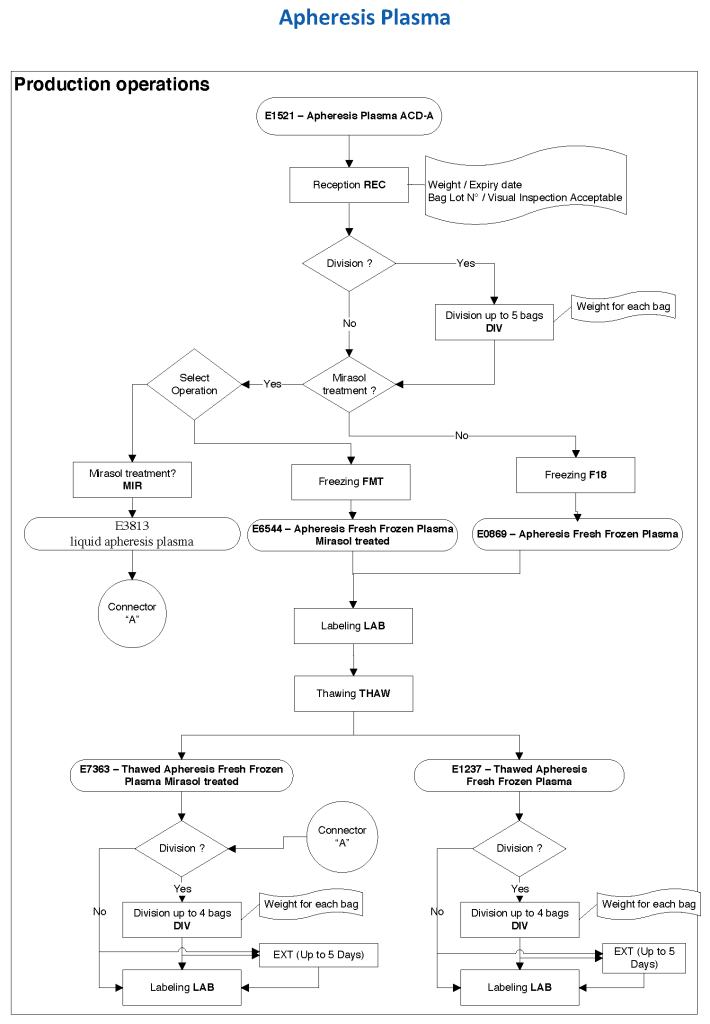
Processes and Software Building 47: Apheresis Plasma

At HMC during my tenure, all plasma products—whole-blood and apheresis-derived were pathogen inactivated with riboflavin (Mirasol).  In our software processes, I had options to release both Mirasol-treated and untreated (the latter in emergencies) and to aliquot either as needed.  The same processes applied to COVID-19 convalescent plasma CCP except that they were performed in a quarantine production area.  There were specific ISBT codes for CCP.

24/9/20

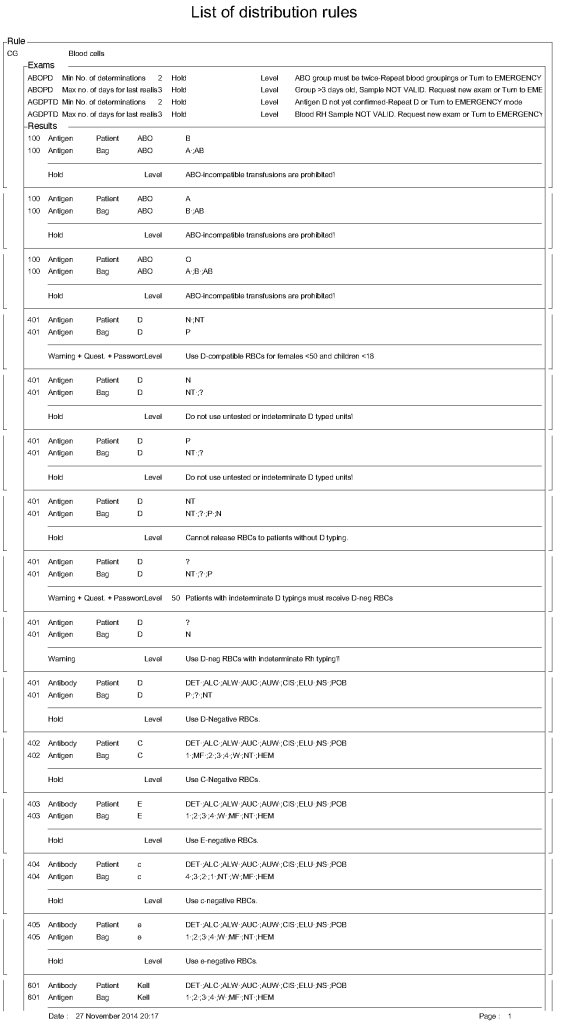
Processes and Software Building 56: RBC Distribution Rules

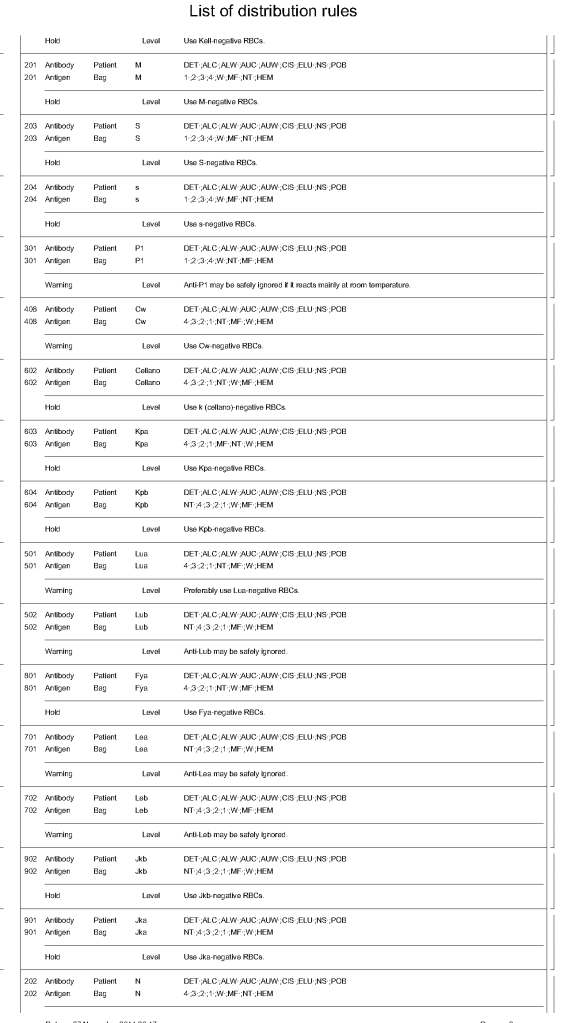
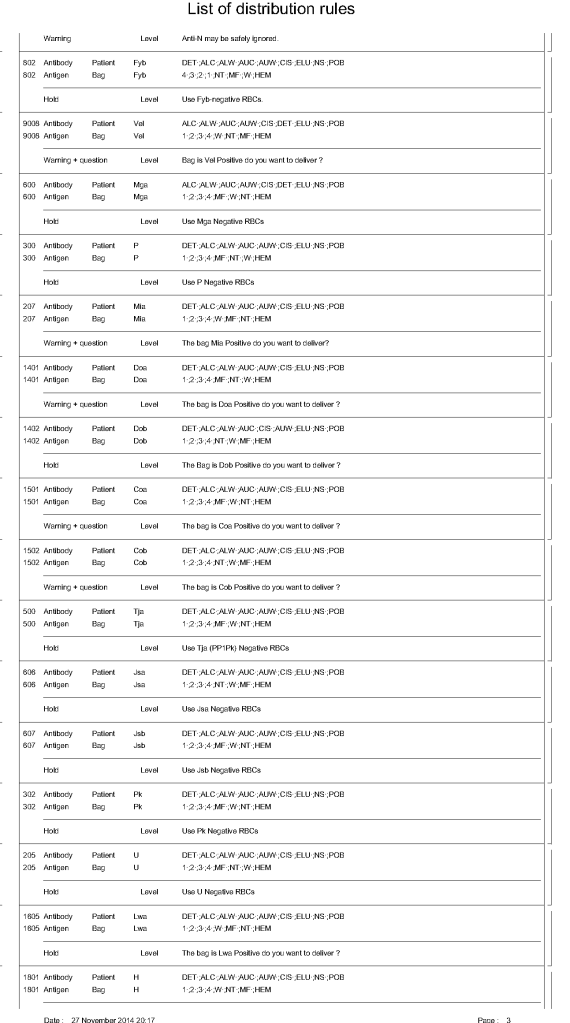
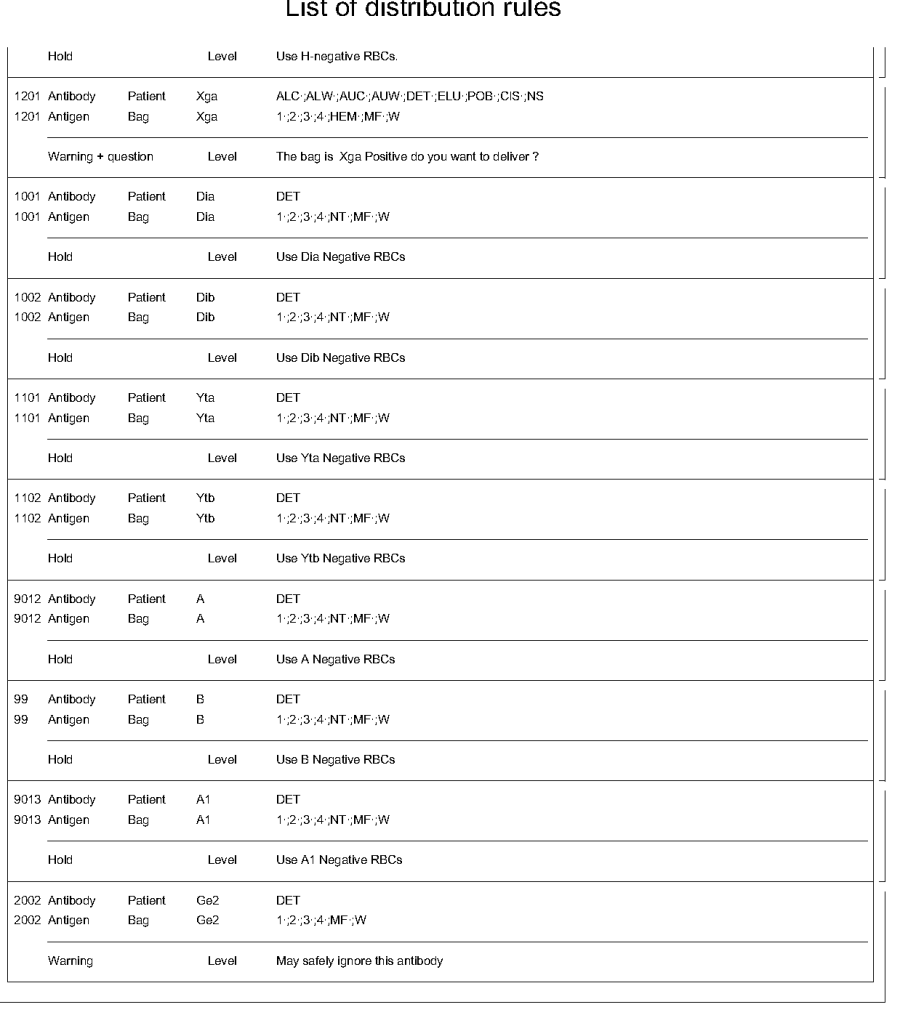
In Medinfo HIIG, one sets parameters to determine which antigens must be matched to allow a RBC product to be released.  These criteria may include:

Number of and timing of ABO/D typings

Permissible ABO/D substitutions

Emergency release

Required antigen matches

Optional antigen matches

Exact wording of conditional and blocked combinations

For ABO/D typing, a minimum of two typings must be on record for routine release and the last typing done within 72 hours.  If not, emergency release must be selected.  ABO-incompatible selections must be blocked.  For D-negative patients, only D-typed units may be selected.  D-incompatible transfusions will trigger a message to use D-compatible for females <50 years.

Required antigen typings include using antigen-negative for patients having antibodies against the specified antigen, e.g. D-negative RBCs for patients with active anti-D, c-negative for patients with anti-c, K-negative for anti-K, etc.

Certain antibodies will trigger a message to flag the use of unmatched units but not block the release.

The attached document shows sample settings for RBC release.  Note that these rules are user-definable.

31/10/20