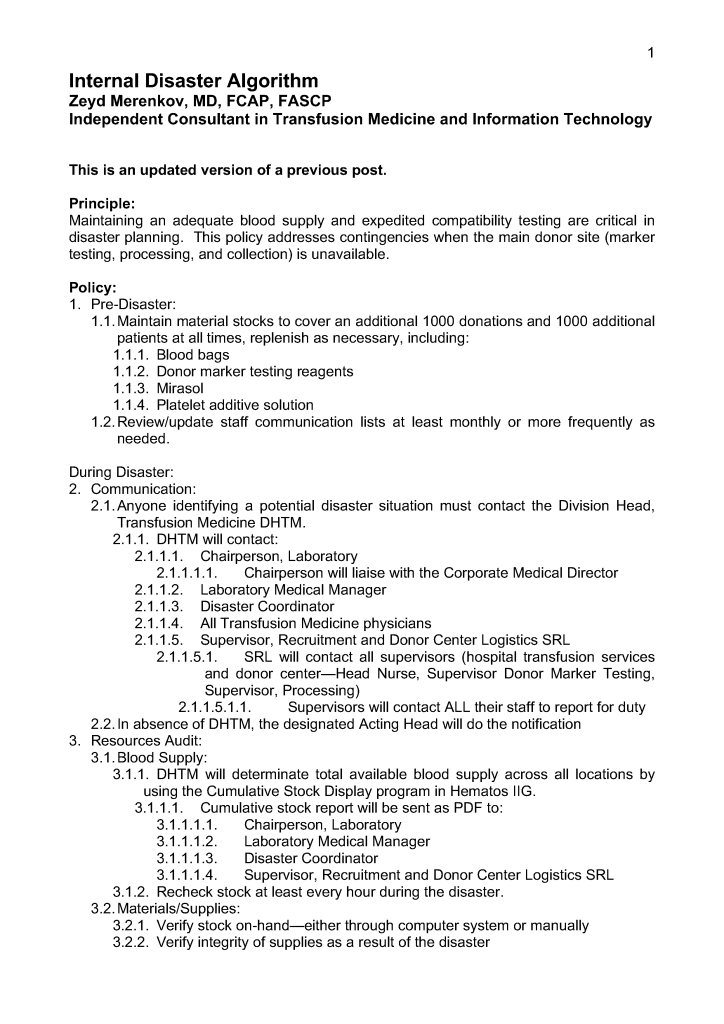
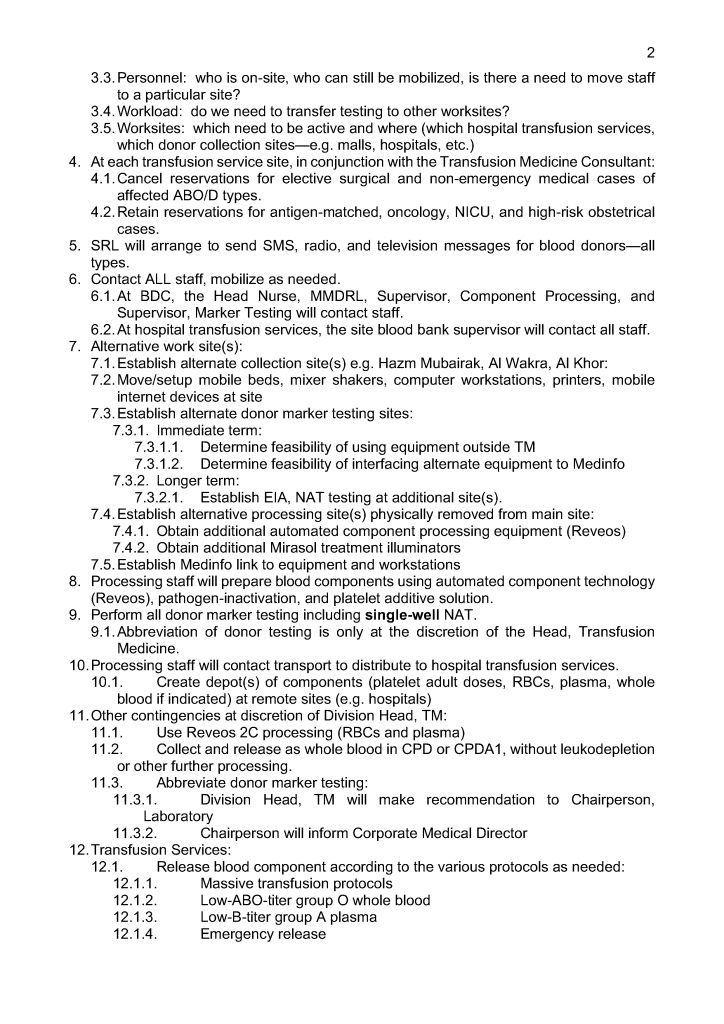
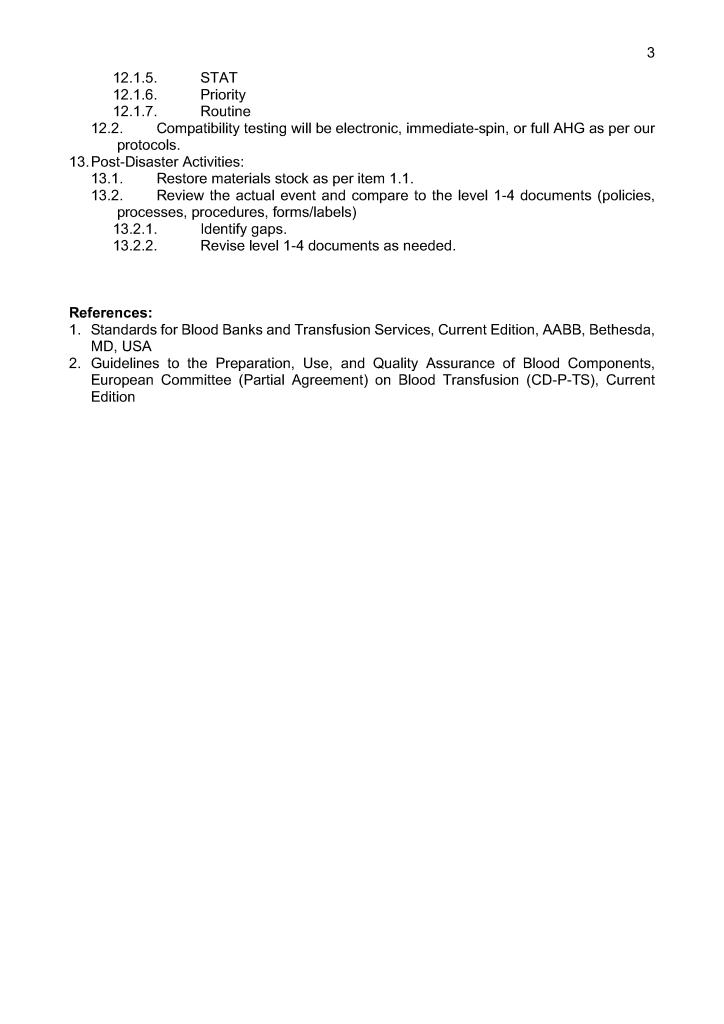
COVID-19 Convalescent Plasma CCP Site Registration

I designed a completely quarantined process for collection, processing, and release of CCP at HMC Doha.  This document shows the Medinfo process for site registration as a separate donor center code.

CCP could only be collected at this special site and only the apheresis bag could be used for collection.  Regular donation options were not available at this CCP site nor was CCP collection an option at the regular donation sites.

4/1/21

Medinfo COVID Convalescent Plasma Workflow Revisited

It now has been over eight 8 months since I prepared the CCP workflow in Medinfo.  It was built on the framework of the manual CCP process including donor prescreening with an abbreviated donor questionnaire.  It was really quite simple and used the donor and patient modules to create quarantine areas for donor screening, collection, processing, and hospital patient blood bank release.

Here are my current comments on the process:

Donor Qualification:

I would still exclude malaria and HTLV from the donor questionnaire and would update to UDQ 2.1.  Since these donors have recovered from a potentially life-threatening illness, I would keep the Hgb threshold at 11 g/dl.

Donor Collection:

In the future, I would consider using one of the soon-to-be-released portable devices that continuously monitor vital signs with pO2 and EKG lead to rule out asymptomatic pulmonary or cardiac problems.

I would also consider using low-ABO-titer, group A, universally to meet the demand for group B and AB patients.

Donor Testing:

There is still no need to segregate and separately test CCP donor specimens from regular blood donor specimens.  I would perform SARS-CoV-2 antibody testing and set a threshold for qualifying donors—that threshold will be based on the manufacturer’s recommendations.  However, if the treating physician wanted to use a low-titer unit, I would permit this.

Donor Processing:

There is no need to change this from the current processes.  Keep the CCP processing separate from the regular operations.

CCP Plasma Release:

I would keep the quarantine release and restrict it to the locations used for treating COVID-19 patients

Medinfo Software Modifications:

I would record the IgG and IgM titers for SARS-CoV-2 antibodies in each donation record.  This would include testing and entering the results on donations prior to this testing.  ISBT labels should include this antibody titer.

Hospital Information Software Modifications:

Set up restricted CCP ordering for the actual treating physicians only.  Also provide the ISBT code and shortened descriptors to it if necessary (certain HIS vendors still cannot read ISBT codes natively).

The original CCP workflow is attached for reference.

COVID-19 Convalescent Plasma CCP Series Introduction

I will be posting a detailed series about the manual and software-enhanced COVID-19 processes that I set up in Qatar at HMC Doha in March-April 2020.

In this series I will provide you with screen shots of my Medinfo Hematos IIG software design for each step in the process:  collection, processing, testing, inter-depot transfer, and hospital transfusion service/blood bank release.

This GMP-compliant software-enhanced system is based on the manual system I set up in early March 2020 at HMC.

I want to thank Medinfo Hematos IIG for their rapid response to building this parallel system based on my standard processes in so short a time (two weeks) and my special thanks to the software engineering team at Vital Health Technologies, the agent for Medinfo in Qatar.

To start the series, I am providing the basic workflow for the system.  As is normal in Medinfo software design, a full mapping of the processes are made.  This workflow shows the new CCP ISBT codes and the quarantine collection and processing steps.  The donor testing (marker and immunohematology) processes are similar to those for regular donor units.

This is basically the same process both manually and in the software.  I always say:

A good software process is based on a good manual process!!

Please note the following workflow for our initial discussion.

Preventing Graft vs. Host Hemolytic Anemia

Principle:

Donor lymphocytes in an organ transplant may make antibodies and cause a clinically significant hemolytic anemia, i.e. a graft vs. host hemolytic anemia GVHHA.  Optimal handling in these cases should include antibody screening/identification for all potential donors and recipients.  The transfusion medicine physician should review the results for possible issues of antibody/antigen incompatibilities to proactively select matched blood components and avoid GVHHA.

In the Medinfo blood bank computer system, we can make custom rules to ensure release of only antigen-matched units as needed.

Policy:

  1. Perform antibody screen and identification (if indicated) for all prospective organ donors and recipients.
  2. If the organ donor has clinically significant antibodies, check if the recipient has the corresponding antigens.  If so, select RBC units negative for the donor antibody specificities. 

Example:  Donor has anti-Kell (K1) and patient is K1-positive.  Use only K1-negative RBCs post-transplant.

  • Send the case to the transfusion medicine physician to review.  He will contact the clinicians as indicated.
  • Create a rule in Medinfo forcing the antigen matching.

References:

  1. Technical Manual, Current Edition, Bethesda, MD, USA
  2. Standards for Blood Banks and Transfusion Services Current Edition, AABB, Bethesda, MD, USA

Patient D-Typing Algorithm Using Ortho Monoclonal Cocktail Reagents

Principle:

We must select D-negative RBC units for transfusion if the patient is truly D-negative or if he/she is a partial D since transfusion of a partial D positive unit may induce antibodies against any part of the D molecule.  Thus, for patients, we will consider patients with partial D as D-negative.  Note that this is NOT the usual practice in the USA;  however, AABB Standards do allow that we do NOT test patients for weak D and give D-negative RBCs instead.

Background:

Ortho Diagnostics Reagents use two different monoclonal antibody cocktails that react variably with the antigen D (Rh1)—these are found on the card:  Anti-A/B/A,B/D/D/Ctrl:

Anti-D/Anti-RH1—IgM monoclonal antibody clone D7B8 can detect most examples of weak and partial D including weak D types 1, 2, 3, 4.0, and D categories II, III, IV, V, VII, DBT, and R0HarIt does NOT detect category VI.  Retest positive reactions of 2+ or less by an alternate method.

Anti-D/Anti-RH1—IgM monoclonal antibody RUM1 can detect most examples of weak and partial D including weak D types 1, 2, 3, 4.0, and D categories II, III, IV, V, VII, DBT, and R0HarIt does NOT detect category VI.  Retest positive reactions of 2+ or less by an alternate method.

Policy:

  1. Follow the manufacturer’s instruction for storage, handling, and usage of all reagents.
  2. If the D-control is positive, the reactions are indeterminate, repeat by another method.
  3. Run both anti-D reagents listed—do not use the donor typing algorithm or reagents.
  4. Use the following table for interpretation and further actions if needed:
Pattern #Anti-D/D7B8Anti-D RUM1D-Interpretation
1PositivePositiveD-positive
2PositiveNegativeDo additional testing
3NegativePositiveDo additional testing
4NegativeNegativeD-negative  

If the reaction is 2+ or less with either the Ortho anti-D/D7B8 reagent or anti-D/RUM1 or if the patterns 2 or 3 above, repeat by another manufacturer’s reagents.  In the meantime, consider the patient as D-negative.

Medinfo-Ortho interface settings for Patient Testing:

Anti-D/D7B8Anti-D RUM1D-Interpretation
3, 43, 4D-positive
3, 40~
03, 4~
00D-negative
~~~

Note all of the following:

  1. If the result is D-indeterminate, use D-negative RBCs.
  2. No reagents may be able to detect all D variants.
  3. ~ means any other value for that reagent (1+, 2+, mf, hemolyzed)
  4. Note that this new algorithm makes a 2+ reactivity as indeterminate with Anti-D/D7B8 or Anti-D/RUM1.

References:

  1. Publication e631300291, Product Insert, Anti-A/B/A,B/D/CDE/Control Card, 2010, Ortho Clinical Diagnostics, High Wycombe, Buckinghamshire/UK
  2. Standards for Blood Banks and Transfusion Services, Current Edition, AABB, Bethesda, MD, USA

Off-Line Donor Medinfo Transactions

Principle:

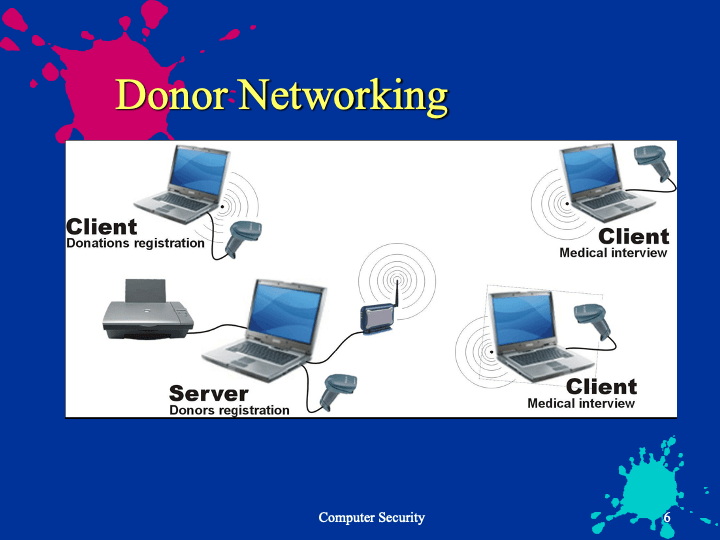
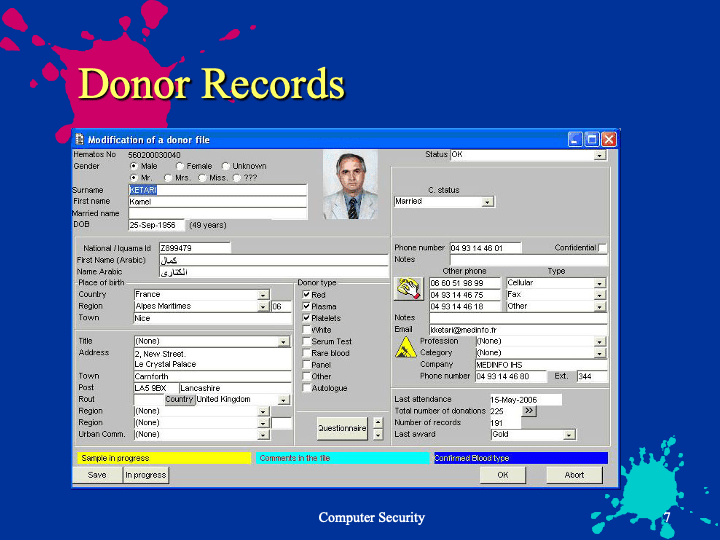
When you cannot establish a direct link to the live Medinfo program, you must arrange for the local Medinfo engineers to create a local server that will have the current Medinfo donor database for use at outside campaigns where the internet connection cannot be used.  This can also be used if for some reason the Blood Donor Center link is down in order to register donors and check the donor deferral database.

Policy:

  1. For each outside campaign, there should be a pre-campaign visit to verify the availability of internet to connect to Medinfo.
    1. If the internet connection is working, use Medinfo using the 4G access points.  Otherwise:
    2. If none, inform the Medinfo engineers to prepare a local server on one of the laptops at least ONE DAY in advance of the campaign.
      1. Give Medinfo engineers the laptop to download the database and software.  This will be the offline server for the campaign.
      2. Link the offline server to the other portable computers for the campaign (see the corresponding Medinfo job aid).
      3. Use the local network (offline server and other portable computers) for registering donors.
      4. Upon return to the Blood Donor Center, upload the data.
      5. Continue the regular processes after uploading.

Note:  When the offline data is uploaded into Medinfo main database, it will be checked against the latest donor deferral database.  The latter will be applied for the donation.

Liver Transplant Processes for the Transfusion Service

Principle:

Liver transplantation requires coordination of the Transfusion Service TS, Liver Transplant LTS , and the Blood Donor Center BDC to prepare blood components for this massive transfusion setting.

Policy:

  1. Whoever receives notification of a possible liver transplant should ensure that ALL of the following senior staff are also informed:
    1. Head, Transfusion Medicine
    2. Coordinator, Donor Recruitment
    3. Supervisor, Transfusion Service
  2. Transfusion Service Supervisor will arrange transfusion service staffing as needed to cover the surgery period and immediate post-operative period.
  3. The current, up-to-date inventory must be calculated.  The following minimum stock must be reserved:
    1. Twenty (20) packed RBCs
    2. Twenty (20) FFPs—-leukodepleted and pathogen-inactivated
    3. Three (3) platelet pools or apheresis doses (each ≥ 2E11 absolute number of platelets)—leukodepleted and pathogen-inactivated.
    4. The Medinfo Liver Transplant Protocol automatically orders all the above.
  4. Complex needs:
    1. If the patient has clinically significant antibodies, confirm the availability of the requested number of antigen-negative/compatible units.
    2. The Head, Transfusion Medicine, or the covering transfusion medicine consultant on-call will contact the liver transplant team to discuss the feasibility of proceeding after assessing the inventory of antigen-negative units.
    3. Only the transfusion medicine consultant can approve the use of antigen-incompatible RBCs in conjunction with the liver transplant team.
  5. Donor Center should increase recruitment/production to meet the anticipated usage as needed.
  6. When the procedure is confirmed:
    1. Crossmatch the RBCs by the appropriate technique according to our algorithms (i.e. computer/electronic, immediate-spin, or full AHG).
    2. Thaw the FFP:  the FFP is valid for FIVE days after thawing for use for the transplant patient or other patients with coagulopathy.
    3. If more than the above number of units is needed, HGH Transfusion Service must inform the Donor Center senior staff (Head, Donor Center; Administrative/Technical Director, and Coordinator, Donor Recruitment) to arrange for additional donations.

Example of Dealing with HIS Interface Issues to Dedicated Blood Bank Software

The following is an actual working document for interactions between the Medinfo HIIG system and a monolithic hospital information system covering nursing, laboratory, ADT, etc.  For the purpose of this post, I shall name it B*.

In a previous position, I was in charge of the Laboratory Information Systems and worked both with Medinfo for donor and patient hospital blood bank processes AND B* for the general laboratory.  It was my decision NOT to use B* for the hospital blood bank because there would be no integration between the donor module in Medinfo and patient blood bank module in B*.  Also, B* had limited handling of complex immunology algorithms and fewer safeguards than Medinfo.

B* could not directly read ISBT product labels from the ISBT dictionary and required hard-coding the links for each and every type of blood component and modification.  It was also slow to order blood components so in emergency situations, I allowed physicians to bypass B* and order directly if they felt in their clinical judgment that the delay in using B* might harm the patient.

The non-transfusion physicians had to directly order blood components in B* except for emergencies as stated above.  They were only allowed to order a limited number of basic tests such as ABO/D type, direct antiglobulin test DAT, or antibody screen.  Based on those tests, we would use algorithms in Medinfo’s patient module.  Example:  an outside doctor could not order a Jka typing—that could only be done according to our internal Medinfo algorithms.  Doctors could only order antibody screens, not antibody identifications, elutions, or titrations.

Sadly, most physicians had no specific training in blood component or blood component therapy so they made many mistakes in ordering manually before the computer system.  I had requested offering training sessions for the doctors but this had never been approved by the medical administration.

Thus, my decision was to place the responsibility for the correct ordering of blood components and testing directly by Transfusion Medicine.  The non-transfusion doctors were only ordering preferences for components—the actual selection was made in Medinfo by my blood bank staff under my order.  We decided whether to irradiate.  All platelet and plasma components were pathogen-inactivated.  All components were leukodepleted to < 1E6 according to CE Standards.

In Medinfo we could thus modify or even cancel requests without having to deal with the B* system.  B* would accept Medinfo cancellations directly.

During the frequent B* downtimes, all processes would be limited to using Medinfo.  There was no way to initiate orders in Medinfo and send them back to B*.  Thus during downtimes, the only way to retrieve results was to use Medinfo.

The following is the process for the interface as was used during my tenure at that institution:

Medinfo-B* Interface Process

Principle:

Limited ordering of components and basic transfusion testing may be initiated on the B* side.  All component orders and all test results will pass into B*, including those which can only be ordered by blood bank staff.  All blood bank processes will continue to be performed within Medinfo.  Transfusion Medicine is not responsible for training physicians and nurses on how to use the B* interface.

Abbreviations:

NTMP:  Non-Transfusion Medicine physicians

TM:  Transfusion Medicine

B*:  A hospital information system including laboratory module (not used by Transfusion Medicine for either patient blood bank or donor issues)—NOT MEDINFO!!

THE FOLLOWING POLICY SUPERCEDES ANY AND ALL PROCESSES CURRENTLY DOCUMENTED IN TRANSFUSION MEDICINE.  The processes are currently being updated to reflect the Medinfo-B* interface issues.

Policy:

  1. For our hospitals, B* ordering must be used unless B* is non-functional or there is a life-threatening clinical emergency that cannot be met expeditiously by ordering in B* e.g. MTP)
  2. NTMP must place all component orders (RBC, plasma, and platelet) and the limited test menu (type and screen, transfusion reaction, ABO/D type, direct antiglobulin test, cord blood) in B*.
    1. The ordering physician must DIRECTLY enter the order, not list the transfusion as a nursing task in the B* system.
  3. NTMP may indicate a preference to the type of component and number/amount requested, but the actual selection and release will be based on internal TM algorithms under the order of the Division Head, Transfusion Medicine.
  4. Tests not listed in the B* menu cannot be directly ordered by the NTMP.
  5. It is the responsibility of TM staff to periodically check the interface from Medinfo to import requests.
  6. Transfusion service/hospital blood bank staff will integrate those order requests which are currently needed for patient care.
    1. Other requests will be kept in the B*-Medinfo queue until they are needed and will be automatically cancelled after 3 days.
  7. Internal Hospital Transfusion Service/Blood Bank Processes:
    1. All Transfusion Medicine work processes will be performed within Medinfo, nothing within B*.
    2. B* Functioning (non-MTP):
    3. Transfusion Medicine staff will accept signed specimens without requisition.
      1. The specimen bar code will provide the two unique identifiers for patient identification.
        1. We will accept even if name is truncated on the B*-generated label, relying on the full name and HC number visible on the screen
      2. Internal processes and algorithms in Medinfo are to be used for selection and reservation of components, component modification, and all testing.
    4. Documentation of work:
      1. Routine specimens (type and screen, ABO/D typings, DAT, negative cord bloods) will be paperless.
      2. Non-routine specimens require paper documentation.  These include:
        1. Abnormal Results that needs supervisor /TRM physician review
        2. If the analyzer is not interfaced to Medinfo
        3. If a manual tube technique is performed
        4. Requests received from any site not ordering through the Medinfo-B* interface
    5. Massive transfusion protocols:
      1. The ordering physician will decide whether to order in B*:  if he decides that ordering in B* will adversely affect the patient outcome, he may revert to the old system (e.g. call the blood bank hotline and request blood and then send paper requisitions and samples to blood bank as conditions permit)
      2. Physicians who use the B* interface must order each wave of the MTP separately (e.g. MTP1, MTP2, MTP3) and adjust the quantities accordingly.
        1. The B*-Medinfo interface does not include ordering for non-blood-bank items (e.g. medications) in the massive transfusion protocol.
  8. B* Results and Statuses:
    1. All results and statuses of tests and components will be available in B* for those sites using the Medinfo-B* interface.
      1. This includes non-B* orderables for components and tests.
    2. Formatting of tests and other requests are limited to the B* build’s capabilities:
      1. NTMP may see test results in the Medinfo Viewer if they prefer.
    3. During B* downtime, TM will revert to Medinfo-only processes including ordering, test-requesting, resulting, and release of components.
      1. There will be NO recovery post-down-time in B*:   test results will be viewable in the Medinfo Viewer only.  There will be no component information in the Medinfo Viewer.
  9. Downtimes and recovery:
    1. B* Downtimes:
      1. Revert to 100% Medinfo processes.
      2. Manual requisitions and specimens will be sent:  complete concordance between specimen tube and requisition is required for the specimen to be used for the purpose of selecting components.
      3. Medinfo accession numbers will be used.
      4. There will be no B* ordering recovery.
      5. Test results will be viewable in Medinfo Viewer only.
      6. No statuses will be available.
    2. Medinfo Downtimes (B* available):
      1. Paper downtime procedures will be in effect.
      2. After restoration:
        1. Retrieve orders from B* interface and proceed OR:
        2. Others use paper requisitions and order/process in Medinfo only.
  10. Training of Clinical Staff:
    1. Training of physicians and nurses to use the B* interface is the responsibility of the Hospital Information System HIS staff, NOT TRANSFUSION MEDICINE!!
    2. All questions for clinical usage should be referred to the hospital’s HIS Help Desk.
    3. Transfusion Medicine will NOT provide B* support!!!

References:

  1. Medinfo interface documentation for B* Integration, January, 2019
  2. Standards for Blood Banks and Transfusion Services, Current Edition, AABB, Bethesda, MD, USA

Opinion: Software for Massive Transfusion Protocols–Pools

Massive transfusion protocols may contain large numbers of different blood components all to be released simultaneously as quickly as possible:

  • Packed RBCs
  • Low-titer group O whole blood
  • Platelets
  • Plasma
  • Cryoprecipitate

For an adult, it might include 6 RBCs, 1 adult platelet dose, 6 plasma, and 10 cryoprecipitate—23 components at one time.

For liver transplant, I had a protocol with 20 RBCs, 3 adult platelet doses, and 20 plasma units—43 components in all.

Even if the blood bank software prints all of these release forms, it requires considerable time to check the identity and serial number of each unit.  This is the rate-limiting step for their release to the critically ill patient.

Our clinicians wanted release within 5 minutes of ordering;  however, it was physically impossible to sign out so many components within this time limit.

Medinfo has facilitated the release by offering pools of one component type (platelets, cryoprecipitate, or plasma).  A pool number is generated to cover the components and this ONE number is used for release.

I would like to see the pooling concept expanded to allow multiple component types to be included in the pool.  Then, at release from the blood bank, only ONE number can be used to sign out the components.

Additionally, the individual units in this mixed pool should be treated the same way as if the units had been released individually including:

  • Apply all protocols for the components.
  • Return individual units back into stock or discard.
  • Use the mixed pool number to view the contents of the pool.
  • Query using the mixed-pool number for its contents.
  • Query the individual unit(s) (e.g. for look-back).
  • Quarantine the unit(s) as needed.

29/11/20