Processes and Software Building 51: Donor D Typing

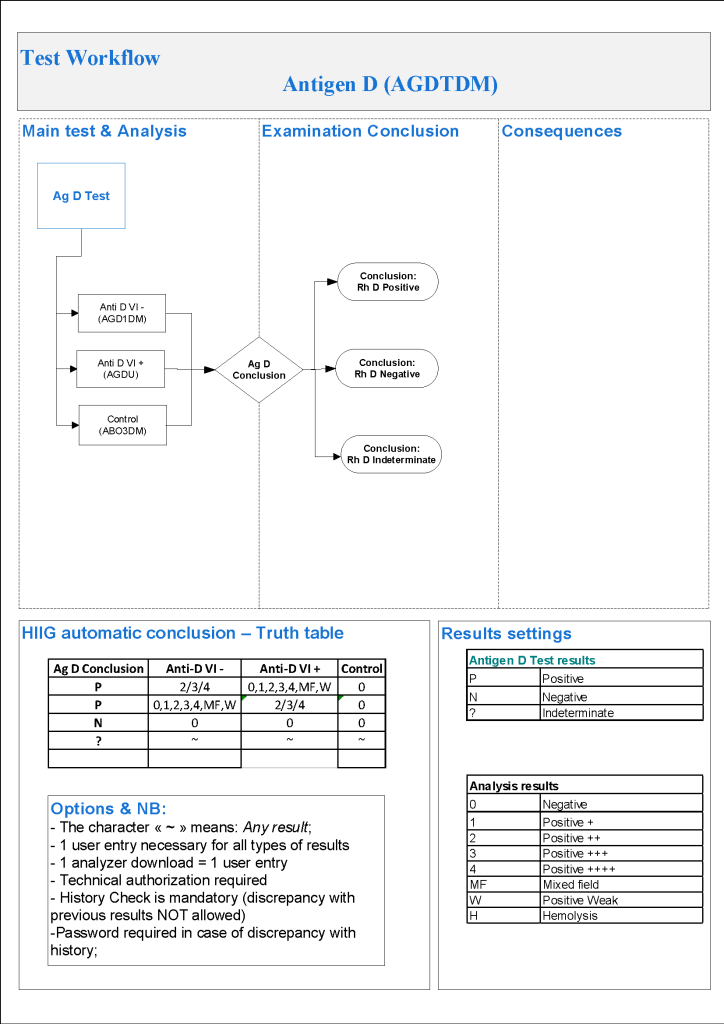
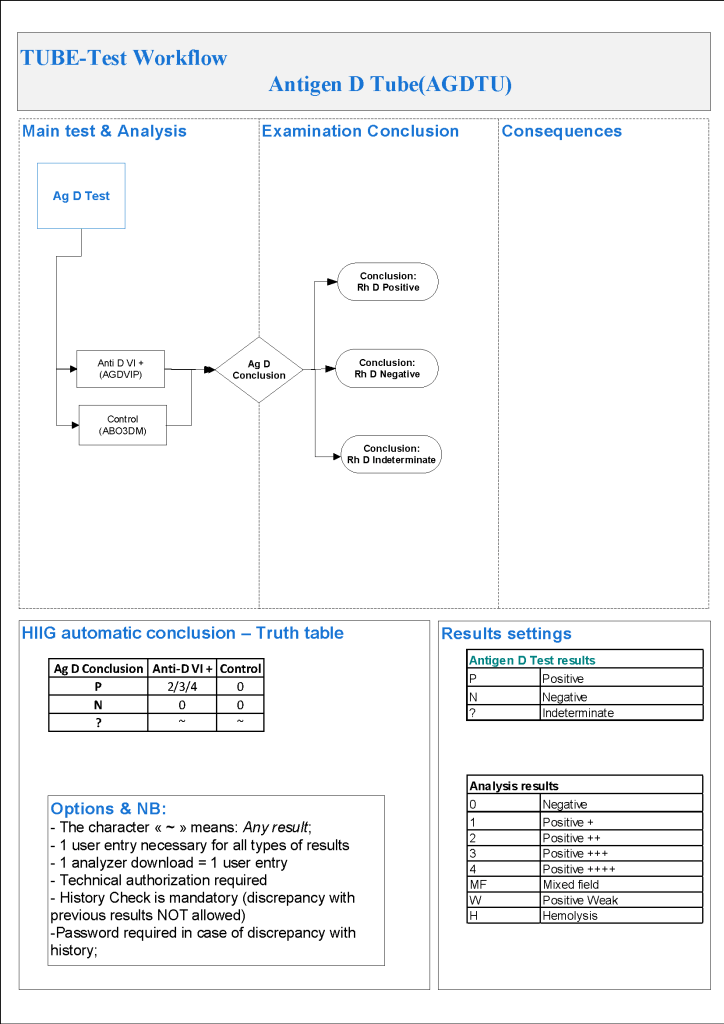
For donor D typing, I always had both automated and manual methods set up on the blood bank computer system Medinfo Hematos IIG.  The automated method had a bidirectional interface between Medinfo and the instrument.   Medinfo did not need a separate middleware.  A truth table was prepared for acceptable results for automatic interpretation.  Other results had to be manually interpreted by someone with the appropriate security level.

For donors, I wanted reagents sensitive for partial or mosaic D types since any D epitopes are potentially immunogenic.  With some reagents, this meant using a DVI+ reagent and others both DVI+ and DVI- reagents.

The manual testing option is structured similarly.  Within Medinfo, it is easy to change the methodology if the system is so built.  Thus, if the analyzer for D typing is down, the staff can select the manual methodology.  Likewise, if one testing center goes off-line, the world can be completed at another site—no need to repeat testing already completed from the first site.  This flexibility can apply to any test in system.

The manufacturer’s recommendations for the particular reagents in use were strictly followed.  One used the range {0, 1, 2, 3, 4, Mixed Field, Weak} as acceptable.  Another used {0, 2, 3, 4}.  Controls were included.  Most importantly, Medinfo can be configured for any set of reagent values.

The attached flows show two different testing systems as examples of what can be built in the Medinfo system.

9/10/20
Opinion: Blood Bank Software Design Should Be Based on Technical, Medical, and Nursing Experience

In my career directing laboratory and blood bank software, I have encountered software that had major features which were difficult to find (hidden in a nested menu system) or named ambiguously.  To this day, I wonder what feedback was provided from the potential end-users—or if any had been requested by the developers.  I will give some examples.

Example 1:

A major hospital system wanted to implement a third-party add-on to a new software covering all major disciplines.  It would provide evidence-based diagnostic assistance (e.g. what algorithm to follow in diagnosing crushing chest pain).  A lot of time was devoted to focusing it for local practices—physicians in many disciplines were involved.  However, the end-users were not engaged in how this expert system was to be accessed.  The end result was that only few physicians actually used the system.  Even in the training period for the new hospital system, this important detail was not emphasized so most physicians did not know how to access it!!

Example 2:

A major hospital system including laboratory and nursing modules had nursing design/build the transfusion reporting system, i.e. recording the actual transfusion information:  component type, start/end and frequency of transfusion.  The nursing informatics staff did not understand anything about ISBT codes or frequency of transfusion.  The transfusing nurses could type anything into the component type, ISBT field, specify frequencies of transfusion from one second to many years, and record different ABO/D types each time they checked the patient’s vital signs—and not compare to the historical or current blood types.  We also discovered that the system could not read ISBT codes at all!

The system had been built without consulting Transfusion Medicine.  We only discovered the errors it was demonstrated when we considered building therapeutic apheresis reporting into it.  I refused to allow my apheresis nurses to use it, and eventually it was scrapped.

Conclusion:

In my builds with Medinfo Hematos IIG, I early engaged my staff (medical, technical, and nursing) to review and critique—and help with the actual build construction to maximize its usability.  This is very important when the staff have many primary languages to ensure that the everyone understands the wording properly.

The presentation of the data is very important to optimize pattern recognition and make proper decisions.  If the data is scattered over many pages, interpretation is impeded.  This is why I prefer a summary dashboard of information for both donor and patient data to facilitate my decision making.

In summary, make certain end-users with the appropriate background are engaged in the building/design process.  They are not there for database design, but to promote usability.  This will greatly improve the final product and facilitate patient and donor care.

Processes and Software Building 50: Donor ABO Confirmatory Typing

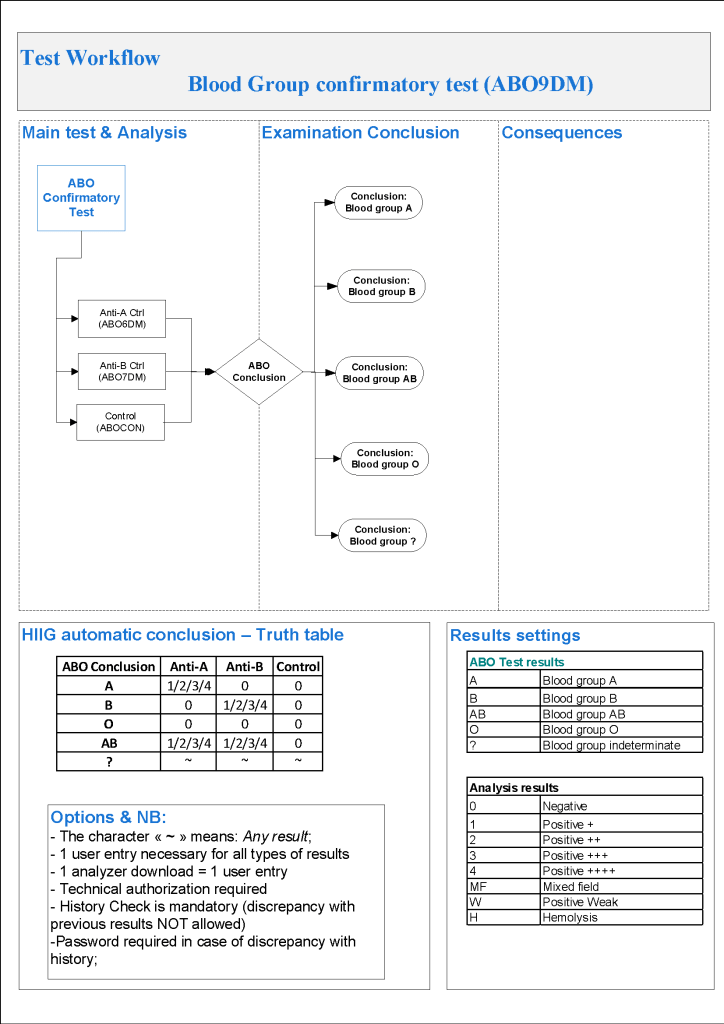
For donor ABO confirmatory typing, I always had both automated and manual methods set up on the blood bank computer system Medinfo Hematos IIG.  The automated method had a bidirectional interface between Medinfo and the instrument.   Medinfo did not need a separate middleware.  A truth table was prepared for acceptable results for automatic interpretation.  Other results had to be manually interpreted by someone with the appropriate security level.

The manual testing option is structured similarly.  Within Medinfo, it is easy to change the methodology if the system is so built.  Thus, if the analyzer for ABO typing is down, the staff can select the manual methodology.  Likewise, if one testing center goes off-line, the world can be completed at another site—no need to repeat testing already completed from the first site.  This flexibility can apply to any test in system.

The manufacturer’s recommendations for the particular reagents in use were strictly followed.  One used the range {0, 1, 2, 3, 4} as acceptable.  Another used {0, 2, 3, 4}.  Controls were included.  Most importantly, Medinfo can be configured for any set of reagent values.  Refer to the following flow diagram.

Confirmatory testing also includes D typing.  That will be considered in a future post.

6/10/20

Processes and Software Building 49: Donor Automated ABO Typing

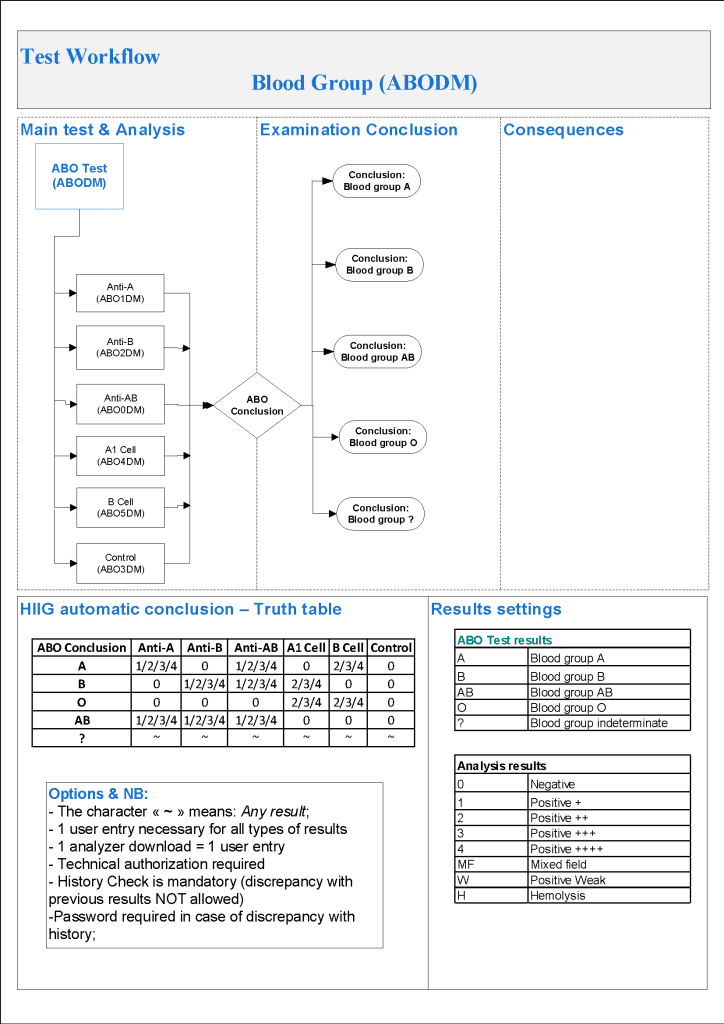
For donor ABO typing, I always had both automated and manual methods set up on the blood bank computer system Medinfo Hematos IIG.  The automated method had a bidirectional interface between Medinfo and the instrument.   Medinfo did not need a separate middleware.  A truth table was prepared for acceptable results for automatic interpretation.  Other results had to be manually interpreted by someone with the appropriate security level.

The manufacturer’s recommendations for the particular reagents in use were strictly followed.  One used the range {0, 1, 2, 3, 4} as acceptable.  Another used {0, 2, 3, 4}.  Controls were included.  Refer to the following flow diagram.

Most importantly, Medinfo could be configured for any set of reagent values.

2/10/20

Processes and Software Building 48: Donor Immunohematology Testing

Donor immunohematology testing of components in progress is similar to patient immunohematology testing.  The tests include:

ABO forward and reverse testing

D typing by multiple monoclonal cocktails

ABO/D confirmatory testing

Antibody screening

Antibody identification

Truth tables are prepared for each test type with interpretations.  Results falling outside these ranges will require manual review and manual interpretation by a user with an appropriate level of privilege (usually senior technologist, supervisor, or transfusion physician.)

Unlike patient D typing, we want to detect partial or variant D types as D-positive since theoretically even a few epitopes of D present may be immunogenic to the patient.  In patient D typing, we can call partial D types as D-negative and use D-negative RBCs.  We don’t want to use partial D RBCs for D-negative women of child-bearing age!

This series will show several different test algorithms including both manual and automated methods.  The criteria for acceptability of the reactions are based on the manufacturers’ recommendations. 

Reflex ordering of antibody identification will occur if the antibody screen is non-negative.

28/9/20

Processes and Software Building 47: Apheresis Plasma

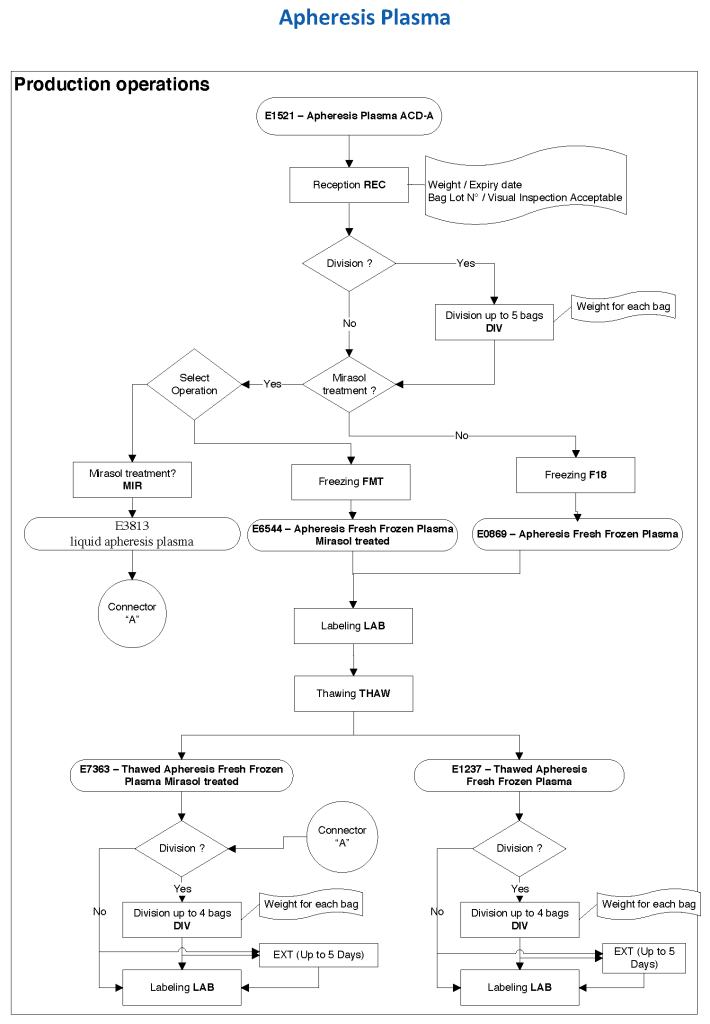
At HMC during my tenure, all plasma products—whole-blood and apheresis-derived were pathogen inactivated with riboflavin (Mirasol).  In our software processes, I had options to release both Mirasol-treated and untreated (the latter in emergencies) and to aliquot either as needed.  The same processes applied to COVID-19 convalescent plasma CCP except that they were performed in a quarantine production area.  There were specific ISBT codes for CCP.

24/9/20

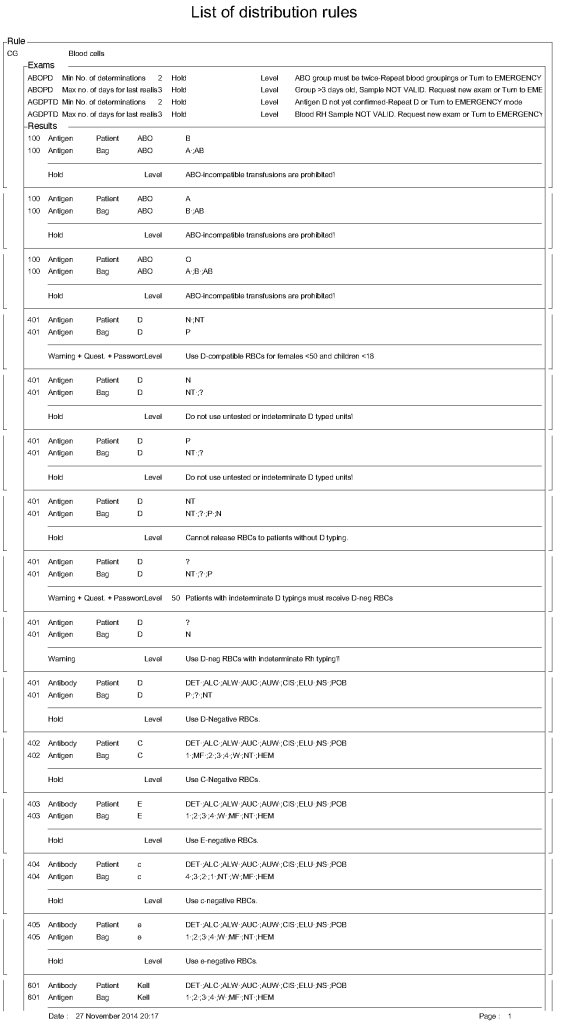
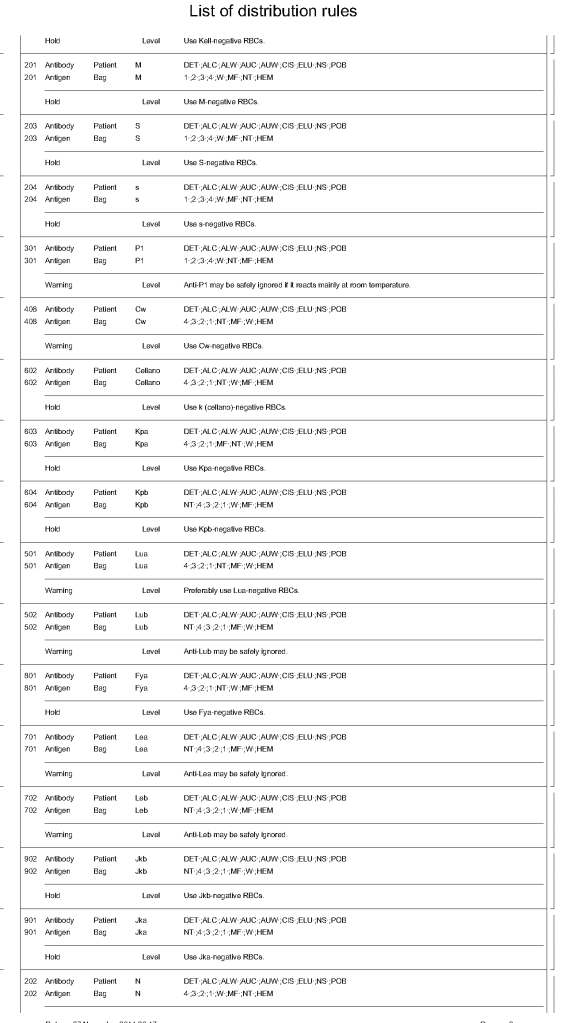
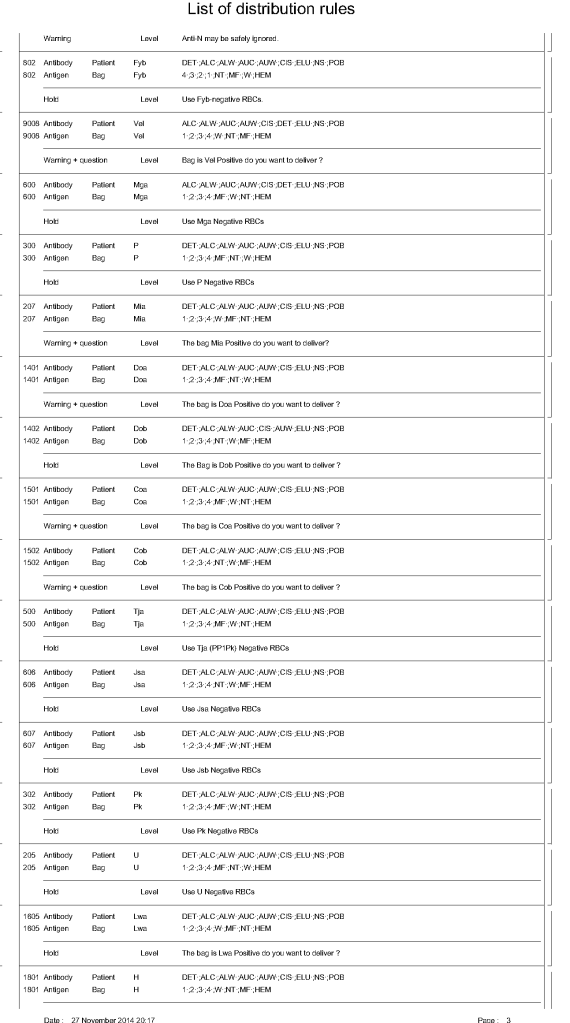
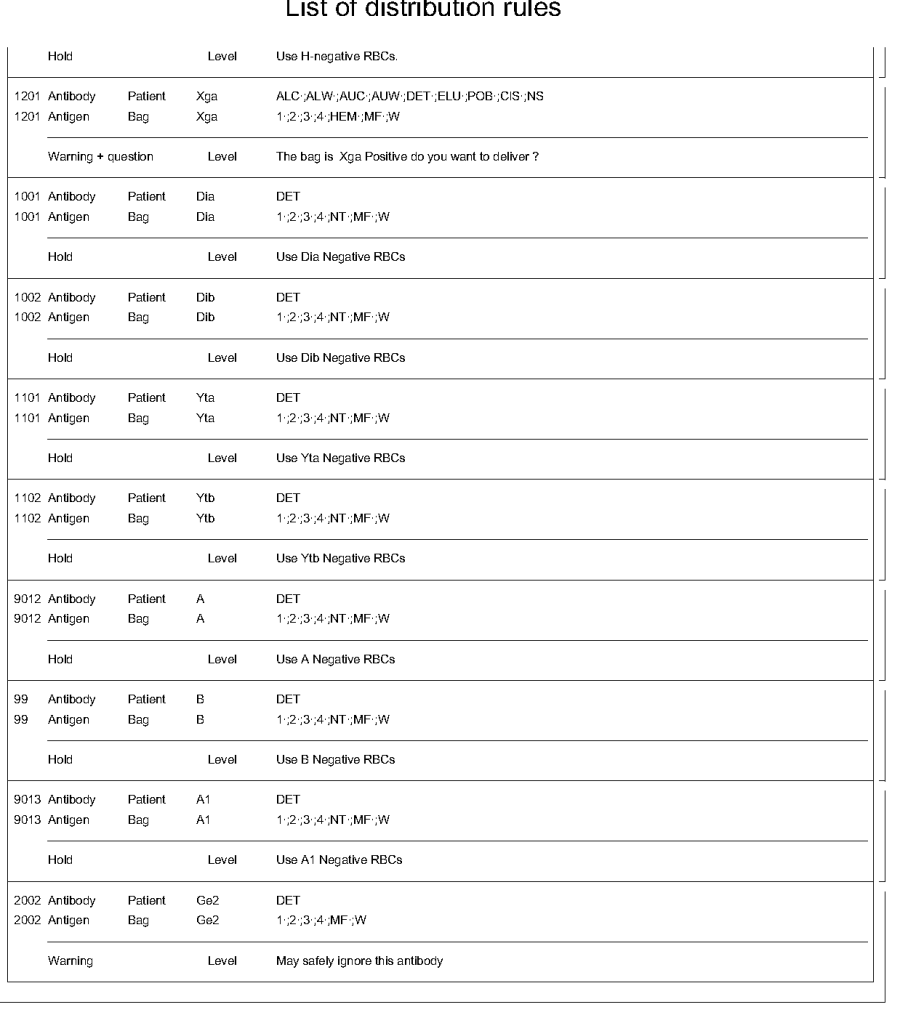
Processes and Software Building 56: RBC Distribution Rules

In Medinfo HIIG, one sets parameters to determine which antigens must be matched to allow a RBC product to be released.  These criteria may include:

Number of and timing of ABO/D typings

Permissible ABO/D substitutions

Emergency release

Required antigen matches

Optional antigen matches

Exact wording of conditional and blocked combinations

For ABO/D typing, a minimum of two typings must be on record for routine release and the last typing done within 72 hours.  If not, emergency release must be selected.  ABO-incompatible selections must be blocked.  For D-negative patients, only D-typed units may be selected.  D-incompatible transfusions will trigger a message to use D-compatible for females <50 years.

Required antigen typings include using antigen-negative for patients having antibodies against the specified antigen, e.g. D-negative RBCs for patients with active anti-D, c-negative for patients with anti-c, K-negative for anti-K, etc.

Certain antibodies will trigger a message to flag the use of unmatched units but not block the release.

The attached document shows sample settings for RBC release.  Note that these rules are user-definable.

31/10/20

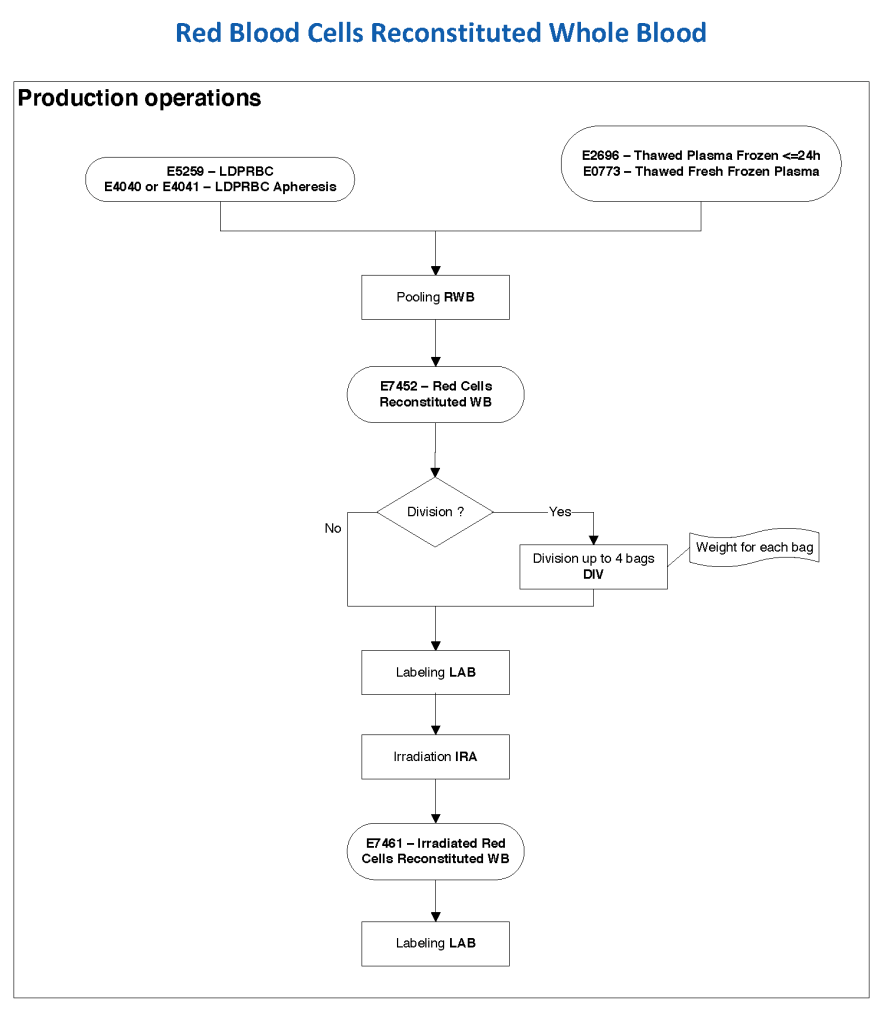
Processes and Software Building 46: Reconstituted Whole Blood

Exchange transfusions using reconstituted whole blood were much more common in the past.  Much of the time IVIG now takes care of hemolytic disease of the fetus/newborn HDFN.

In Medinfo, we took a fresh (<= 14 day old) packed RBC in SAGM, group O, Rh-compatible and mixed it with a unit of group AB plasma—the desired hematocrit could be achieved by adjusting the amount thawed plasma that we added.  The product could then be aliquoted and irradiated.  Note that I medically chose to use either FP24 or FFP.

Here is the Medinfo process:

19/9/20

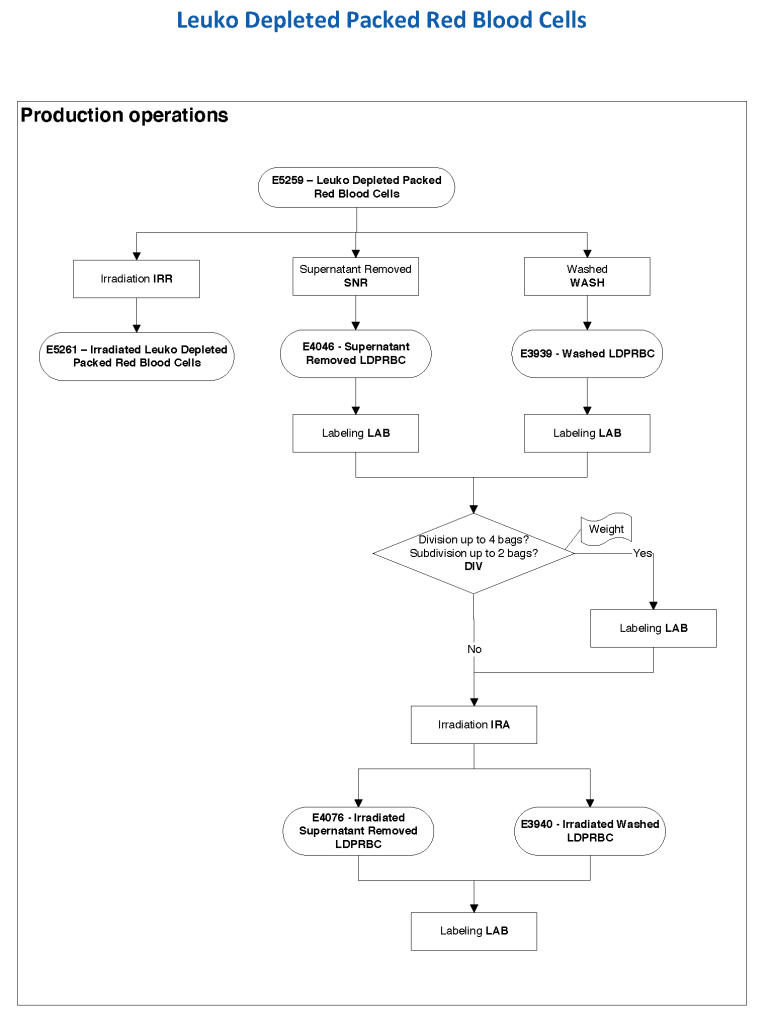
Processes and Software Building 45: Modifying RBC Components

Components may be modified either in the Blood Donor Center or in the hospital blood bank.  In either case, they use the PRODUCTION section of Medinfo to perform these operations.

These operations may include:

  • Irradiation
  • Tight-packing (removal of the supernatant, especially for intrauterine or neonatal transfusions)
  • Washing
  • Aliquoting (division of the primary RBC bag and possibly further division of one of the secondary bags)
  • Final labelling of the modified component

The weight of the component is converted to the volume by the software.

The end-user can specify which modified components were available.  As with any ISBT-labelled products, any changes will trigger a new ISBT E code and label.

16/9/20

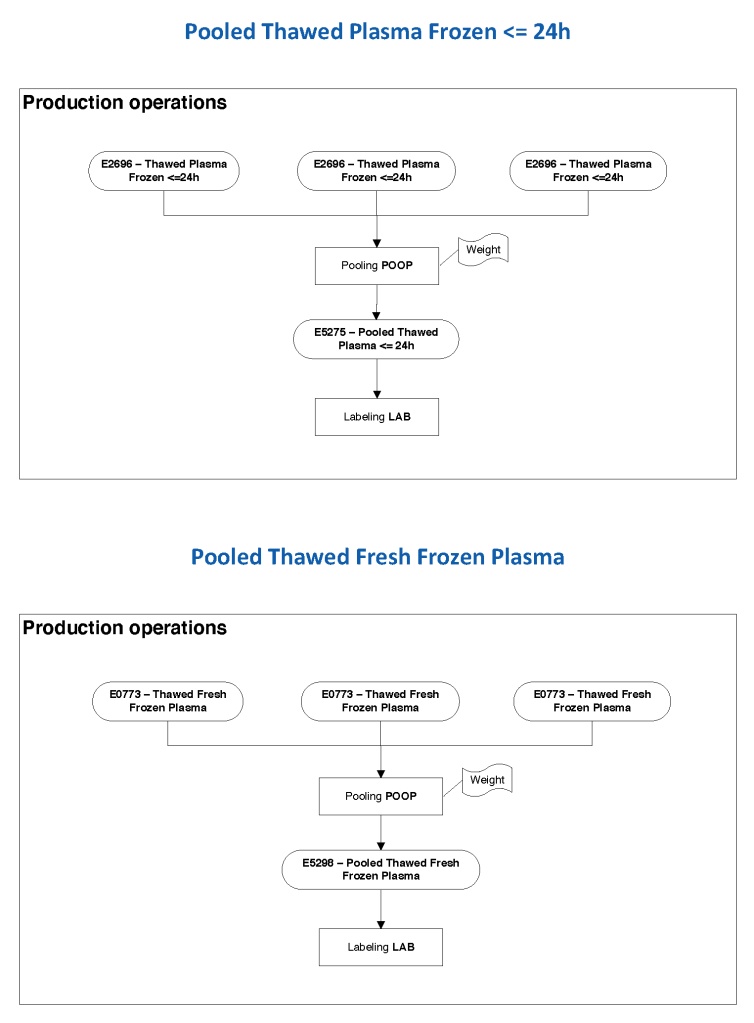
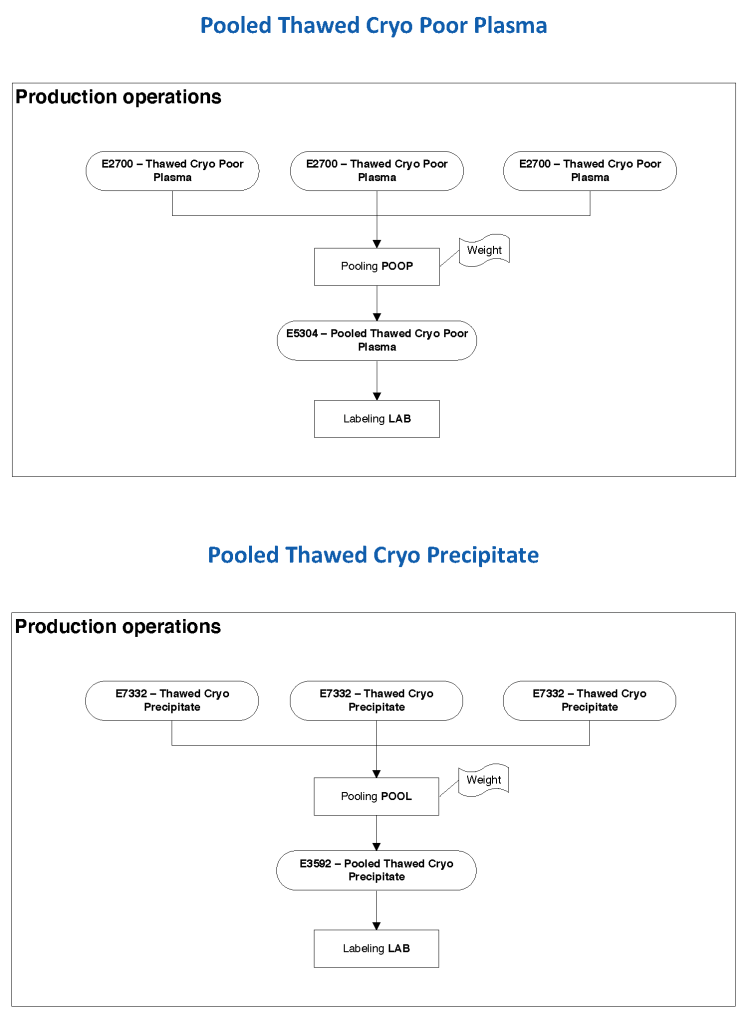
Processes and Software Building 44: Pooling Components

Medinfo Hematos IIG has a pooling operation that can be used for pooling platelets, plasma, cryoprecipitate, etc.  It is a one-step operation.  In the set-up, one specifies the maximum number of components to pool together for each component type.  In general, they are of the same ABO type;  however, at HMC Doha I did allow mixed ABO platelet pools to avoid wastage of platelets that would otherwise be discarded—this may not be allowed in all jurisdictions.

The following examples show pooling of FFP, FP24, cryoprecipitate, and cryo-poor plasma:

13/9/20