Advice to Transfusion Medical Directors on the Selection of Blood Bank Software

Most Transfusion Medical Directors are not information technology IT people.  Still, regardless if you direct a hospital blood bank/transfusion service, a blood donor center, or both, you will still have to evaluate software for your operations.  You will probably have to sign off on the selection of a system and on the final build before going live.

This can be a formidable task, especially since none of us were trained in IT.  In my opinion, you can still do this based on your knowledge and experience and make a successful choice.

The most important thing is to KNOW YOUR OPERATIONS!!  Someone in your organization should map out all your processes, preferably as flow charts.  Optimize your manual processes.  Look at your critical control points:  How does the software enhance operations and safety?  How does the candidate system enhance security and consistency?  Does it bolster the critical control points?

My experience has been that the best software build is the one based on a good manual system.  Study the new candidates:  how do they enhance your operations?  Now reconstruct your processes with the enhanced features of the new system.

Don’t be afraid to ask for help.  Check your local resources and/or consider outside consultants if necessary.  The latter should have experience in working with blood bank systems and ideally have worked with your candidate vendors.

Human beings are not consistent creatures.  We often do not like following a series of steps in a processes, we like to skip around.  All of this is very dangerous to patient care.  The ideal system enforces consistency and integrity.  I actually like it when my staff complain that the software is merciless—they cannot take shortcuts.  They must follow each step in order!

Choosing a module from within a laboratory or hospital information system LIS/HIS will facilitate integration with the rest of system.  However, such modules (mainly limited to hospital blood banks) do not have all the features that a dedicated blood bank software has  For example, will they prevent release of unphenotyped or Kell-positive units in a patient with anti-Kell?

If you choose the dedicated system option, you must determine if a functioning interface to the LIS/HIS exists.  If not, what is the time frame to make the connection?  Very importantly, check that your specifications are actually built into the interface.  Almost every LIS/HIS vendor says that they can make an interface, but are they communicating what you need?  If you talk English and they answer you in Sanskrit, are you effectively communicating?

I prefer a dedicated blood bank system for both patients and donors, especially one that allows you to create rules to handling different situations like electronic/computer crossmatch, irradiation, etc.  Integrating both patient and donor operations will facilitate operations, especially in times of disaster and product recalls/quarantines.

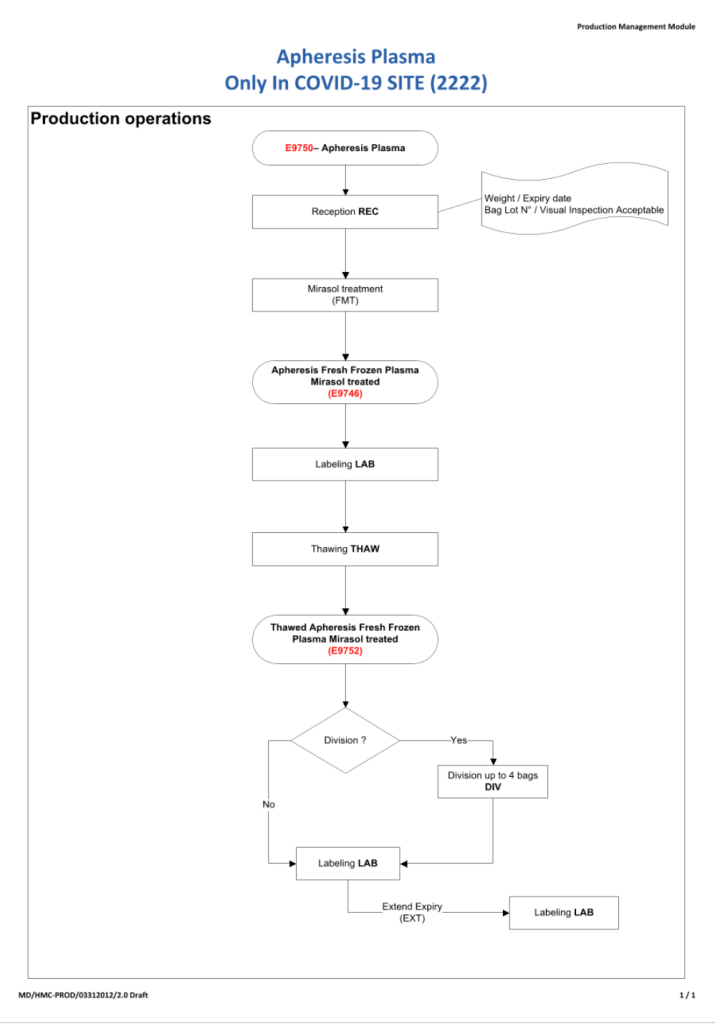
Make certain that there are interfaces available for your analyzers and blood production equipment (e.g. Ortho Vision Max, Reveos, Mirasol, etc.).  Check these out on a site visit.  Many vendors promise that they can communicate with your equipment, but you must verify this yourself.

You are the pilot.  Is the transfusion or donor information organized to facilitate your decision making? Is it available all on one screen?  Do you have to flip across many screens to get the information (e.g. transfusion history, transfusion reactions, DAT, antibodies, donor history, marker testing) you need?

If you are directing a donor center, you will most likely need a separate dedicated software.  Usually, donor center software does not directly integrate into the LIS/HIS.  However, at least your patient hospital blood bank module must be able to read your ISBT labels properly.

I recommend a visit to a site comparable to your current operations.  Look for ease of use, response time, and talk privately with the end-users at the site.  Ask your IT staff to help you select a site that uses the same operating and database software (e.g. Oracle) as you will be using.

How readily can the system be modified for new practices?  With COVID-19, SARS, ZIKA, etc. there have been many changes in regulations in a short time.  How long will it take your vendor to update your system?  Is the system compliant with your local regulations and international accreditation standards?

Structurally, the optimal system is one that is a framework where almost all changes can be handled by changing settings or parameters.  The underlying structure does not change so this facilitates making the modification.  There is no need to “hard code” the changes.  You are not writing a new software structure.  Warning:  many blood bank softwares do not have this framework or flexibility—it takes a long time often even to make minor changes or updates.

Using blood bank software is like playing with fire.  Defects in design can adversely affect patient care.  The vendor will install the software with settings, but it is still YOUR responsibility to verify it works according to the specifications.

I recommend engaging computer-literate end-users (nurses, doctors, medical technologists, recruitment staff) .from the very beginning of the actual software build.  These staff can become Super Users to handle minor issues and train other staff and can help perform your software validations.

In summary, you will have to accept the choice of vendor and the final software build.  Find resources to help you with these tasks.  Never forget that what you are doing could adversely affect patient care if you are not vigilant!

4/11/20

COVID-19 Convalescent Plasma Revisited:

In February, 2020, I developed a program for convalescent COVID-19 plasma at Hamad Medical Corporation in Doha.  In early March, 2020, our program started collecting CCP by apheresis.  We started before the software modifications were completed since there were urgent requests by the clinicians for the product.

I proposed the software specifications and our vendor Medinfo Hematos IIG implemented them within 2-3 weeks, after which they were implemented/validated

Thus, now we have 8 month experience has been 8 months since starting manually and more than 7 months using a specific modification of our blood bank software Medinfo.

A complete manual system was implemented with quarantined registration, screening, collection, processing, and release.  Only the donor marker testing was shared with the regular donors.  This was built into the computer system.

Upon review, these are my current thoughts on our processes:

  1. Actively monitor supply requests:  Keep good communication between ordering/treating physicians and apheresis unit to optimize the stock according to patient needs.
  2. Collect/process/release separately from regular donations.
  3. Use dedicated quarantine equipment (apheresis, processing, storage refrigerators)
  4. Collect manufacturer’s recommended maximum of plasma based on body weight.
  5. Use pre-donation screening to allow quick release of components and avoid wasting apheresis kits.
  6. Repeat testing on the new specimen collected at the time of apheresis donation.
  7. Process units by same processes used for normal donations, including pathogen-inactivation.
  8. Use standard processes for release of blood components to end-users.
  9. Restrict ordering to designated treating COVID-19 physicians (enforce in computer system)
  10. Restrict release of CCP to designated non-blood bank staff from the quarantine storage location (enforce in computer system)

Notes:

  1. Include COVID-19 antibody testing and establish a threshold level (e.g. 1:128 titer) for donor qualification.  Do not collect if low-titer or absence of COVID-19 antibodies.   Store titer information with donation record.  Add antibody results to donation records that occurred before the assay was available.
  2. Review of donor criteria:  are there increased risks using these recovered donors:  cardiac or respiratory risk?  Is there a way to continuously monitor CCP donors’s vital signs during the donation?
  3. Collect apheresis components only in pre-screened donors:  Apheresis kits are expensive, use them only if the donor is prequalified, continue to retest when actual apheresis donation occurs
  4. Allow use of units directly after collection/processing as long as the other donor processing steps have been completed (allow blood bank computer system to use pre-donation specimen for marker testing criteria).

Donor Unit Discrepancies

Principle:

All donor unit mislabeling is potentially life-threatening and must be stringently investigated as soon as possible after the discrepancy is detected.  Most importantly, if there is one error, there may be possibly ADDITIONAL donor unit errors (e.g. switch of donor tubes or units, etc.).  All donor units processed in the same batch must be also quarantined until the discrepancies are resolved.

The blood bank computer system will detect many errors;  however, if the donor unit or its samples are mislabeled in the beginning, these may not be detected.  Medinfo enforces checks on the final ISBT label and will compare current results to the historical record and will alert to any errors. Additionally, the use of ISBT specimen labels will obviate the risk of barcode reading errors.

Definitions:

Responsible blood bank physician:  specialist or consultant physician on-call at the time the discrepancy is detected

Policy Details:

The following steps MUST be performed as soon as possible:

  1. The Component Processing Supervisor or Senior Technologist must be IMMEDIATELY notified of any discrepancy.
  2. The Blood Bank Supervisor will inform the Division Head, Transfusion Medicine.  If the Head is not available, notify the Transfusion Medicine on-call.
  3. Quarantine ALL donor units collected and processed in the same batch.
  4. Obtain copies of all testing including photos of the gel/glass bead cards documenting the discrepancy.
  5. Obtain copies of all worksheets used in donor processing for the affected batch.
  6. Perform repeat ABO/D typing of ALL DONOR UNITS in the affected batch.  Any further discrepancies must be investigated and resolved.
  7. Identify all staff who were involved in handling the donor unit (phlebotomist, blood bank technicians processing and labelling the unit).  Identify those associated directly with the error.
  8. Submit all documents and photos to the Blood Bank Supervisor or designate.
  9. Prepare an occurrence/variance OVA report documenting all the data, findings, and interpretations.
  10. All investigations must be reviewed by the Supervisor, responsible blood bank physician, and one of the senior consultants.
  11. All such investigations must then be finally reviewed and approved by the Division Head, Transfusion Medicine or his designate.  Only when the issue(s) are completely resolved and investigation is approved may the donor unit be properly relabeled and released into available stock.  Also, only at that time may the other units in the affected batch be released into available stock!!
  12. Photograph the correctly relabeled unit and attach it to the other documentation of the incident.
  13. If the discrepancy cannot be resolved, ALL units in the affected batch must be discarded.
  14.  The implicated staff’s personnel record should be reviewed for previous errors.   Appropriate disciplinary action should be taken and documented in the personnel record.  If a verbal warning is given, it should still be documented in the written record.
  15. If there is a systemic cause for the error, appropriate measures should be taken to minimize reoccurrence.
  16. All actions must be in accordance with the institution’s policies and regulations.

2/11/20

Blood Bank Software is Dynamic, NOT Static

I was recently talking with one of the hospital software system administrators from my previous site.  He had originally worked on building the Medinfo system, but was then reassigned to the laboratory modules of the hospital information system.

His alarming comment to me was that the Medinfo build was completed so there was no need to worry about it now—it was finished.  I guess he was looking from the perspective of the general laboratory software.  There is no need to make major changes to the build, just update interfaces and troubleshoot.

I was surprised.  He had no idea of how many times we have to update the structure for new rules and regulations, and changes in blood bank practice—let alone emerging pathogens such as ZIKA, dengue, Chikungunya, and most recently, COVID-19.

My daily morning routine was to survey several blood bank websites with changes to blood donor criteria including US FDA CBER, read the transfusion journals (Transfusion, Vox Sanguis, etc.), AABB, and ASFA.  If there were any changes pertinent to our organization, I had to make interim policies and procedures, and finally prepare specifications for changes in the Medinfo software.

The Medinfo engineers would prepare flow charts of the proposed changes and implement them in a test environment for the Super-Users to test.  I had to prepare validation protocols for the testing, and then review the validation results and finally approve the adoption of the changes.

I cannot remember even a month going by without some revision in the donor protocols.  When COVID-19 came, I had to prepare a parallel, but separate, processing and allocation/release system.

This was a never-ending story that kept the Super Users and the local Medinfo engineers busy.  I always reminded the hospital information system staff that playing with blood bank software was like playing with fire:  there is a good chance you will get burned if you do not set it up properly.

31/10/20

Processes and Software Building 55: Manual Stock Entry

At times of disaster, it is crucial to know the blood component stock at each location.  In Medinfo, it is very simple and fast (measured in seconds) to display information by location, outdate, type, etc.  It can also enumerate stock in preparation at the component preparation sites.

To manually accomplish this, it took plenty of phone calls and a lot of staff to count units—staff that could be better deployed with handling the emergency.

SOP:  Cumulative Stock Inventory Using Medinfo

Principle:

The Medinfo HIIG computer system can calculate the inventory of various blood components at any site or within transit dynamically upon request.  THIS IS HIGHLY SENSITIVE INFORMATION THAT HAS NATIONAL SECURITY IMPLICATIONS!!

Policy:

  1. Access to Cumulative Stock Inventory functionality is restricted to designated staff.
  2. The total number for any search will include stock of a given status (active, quarantine, etc.)
  3. Inventory levels are privileged information for Transfusion Medicine staff for planning and recruiting purposes.
  4. Release of stock levels to non-Transfusion Medicine staff must be approved by the Division Head, Transfusion Medicine, a transfusion medicine consultant, or blood bank supervisory personnel only.
  5. Active stock includes both reserved/allocated and unallocated units.
  6. For queries about specific phenotypes or modified components, stock entry (not cumulative stock entry) function should be used.

Procedure:

  • Sign into HIIG with your user name and password.
  • Select Production Access:

Then select Cumulative Stock Display:

The Display Cumulative Stock Screen will appear:

  • Select your criteria (depot, product, group, qualifications, list, date of entry/production, date range, expiration date).
  • Then press the Search button.
  • Exit the program using the Exit button.

Sample options follow:

25/10/20

Processes and Software Building 54: Confidential Unit Exclusion

As per AABB Standards, each donor must have the opportunity to confidentially exclude the use of his collected blood AFTER the collection.  He may use a confidential code associated with his collection encounter.  Donor Center staff will mark the Confidential Unit Exclusion and the donor is permanently deferred.  All products made from his/her donation will be discarded.

22/10/20

Look-Back of Patients and Donors

Principle:

Using the Medinfo Hematos IIG program, it is easy to perform look-back for patients who have developed an infectious disease that might have been transmitted by a blood component.  Likewise, if a donor develops an infectious disease that is transmissible to patients, we can check which patient(s) received blood components from the incriminated donor.  The time interval for checking will vary according to local regulations.

Policy:

  1. If a patient is reported to have developed an infectious disease which might have been transmitted by a blood component transfusion:
    1. Review the patient’s infectious marker testing data.
    2. Review the patient’s transfusion history, especially for any transfusions at outside institutions or any other body fluid exposures.
    3. Look up the transfusion history in Medinfo HIIG.
    4. Determine which transfusions occurred during the deferral period for that disease.  Examples:
      1. HBV—6 months
      2. HCV—6 months
      3. HIV—2 months
      4. Malaria—6 months
      5. HTLV—6 months
      6. Syphilis—12 months
    5. Look up the donors for each donation during the specified interval.
    6. Check each donor’s donation records for:
      1. Infectious disease marker testing
      2. Questionnaires—any irregularities noted?
    7. Call donors back for repeat testing (only on advice of the investigating transfusion medicine physician)
    8. Collate all results and prepare an interpretative report.
    9. Interpretative report must be reviewed/released by the Head, Transfusion Medicine.
    10. Submit the report to Infectious Disease and the patient’s most responsible physician
    11. If any irregularities are found, assess processes to make any improvements in an attempt to minimize future risk.
    12. Prepare an OVA according to HMC procedures.
  2. If donor develops an infectious disease:
    1. Review the donor’s infectious marker testing results.
    2. Check if the donor had any body fluid exposures.
    3. Obtain new specimen from the donor.
    4. Look up all components made from that donor.
    5. Determine which transfusions occurred during the incubation period for that disease.  Examples:
      1. HBV—6 months
      2. HCV—6 months
      3. HIV—2 months
      4. Malaria—6 months
      5. HTLV—6 months
      6. Syphilis—12 months
    6. Recheck the complete donor history including infectious disease marker testing and questionnaire
    7. If samples are available from the interval, repeat donor marker testing on it.
    8. Look up the patient/recipients for each donation during the specified interval
    9. Check each patient’s records for infectious disease marker testing results
    10. Call patients back for repeat testing (only on advice of the investigating transfusion medicine physician in conjunction with the Infectious Disease department.)
    11. Collate all results and prepare an interpretative report.
    12. Interpretative report must be reviewed/released by the Head, Transfusion Medicine.
    13. Submit the report to Infectious Disease and the patient’s most responsible physician
    14. If any irregularities are found, assess processes to make any improvements in an attempt to minimize future risk.
    15. Prepare an OVA according to HMC procedures.

Reference:

Standards for Blood Banks and Transfusion Services, Current Edition, Bethesda, MD, USA

Policy: ISBT Component Label Usage

Principle:

Blood components will only receive final ISBT labels for the purpose of transfusion upon completion of the production processes specific for that component and will be specifically prepared by the Medinfo Hematos IIG software in accordance to Council of Europe CE Standards.

An improper label, be it for the wrong unit, or improper designation can have catastrophic results to the recipient.  This is why this is such a CONTROLLED process under Medinfo Hematos IIG.  There are label-printing softwares available that do not follow these rules, but I consider them dangerous to use since these safeguards are not enforce—they are NOT permitted here.

Policy:

  1. The formatting of ISBT labels is addressed in the Interim Policy: ISBT Labels (a previous post).
  2. The selection of the ISBT E codes will be made by the Division Head, Transfusion Medicine and Laboratory Information Systems.
  3. Blood component labels, either final or in-process are ISBT-specific and may only be generated by the Hematos IIG computer system.
  4. The ISBT specimen are generated at the time of donor registration.
    1. ISBT specimen labels are of limited number and cannot be reprinted by operational staff.
      1. Reprinting is only allowed by Transfusion LIS with approval of the Division Head, Transfusion Medicine/Laboratory Information System
  5. Final ISBT blood component labels may only be attached at the successful completion of component processing according to the HIIG workflow processes specific for each component.
  6. ISBT labels are also generated and attached after component modification (washing, irradiating, aliquoting, pooling) in accordance with the respective HIIG workflow processes.
    1. Multiple modifications may be performed before the final ISBT label is generated by HIIG.
  7. No modifications of the HIIG-generated ISBT labels is permitted.
  8. No manual corrections or attachment of additional, non-ISBT labels is permitted.
  9. During computer down-times, manual (non-ISBT) labels may be generated internally and will be replaced by the formal ISBT label using Manual Stock Entry after resumption of HIIG.
  10. For solvent-detergent-treated plasma SDP (e.g. Octaplas), the following applies:
    1. SDP (Octaplus) ISBT labels are prepared and attached by the manufacturer Octapharma during the manufacturing process and will be used/read as such.
    2. Thawed SDP will receive a new ISBT label at the time of thawing.

References:

  1. HIIG Workflows, Component Processing, 1002
  2. Standards for Blood Banks and Transfusion Services, Current Edition, AABB, Bethesda, MD, USA

  3. Policy:  ISBT Labels, Current Edition—previously posted
  4. TRM.43625 CAP Checklist

20/10/20

Processes and Software Building 53: Donor Extended Rh and Kell Typing

For this typing, I always had both automated and manual methods set up on the blood bank computer system Medinfo Hematos IIG.  The automated method had a bidirectional interface between Medinfo and the instrument.   Medinfo did not need a separate middleware.  A truth table was prepared for acceptable results for automatic interpretation.  Other results had to be manually interpreted by someone with the appropriate security level.

It was standard in my donor processing laboratory that extended Rh typing (EeCc) and Kell were performed.  We were in a region with many sickle cell and thalassemia patients.  Having all RBC units pre-typed in the Blood Donor Center expedited selection and release in the hospital blood bank—especially for matching K-negative units to K-negative patients and extended Rh phenotypes for sickle cell patients.

The manual testing option is structured similarly.  Within Medinfo, it is easy to change the methodology or have more than one methodology if the system is so built.  Thus, if the analyzer for this typing was down, the staff could select the manual methodology.  Likewise, if one testing center went off-line, the work could be completed at another site—no need to repeat testing already completed from the first site.  This flexibility could apply to any test in system.

The manufacturer’s recommendations for the particular reagents in use were strictly followed.  Most importantly, Medinfo can be configured for any set of reagent values.

Please refer to the sample flowchart which also includes Cw and DVI+ typing.  The same process could apply to patient testing, but some reagents would use a DVI- reagent.

18/10/20

Processes and Software Building 52: Donor Antibody Screening

For donor antibody screening, I always had both automated and manual methods set up on the blood bank computer system Medinfo Hematos IIG.  The automated method had a bidirectional interface between Medinfo and the instrument.   Medinfo did not need a separate middleware.  A truth table was prepared for acceptable results for automatic interpretation.  Other results had to be manually interpreted by someone with the appropriate security level.

I did not use pooled cells, but instead 2, 3, or 4 cell screens at various times based on the available reagents.  Personally, I prefer a 3 or 4 cell screen which is more sensitive—I want homozygous Jka and Jkb cells present.  All positive cases had an antibody identification performed.  According to my medical decision, I did not routinely allow any donor to be collected if he/she had a positive antibody screen.  Some standards would permit the use of RBCs from such a case, but this was not my preference.  In cases with rare phenotypes, I would allow production of RBCs (e.g. Bombay donor with anti-H, patient with anti-Tja (PP1Pk)) for patients with those rare types.

The manual testing option is structured similarly.  Within Medinfo, it is easy to change the methodology if the system is so built.  Thus, if the analyzer for antibody screening is down, the staff can select the manual methodology.  Likewise, if one testing center goes off-line, the world can be completed at another site—no need to repeat testing already completed from the first site.  This flexibility can apply to any test in system.

The manufacturer’s recommendations for the particular reagents in use were strictly followed.  Controls were included.  Most importantly, Medinfo can be configured for any set of reagent values.

Also note that Medinfo will check for the donor’s previous testing history and compare results.  If there are discrepancies, this will require manual review.  Normally, a donor with a positive antibody history is indefinitely deferred.  The transfusion medicine physician could remove such a deferral if indicated.

Refer to the following flow diagram for a three-cell  and four-cell screens.

16/10/20