Liver Transplant Processes for the Transfusion Service

Principle:

Liver transplantation requires coordination of the Transfusion Service TS, Liver Transplant LTS , and the Blood Donor Center BDC to prepare blood components for this massive transfusion setting.

Policy:

  1. Whoever receives notification of a possible liver transplant should ensure that ALL of the following senior staff are also informed:
    1. Head, Transfusion Medicine
    2. Coordinator, Donor Recruitment
    3. Supervisor, Transfusion Service
  2. Transfusion Service Supervisor will arrange transfusion service staffing as needed to cover the surgery period and immediate post-operative period.
  3. The current, up-to-date inventory must be calculated.  The following minimum stock must be reserved:
    1. Twenty (20) packed RBCs
    2. Twenty (20) FFPs—-leukodepleted and pathogen-inactivated
    3. Three (3) platelet pools or apheresis doses (each ≥ 2E11 absolute number of platelets)—leukodepleted and pathogen-inactivated.
    4. The Medinfo Liver Transplant Protocol automatically orders all the above.
  4. Complex needs:
    1. If the patient has clinically significant antibodies, confirm the availability of the requested number of antigen-negative/compatible units.
    2. The Head, Transfusion Medicine, or the covering transfusion medicine consultant on-call will contact the liver transplant team to discuss the feasibility of proceeding after assessing the inventory of antigen-negative units.
    3. Only the transfusion medicine consultant can approve the use of antigen-incompatible RBCs in conjunction with the liver transplant team.
  5. Donor Center should increase recruitment/production to meet the anticipated usage as needed.
  6. When the procedure is confirmed:
    1. Crossmatch the RBCs by the appropriate technique according to our algorithms (i.e. computer/electronic, immediate-spin, or full AHG).
    2. Thaw the FFP:  the FFP is valid for FIVE days after thawing for use for the transplant patient or other patients with coagulopathy.
    3. If more than the above number of units is needed, HGH Transfusion Service must inform the Donor Center senior staff (Head, Donor Center; Administrative/Technical Director, and Coordinator, Donor Recruitment) to arrange for additional donations.

Example of Dealing with HIS Interface Issues to Dedicated Blood Bank Software

The following is an actual working document for interactions between the Medinfo HIIG system and a monolithic hospital information system covering nursing, laboratory, ADT, etc.  For the purpose of this post, I shall name it B*.

In a previous position, I was in charge of the Laboratory Information Systems and worked both with Medinfo for donor and patient hospital blood bank processes AND B* for the general laboratory.  It was my decision NOT to use B* for the hospital blood bank because there would be no integration between the donor module in Medinfo and patient blood bank module in B*.  Also, B* had limited handling of complex immunology algorithms and fewer safeguards than Medinfo.

B* could not directly read ISBT product labels from the ISBT dictionary and required hard-coding the links for each and every type of blood component and modification.  It was also slow to order blood components so in emergency situations, I allowed physicians to bypass B* and order directly if they felt in their clinical judgment that the delay in using B* might harm the patient.

The non-transfusion physicians had to directly order blood components in B* except for emergencies as stated above.  They were only allowed to order a limited number of basic tests such as ABO/D type, direct antiglobulin test DAT, or antibody screen.  Based on those tests, we would use algorithms in Medinfo’s patient module.  Example:  an outside doctor could not order a Jka typing—that could only be done according to our internal Medinfo algorithms.  Doctors could only order antibody screens, not antibody identifications, elutions, or titrations.

Sadly, most physicians had no specific training in blood component or blood component therapy so they made many mistakes in ordering manually before the computer system.  I had requested offering training sessions for the doctors but this had never been approved by the medical administration.

Thus, my decision was to place the responsibility for the correct ordering of blood components and testing directly by Transfusion Medicine.  The non-transfusion doctors were only ordering preferences for components—the actual selection was made in Medinfo by my blood bank staff under my order.  We decided whether to irradiate.  All platelet and plasma components were pathogen-inactivated.  All components were leukodepleted to < 1E6 according to CE Standards.

In Medinfo we could thus modify or even cancel requests without having to deal with the B* system.  B* would accept Medinfo cancellations directly.

During the frequent B* downtimes, all processes would be limited to using Medinfo.  There was no way to initiate orders in Medinfo and send them back to B*.  Thus during downtimes, the only way to retrieve results was to use Medinfo.

The following is the process for the interface as was used during my tenure at that institution:

Medinfo-B* Interface Process

Principle:

Limited ordering of components and basic transfusion testing may be initiated on the B* side.  All component orders and all test results will pass into B*, including those which can only be ordered by blood bank staff.  All blood bank processes will continue to be performed within Medinfo.  Transfusion Medicine is not responsible for training physicians and nurses on how to use the B* interface.

Abbreviations:

NTMP:  Non-Transfusion Medicine physicians

TM:  Transfusion Medicine

B*:  A hospital information system including laboratory module (not used by Transfusion Medicine for either patient blood bank or donor issues)—NOT MEDINFO!!

THE FOLLOWING POLICY SUPERCEDES ANY AND ALL PROCESSES CURRENTLY DOCUMENTED IN TRANSFUSION MEDICINE.  The processes are currently being updated to reflect the Medinfo-B* interface issues.

Policy:

  1. For our hospitals, B* ordering must be used unless B* is non-functional or there is a life-threatening clinical emergency that cannot be met expeditiously by ordering in B* e.g. MTP)
  2. NTMP must place all component orders (RBC, plasma, and platelet) and the limited test menu (type and screen, transfusion reaction, ABO/D type, direct antiglobulin test, cord blood) in B*.
    1. The ordering physician must DIRECTLY enter the order, not list the transfusion as a nursing task in the B* system.
  3. NTMP may indicate a preference to the type of component and number/amount requested, but the actual selection and release will be based on internal TM algorithms under the order of the Division Head, Transfusion Medicine.
  4. Tests not listed in the B* menu cannot be directly ordered by the NTMP.
  5. It is the responsibility of TM staff to periodically check the interface from Medinfo to import requests.
  6. Transfusion service/hospital blood bank staff will integrate those order requests which are currently needed for patient care.
    1. Other requests will be kept in the B*-Medinfo queue until they are needed and will be automatically cancelled after 3 days.
  7. Internal Hospital Transfusion Service/Blood Bank Processes:
    1. All Transfusion Medicine work processes will be performed within Medinfo, nothing within B*.
    2. B* Functioning (non-MTP):
    3. Transfusion Medicine staff will accept signed specimens without requisition.
      1. The specimen bar code will provide the two unique identifiers for patient identification.
        1. We will accept even if name is truncated on the B*-generated label, relying on the full name and HC number visible on the screen
      2. Internal processes and algorithms in Medinfo are to be used for selection and reservation of components, component modification, and all testing.
    4. Documentation of work:
      1. Routine specimens (type and screen, ABO/D typings, DAT, negative cord bloods) will be paperless.
      2. Non-routine specimens require paper documentation.  These include:
        1. Abnormal Results that needs supervisor /TRM physician review
        2. If the analyzer is not interfaced to Medinfo
        3. If a manual tube technique is performed
        4. Requests received from any site not ordering through the Medinfo-B* interface
    5. Massive transfusion protocols:
      1. The ordering physician will decide whether to order in B*:  if he decides that ordering in B* will adversely affect the patient outcome, he may revert to the old system (e.g. call the blood bank hotline and request blood and then send paper requisitions and samples to blood bank as conditions permit)
      2. Physicians who use the B* interface must order each wave of the MTP separately (e.g. MTP1, MTP2, MTP3) and adjust the quantities accordingly.
        1. The B*-Medinfo interface does not include ordering for non-blood-bank items (e.g. medications) in the massive transfusion protocol.
  8. B* Results and Statuses:
    1. All results and statuses of tests and components will be available in B* for those sites using the Medinfo-B* interface.
      1. This includes non-B* orderables for components and tests.
    2. Formatting of tests and other requests are limited to the B* build’s capabilities:
      1. NTMP may see test results in the Medinfo Viewer if they prefer.
    3. During B* downtime, TM will revert to Medinfo-only processes including ordering, test-requesting, resulting, and release of components.
      1. There will be NO recovery post-down-time in B*:   test results will be viewable in the Medinfo Viewer only.  There will be no component information in the Medinfo Viewer.
  9. Downtimes and recovery:
    1. B* Downtimes:
      1. Revert to 100% Medinfo processes.
      2. Manual requisitions and specimens will be sent:  complete concordance between specimen tube and requisition is required for the specimen to be used for the purpose of selecting components.
      3. Medinfo accession numbers will be used.
      4. There will be no B* ordering recovery.
      5. Test results will be viewable in Medinfo Viewer only.
      6. No statuses will be available.
    2. Medinfo Downtimes (B* available):
      1. Paper downtime procedures will be in effect.
      2. After restoration:
        1. Retrieve orders from B* interface and proceed OR:
        2. Others use paper requisitions and order/process in Medinfo only.
  10. Training of Clinical Staff:
    1. Training of physicians and nurses to use the B* interface is the responsibility of the Hospital Information System HIS staff, NOT TRANSFUSION MEDICINE!!
    2. All questions for clinical usage should be referred to the hospital’s HIS Help Desk.
    3. Transfusion Medicine will NOT provide B* support!!!

References:

  1. Medinfo interface documentation for B* Integration, January, 2019
  2. Standards for Blood Banks and Transfusion Services, Current Edition, AABB, Bethesda, MD, USA

Opinion: Software for Massive Transfusion Protocols–Pools

Massive transfusion protocols may contain large numbers of different blood components all to be released simultaneously as quickly as possible:

  • Packed RBCs
  • Low-titer group O whole blood
  • Platelets
  • Plasma
  • Cryoprecipitate

For an adult, it might include 6 RBCs, 1 adult platelet dose, 6 plasma, and 10 cryoprecipitate—23 components at one time.

For liver transplant, I had a protocol with 20 RBCs, 3 adult platelet doses, and 20 plasma units—43 components in all.

Even if the blood bank software prints all of these release forms, it requires considerable time to check the identity and serial number of each unit.  This is the rate-limiting step for their release to the critically ill patient.

Our clinicians wanted release within 5 minutes of ordering;  however, it was physically impossible to sign out so many components within this time limit.

Medinfo has facilitated the release by offering pools of one component type (platelets, cryoprecipitate, or plasma).  A pool number is generated to cover the components and this ONE number is used for release.

I would like to see the pooling concept expanded to allow multiple component types to be included in the pool.  Then, at release from the blood bank, only ONE number can be used to sign out the components.

Additionally, the individual units in this mixed pool should be treated the same way as if the units had been released individually including:

  • Apply all protocols for the components.
  • Return individual units back into stock or discard.
  • Use the mixed pool number to view the contents of the pool.
  • Query using the mixed-pool number for its contents.
  • Query the individual unit(s) (e.g. for look-back).
  • Quarantine the unit(s) as needed.

29/11/20

Processes and Software Building 56: Multi-Site Patient and Donor Considerations

As our hospital network expanded, there were many patients who moved between locations.  They might first start in an emergency room and then be transferred to a specialty hospital.  These locations might be served from different hospital blood banks/transfusion services.  What happens if work is progress from one site when the new site receives the patient.  Must the previous workup be repeated or could it be used for transfusion at the next site?

For example, the ABO typing could be performed at one site and the antibody screen at a second site, and the antibody identification at still another site.  Could the results be used across the entire system?

I had multiple hospital blood banks and blood donor centers.  The general and specialty laboratories had multiple sites.  The hospital information system was set up so that the various tests could only be performed at specific designated sites.  This posed problems as patients were moved around or if some site(s) became inoperative since the specimens then had to transported at great distances for testing.  Only a few basic STAT tests were available at all sites.

It was my decision to allow all test categories at all sites, e.g. a DAT request from any site, any methodology, could be used to satisfy the order.  Similarly, all donor processes were available at all donor centers (the processes could be completed at one or more sites).  Different hospital blood banks had different equipment but all the test categories were the same across site—the methodologies might differ.  We had at least four different DATs across our system.

The interface between the blood bank and hospital system worked as follows:  In the hospital information system HIS, test orders pointed to a category of testing and any methodology for that category at any site could be used in the blood bank system for testing and reporting back to the HIS.  Any test in a category from any site could be used to satisfy the test request.  Blood bank staff would choose the particular test methodology to use.  It was NOT specified by the HIS!

In summary, for blood banks and donor centers within our system, the work could be flexibly moved between sites.  There was no need to repeat testing when a patient transferred to a new site.  The only type the work was repeated if testing was done at an institution outside our system.

Sample Validation Change Protocol: Donor Hgb Levels

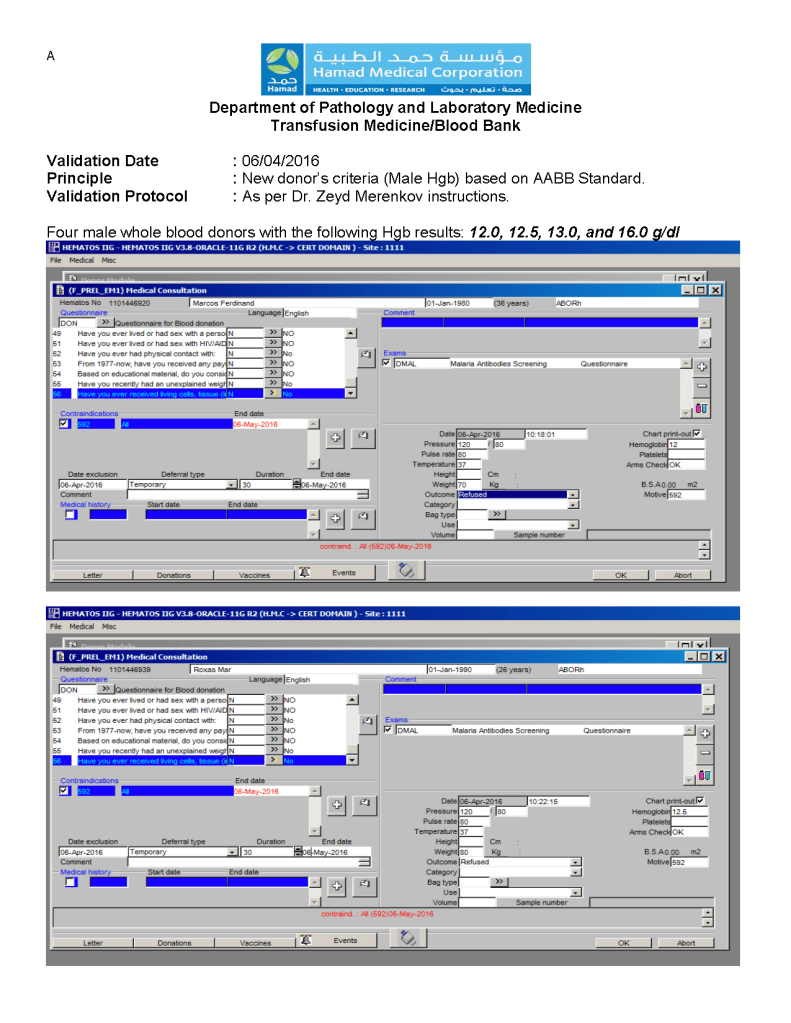
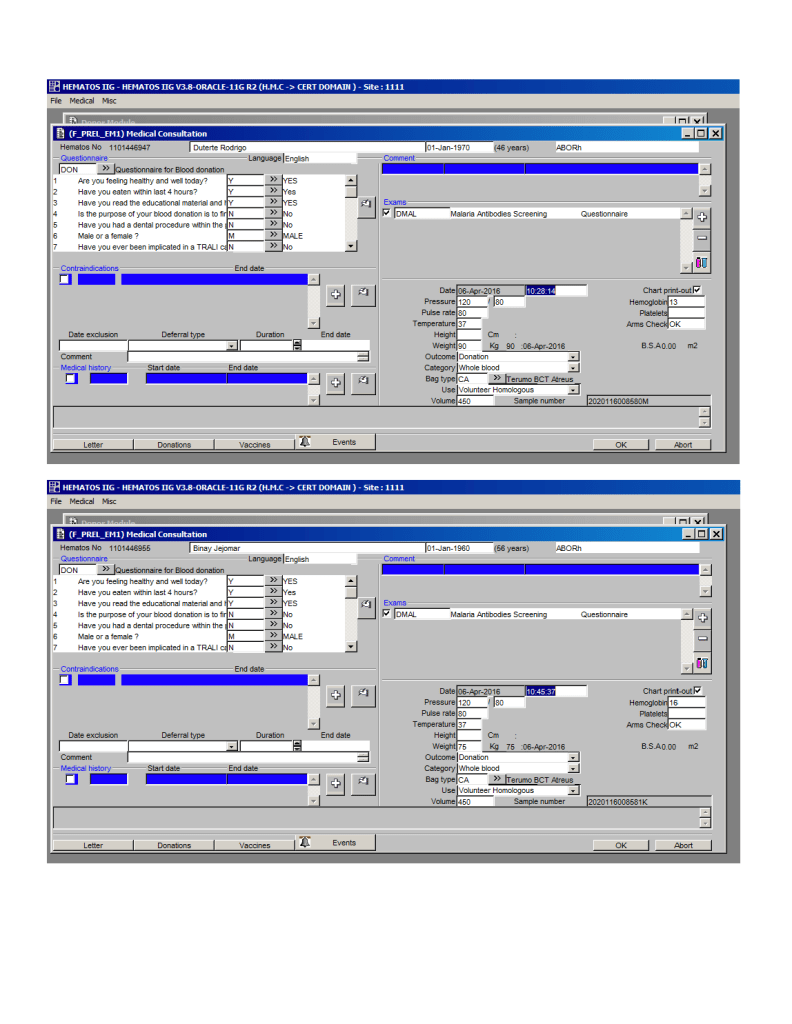
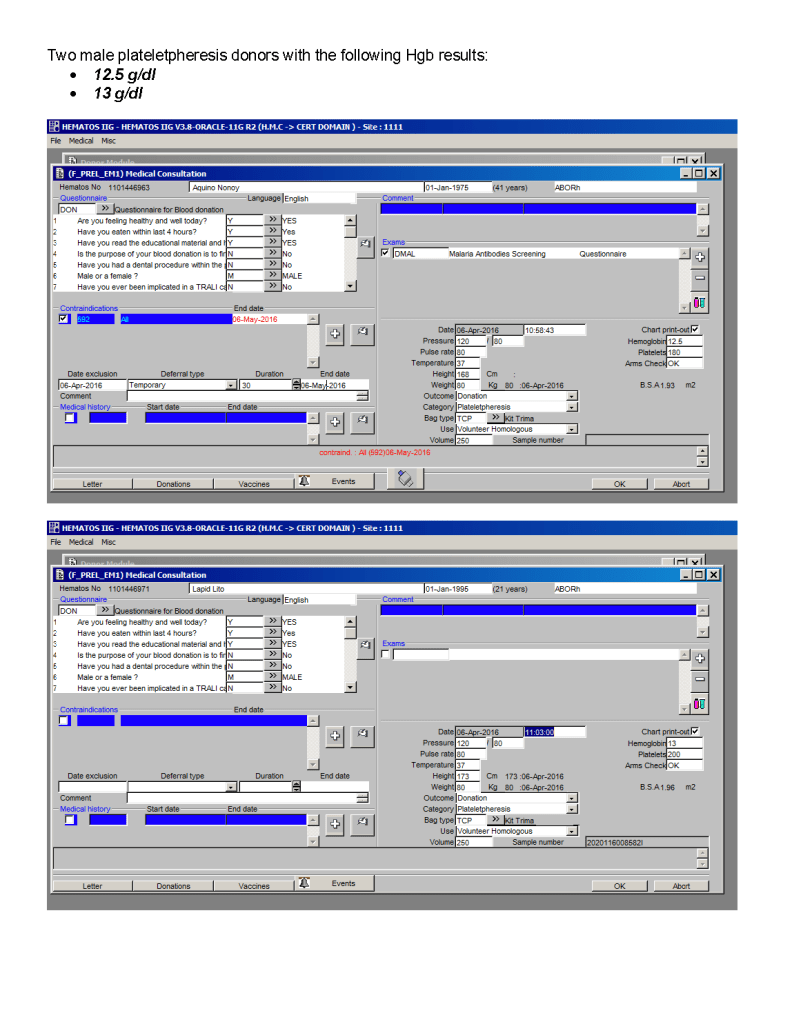
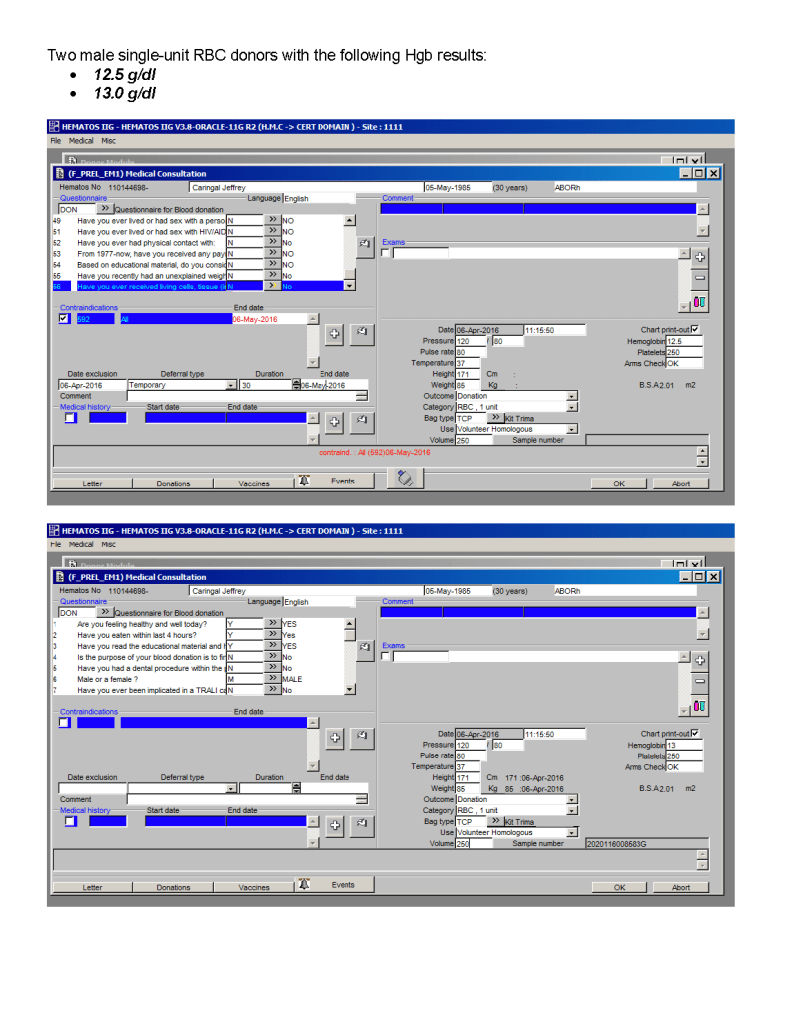
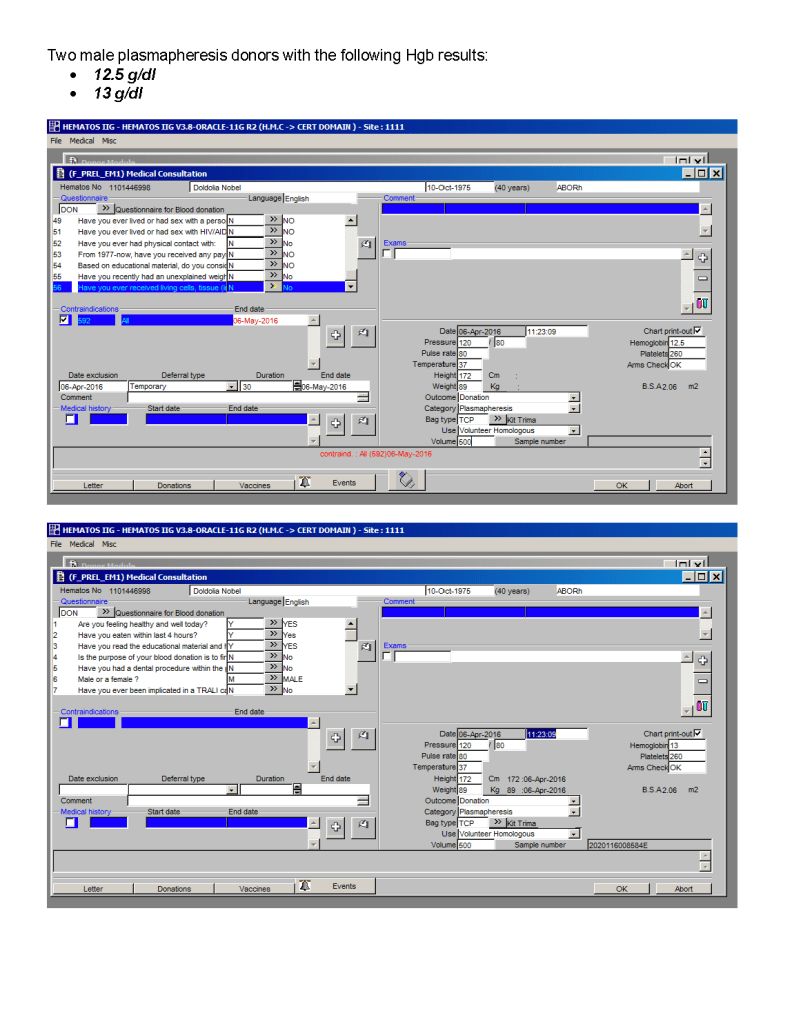
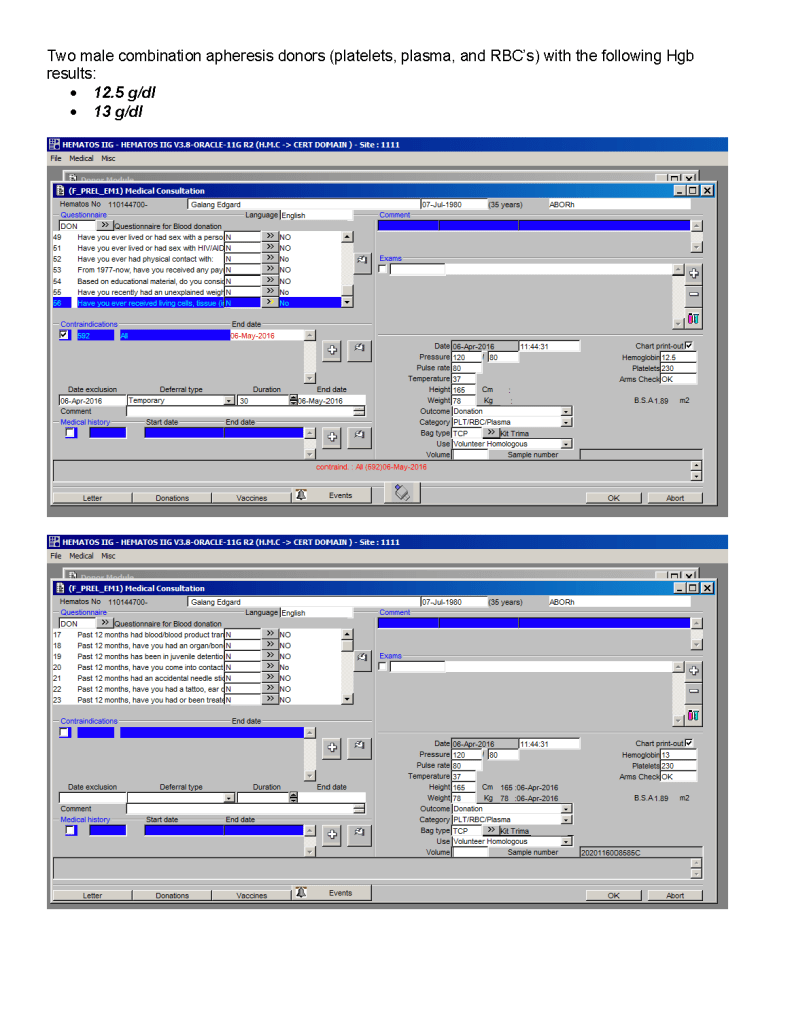
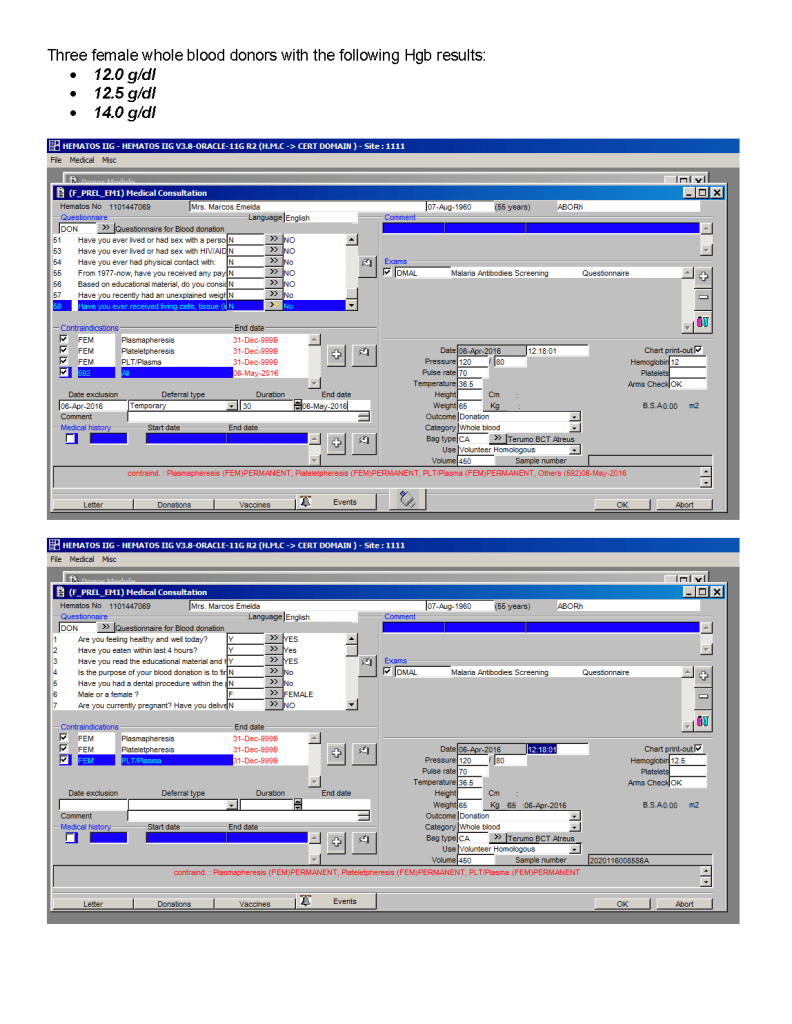
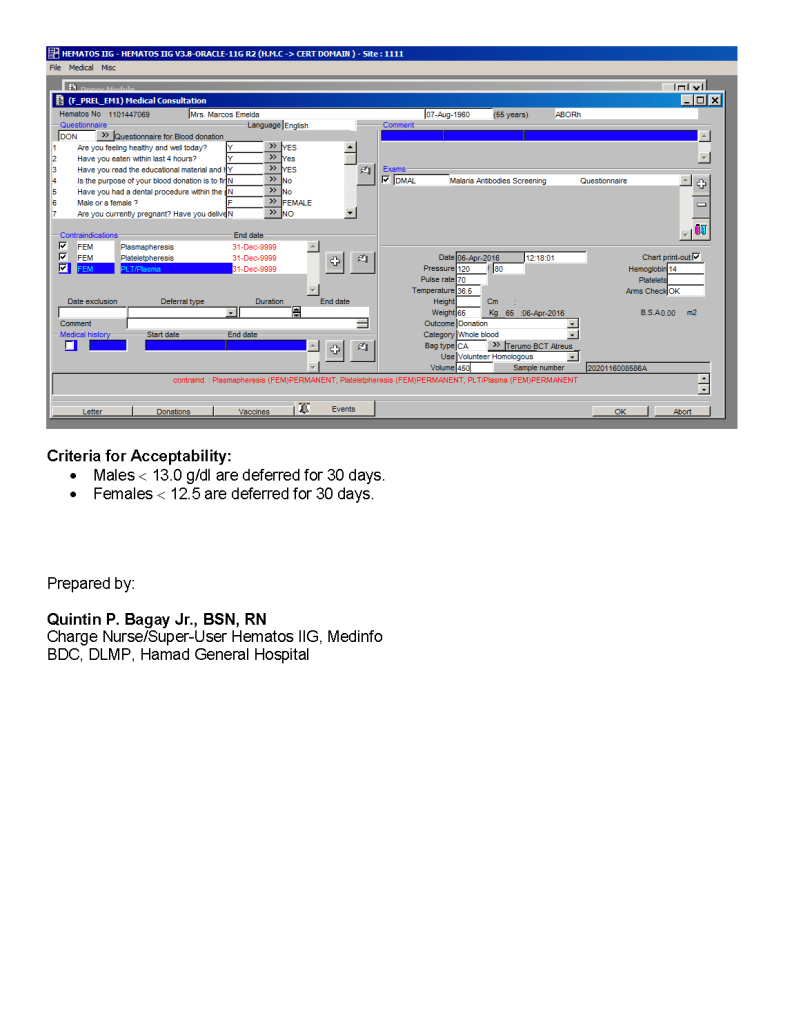
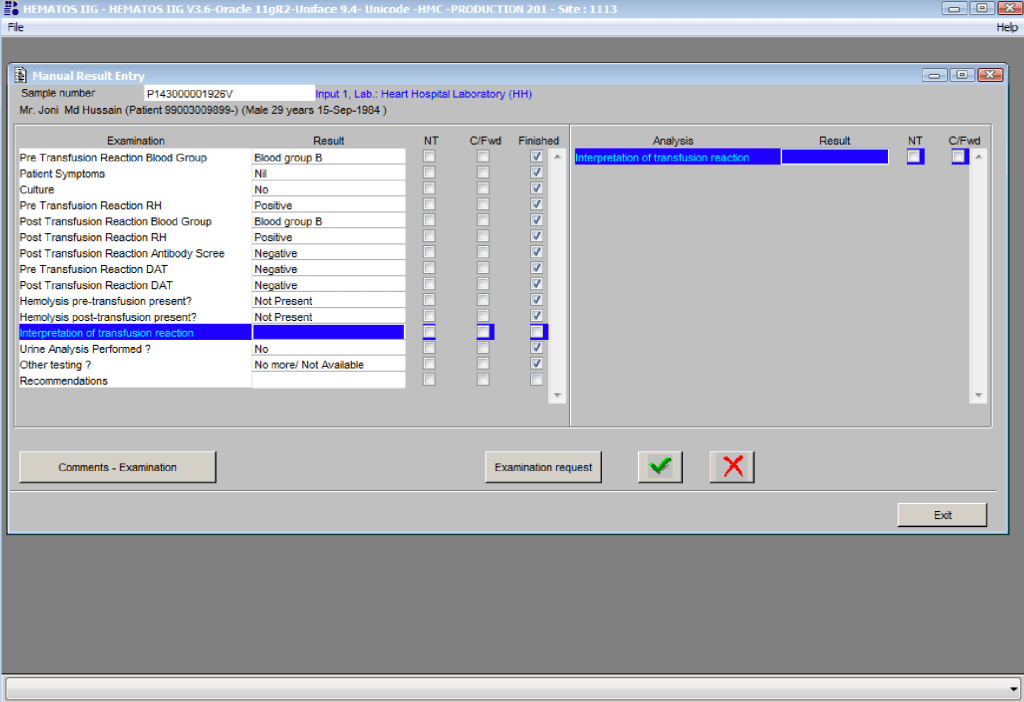
Changes to donor criteria can occur at any time.  This example is the change in donor criteria for males to 13.0 g/dl based on AABB Bulletin #16-05.

I made a validation protocol, which was subsequently performed by a Donor Center Medinfo Super-User.   The data was then sent to me for review and then accepted.

Note that females were included in the testing for regression purposes.  Females were only permitted to donate RBCs—all other components were discarded in production. Contraindication information appears in RED.

Physician Review and Data Entry of Transfusion Reactions

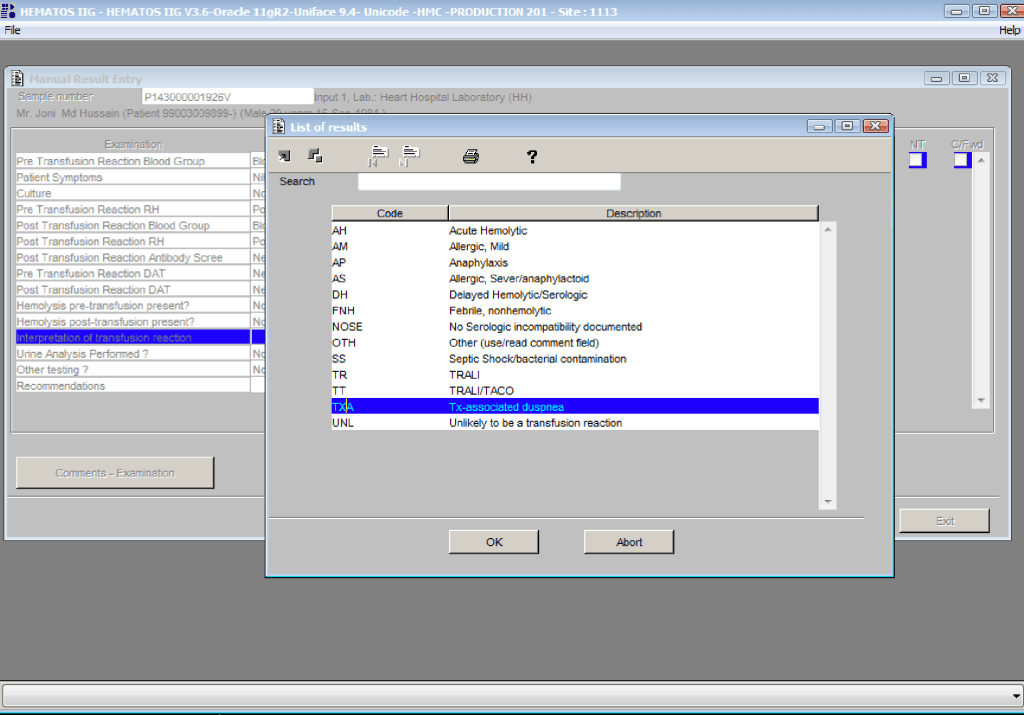
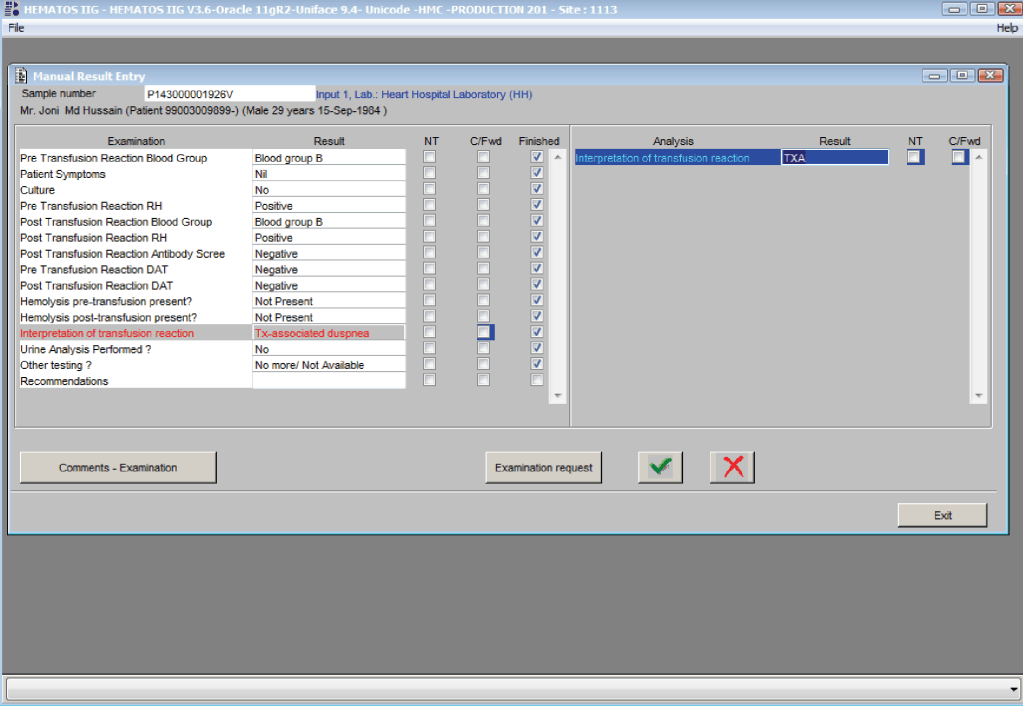
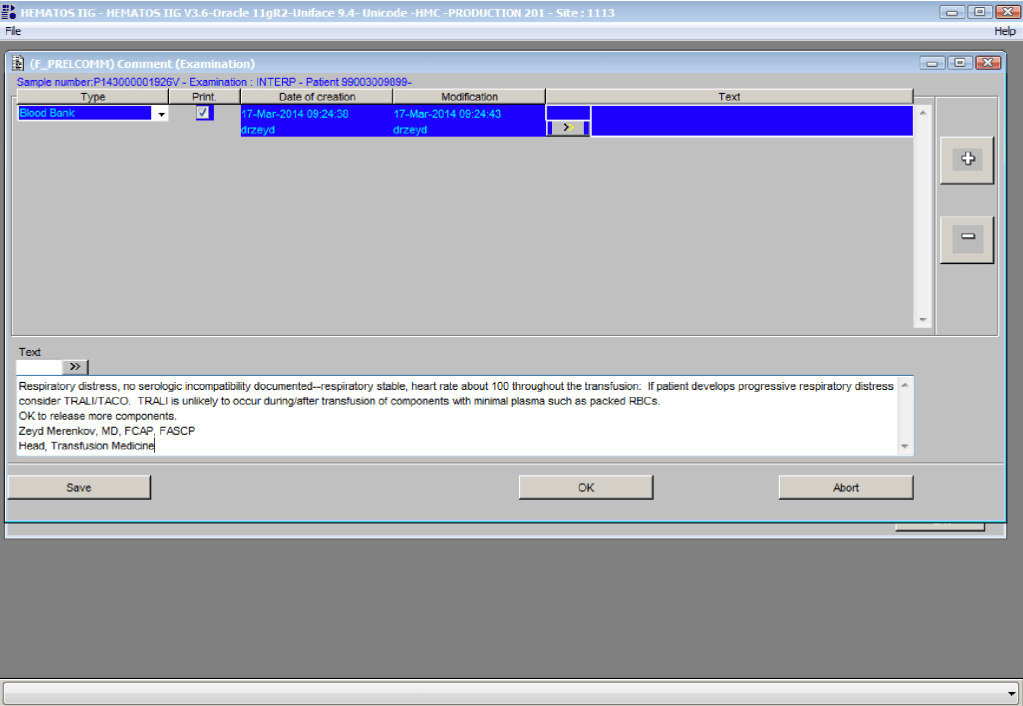
Physicians must enter their interpretations and recommendations for each transfusion reaction review.  In addition, they may enter comments against any of the data.  This post shows the process used in Medinfo Hematos IIG.

By highlighting Interpretation (left side), they then click on the Result Field (right side) and select their interpretation from the drop-down menu.  They can also select other and then enter a comment.

References:

  1. Standards for Blood Banks and Transfusion Services, Current Edition, AABB, Bethesda, MD, USA
  2. Guidelines to the Preparation, Use, and Quality Assurance of Blood Components, European Committee (Partial Agreement) on Blood Transfusion (CD-P-TS), Current Edition

External Disaster Plan, Simplified

Principle:

Maintaining an adequate blood supply and expedited compatibility testing are critical in disaster planning.  Medinfo Hematos IIG allows us to get dynamic updates of our blood supply and dynamically reallocate blood components as needed.

Policy:

  1. Determinate total available blood supply across all locations by using the Cumulative Stock Display program in Medinfo Hematos IIG.
    1. Recheck stock at least every hour during the disaster.
  2. At each transfusion service site, in conjunction with a Transfusion Medicine Consultant:
    1. Cancel reservations for elective surgical and non-emergency medical cases of affected ABO/D types.
    2. Retain reservations for antigen-matched, oncology, NICU, and high-risk obstetrical cases.
  3. Inform Donor Recruitment/Logistics to send SMS, radio, and television messages for blood donors—all types.
  4. Contact ALL staff and have them report to duty.
    1. At the Blood Donor Center, the Head Nurse, Recruitment, Supervisor, Component Processing, and Supervisor, Marker Testing will contact staff.
    2. At hospital transfusion services, the site supervisor will contact all staff.
  5. Process blood components using automated component technology (Reveos).
  6. Perform all donor marker testing including single-well NAT.
    1. Abbreviation of donor marker testing is only at the discretion of the Division Head, Transfusion Medicine.
  7. Transfusion Services:
    1. Release blood component according to the various protocols as needed:
      1. Massive Transfusion Protocols
      2. Emergency release
      3. STAT
      4. Priority
      5. Routine
  8. Compatibility testing will be electronic, immediate-spin, or full AHG as per our protocols.

References:

  1. Standards for Blood Banks and Transfusion Services, Current Edition, AABB, Bethesda, MD, USA
  2. Guidelines to the Preparation, Use, and Quality Assurance of Blood Components, European Committee (Partial Agreement) on Blood Transfusion (CD-P-TS), Current Edition

Data Entry Verification

Principle:

This policy outlines steps taken to minimize the risk of data entry errors and is based on a dualistic approach:  review of results by a senior technologist and/or supervisor and various computer safeguards built into the Medinfo Hematos IIG blood bank computer HIIG system.  This policy also discusses the verification (here called authorization) and purge processes of HIIG.

Policy:

  1. Review by senior technical, supervisory, or transfusion medical staff:
    1. Designated test procedures require review by a second technologist before authorization.
    2. Complex immunohematology testing and specimens showing aberrant results (e.g. ABO/D discrepancies) are reviewed by the supervisors or designates and ultimately a transfusion medicine physician before authorization.
  2. Computer system HIIG rules:
    1. Privileges:
      1. System restricts which staff can perform specific tests
    2. Patient/donor identity:
      1. System asks end-users to verify patient/donor identity before starting any access to the patient/donor record.
      2. System performs historical database checking and flags any inconsistencies (e.g. historical ABO/D typing differences, etc.)
    3. Testing:
      1. Only selected staff have privileges to authorize or purge.
      2. ABO/D testing algorithms require entry of reactions, not interpretation of results and are compared to a truth table.
        1. Aberrant results require special review before ABO/D typing results can be authorized/purged.
        2. D-controls must be negative to allow D typing results to be authorized for liquid D-typing reagents.
      3. DAT results require appropriate controls to meet truth-table criteria.
      4. Eluates require last wash to be negative before authorization
    4. Blood components:
      1. Selection of RBC or plasma units requires two independent sample determinations within 72 hours of each other.
      2. ABO-incompatible RBC or FFP/FP24 transfusions are not allowed.
      3. Donors with any detectable antibodies are permanently deferred.
      4. Depending on the patient’s antibody history, release of RBC units may require antigen-matched units.  Examples:
        1. Mandatory matching (only antigen negative matched units allowed—no antigen positive or antigen-untyped units):  Antibodies against H, D, c, K, k, Kpa, Kpb, Jsa, Jsb, Jka, Jkb antigens, anti-PP1Pk
        2. Priority matching (incompatible or untested can be approved by a transfusion medicine physician):  C,E, e, Fya, Fyb, M, S, s
        3. Antigen matching not required:  Lea, Leb, N
      5. Least-incompatible crossmatch require special authorization to release
      6. Protocols to force irradiation or other modified components can be setup in HIIG.
    5. Donors:
      1. Donor tests have same criteria as the same test used in patient testing for controls, etc.
      2. Donor demographics are read directly from the Ministry of Interior database—no manual entry (bar code only used).

References:

  1. Workflows for Hematos IIG (1001 through 1005), 2013-2020
  2. Standards for Blood Banks and Transfusion Services, Current Edition, AABB, Bethesda, MD, USA
  3. Guidelines to the Preparation, Use, and Quality Assurance of Blood Components, European Committee (Partial Agreement) on Blood Transfusion (CD-P-TS), Current Edition

Advice to Transfusion Medical Directors on the Selection of Blood Bank Software

Most Transfusion Medical Directors are not information technology IT people.  Still, regardless if you direct a hospital blood bank/transfusion service, a blood donor center, or both, you will still have to evaluate software for your operations.  You will probably have to sign off on the selection of a system and on the final build before going live.

This can be a formidable task, especially since none of us were trained in IT.  In my opinion, you can still do this based on your knowledge and experience and make a successful choice.

The most important thing is to KNOW YOUR OPERATIONS!!  Someone in your organization should map out all your processes, preferably as flow charts.  Optimize your manual processes.  Look at your critical control points:  How does the software enhance operations and safety?  How does the candidate system enhance security and consistency?  Does it bolster the critical control points?

My experience has been that the best software build is the one based on a good manual system.  Study the new candidates:  how do they enhance your operations?  Now reconstruct your processes with the enhanced features of the new system.

Don’t be afraid to ask for help.  Check your local resources and/or consider outside consultants if necessary.  The latter should have experience in working with blood bank systems and ideally have worked with your candidate vendors.

Human beings are not consistent creatures.  We often do not like following a series of steps in a processes, we like to skip around.  All of this is very dangerous to patient care.  The ideal system enforces consistency and integrity.  I actually like it when my staff complain that the software is merciless—they cannot take shortcuts.  They must follow each step in order!

Choosing a module from within a laboratory or hospital information system LIS/HIS will facilitate integration with the rest of system.  However, such modules (mainly limited to hospital blood banks) do not have all the features that a dedicated blood bank software has  For example, will they prevent release of unphenotyped or Kell-positive units in a patient with anti-Kell?

If you choose the dedicated system option, you must determine if a functioning interface to the LIS/HIS exists.  If not, what is the time frame to make the connection?  Very importantly, check that your specifications are actually built into the interface.  Almost every LIS/HIS vendor says that they can make an interface, but are they communicating what you need?  If you talk English and they answer you in Sanskrit, are you effectively communicating?

I prefer a dedicated blood bank system for both patients and donors, especially one that allows you to create rules to handling different situations like electronic/computer crossmatch, irradiation, etc.  Integrating both patient and donor operations will facilitate operations, especially in times of disaster and product recalls/quarantines.

Make certain that there are interfaces available for your analyzers and blood production equipment (e.g. Ortho Vision Max, Reveos, Mirasol, etc.).  Check these out on a site visit.  Many vendors promise that they can communicate with your equipment, but you must verify this yourself.

You are the pilot.  Is the transfusion or donor information organized to facilitate your decision making? Is it available all on one screen?  Do you have to flip across many screens to get the information (e.g. transfusion history, transfusion reactions, DAT, antibodies, donor history, marker testing) you need?

If you are directing a donor center, you will most likely need a separate dedicated software.  Usually, donor center software does not directly integrate into the LIS/HIS.  However, at least your patient hospital blood bank module must be able to read your ISBT labels properly.

I recommend a visit to a site comparable to your current operations.  Look for ease of use, response time, and talk privately with the end-users at the site.  Ask your IT staff to help you select a site that uses the same operating and database software (e.g. Oracle) as you will be using.

How readily can the system be modified for new practices?  With COVID-19, SARS, ZIKA, etc. there have been many changes in regulations in a short time.  How long will it take your vendor to update your system?  Is the system compliant with your local regulations and international accreditation standards?

Structurally, the optimal system is one that is a framework where almost all changes can be handled by changing settings or parameters.  The underlying structure does not change so this facilitates making the modification.  There is no need to “hard code” the changes.  You are not writing a new software structure.  Warning:  many blood bank softwares do not have this framework or flexibility—it takes a long time often even to make minor changes or updates.

Using blood bank software is like playing with fire.  Defects in design can adversely affect patient care.  The vendor will install the software with settings, but it is still YOUR responsibility to verify it works according to the specifications.

I recommend engaging computer-literate end-users (nurses, doctors, medical technologists, recruitment staff) .from the very beginning of the actual software build.  These staff can become Super Users to handle minor issues and train other staff and can help perform your software validations.

In summary, you will have to accept the choice of vendor and the final software build.  Find resources to help you with these tasks.  Never forget that what you are doing could adversely affect patient care if you are not vigilant!

4/11/20