Framework for Establishing the Use of Universal Low-Titer Group A Plasma

This post outlines a framework for establishing the use of low-titer group A plasma as a universal donor.  Manual titering large number of donor specimens in my organization is not practical.  Using an automated system will also increase the precision of the results.

Process:

  1. Select a cut-off anti-B titer.  This should be determined by the blood bank medical director.
    1. I selected saline 1:64 based on recent THOR (Thrombosis Hemostasis Oxygenation Research) meetings
  2. Perform a survey of the anti-B titers in your blood donor population.
    1. At my sites, about 50% had titers less than or equal to 1:64.
    2. Determine how stable the titer is:
      1. For serial donor plasmapheresis, how long could you accept the donor as low-titer?
      2. Does the titer change between whole blood donations?
  3. Determine the target inventory level for universal plasma (group AB and low-titer A) based on current/past usage.
  4. Assess availability of automated immunohematology analyzers for titration.
    1. Titration may take up to 30 minutes per sample, during which time the machine cannot be used for any other purpose.
  5. Add a new blood type AU (for group A universal) for plasma in your blood typing algorithm.
    1. AU should be used interchangeably with group AB.
  6. Software:
    1. Set up new truth table in your blood bank computer system.
    2. Validate the modification in your blood bank donor and patient modules.
    3. Update ISBT code for this new product, verify your transfusion service module can read this.

Special notes:

  1. At my last location, we had only 3 analyzers capable of doing the titration.  Thus, we could only do 6 titrations per hour at the expense of stopping all other testing.  You will have to coordinate the titration with your other immunohematology testing.  Also, verify if all these equipment interface to your production software.  In my system, any test (including titration) could be performed at any location and its results be used for production purposes.
  2. Donor ABO antibody titers may fluctuate.  I would not use previous results to qualify a donor to be AU.  I would repeat the anti-B titer each donor encounter.  If I collect donor plasmapheresis, I would determine for how long the titer can be used (see 2.2.1 above).

References:

  1. Technical Manual, Current Edition, Bethesda, MD, USA
  2. Standards for Blood Banks and Transfusion Services Current Edition, AABB, Bethesda, MD, USA
  3. Medinfo Hematos IIG Donor Production Module
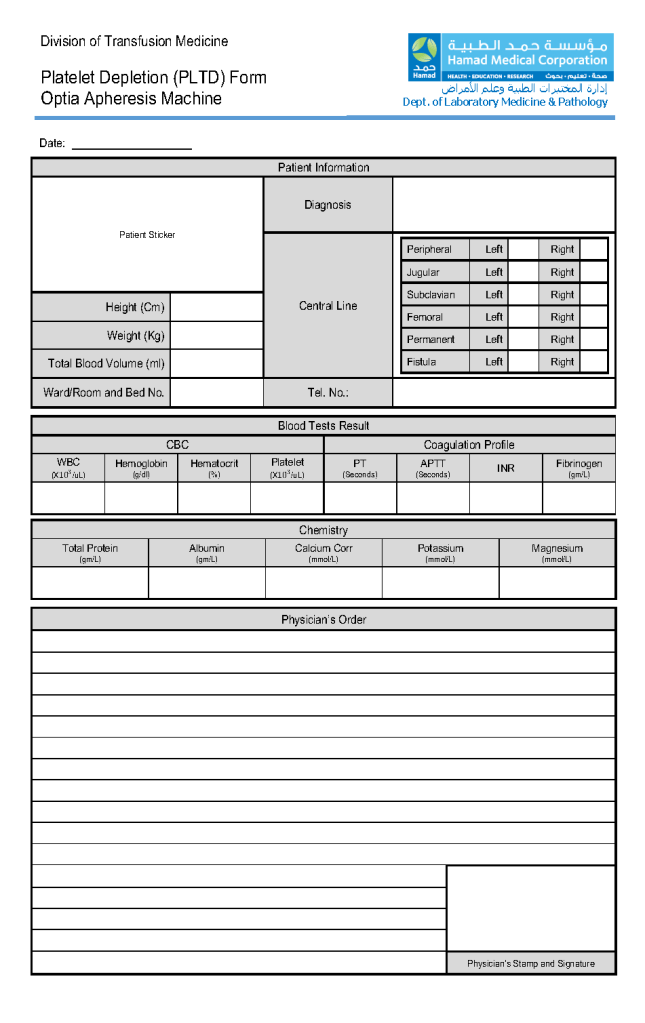
Platelet Depletion Apheresis Form

This is the apheresis form used for reductive thrombapheresis developed by my apheresis team and me. In particular, I want to thank Dr. Saloua Al Hmissi, Consultant Transfusion Medicine, and Ms. Mini Paul, Head Apheresis Nurse, all their hard work.

The attached form can be developed into a computer entry form if one has a suitable hospital information system. It is organized so that the apheresis nurse can quickly enter the data on one screen. Never forget that our goal is treat the patient–not spend all of our time on data entry!!

20/12/20

Data Entry Verification: Updated Version

This is an update from the previous version posted to include low-titer group A FFP/FP24 and low ABO-titer group O whole blood.

Principle:

This policy outlines steps taken to minimize the risk of data entry errors and is based on a dualistic approach:  review of results by a senior technologist and/or supervisor and various computer safeguards built into the Medinfo Hematos IIG blood bank computer HIIG system.  This policy also discusses the verification (here called authorization) and purge processes of HIIG.

Policy:

  1. Review by senior technical, supervisory, or transfusion medical staff:
    1. Designated test procedures require review by a second technologist before authorization.
    2. Complex immunohematology testing and specimens showing aberrant results (e.g. ABO/D discrepancies) are reviewed by the supervisors or designates and ultimately a transfusion medicine physician before authorization.
  2. Computer system HIIG rules:
    1. Privileges:
      1. System restricts which staff can perform specific tests
    2. Patient/donor identity:
      1. System asks end-users to verify patient/donor identity before starting any access to the patient/donor record.
      2. System performs historical database checking and flags any inconsistencies (e.g. historical ABO/D typing differences, etc.)
    3. Testing:
      1. Only selected staff have privileges to authorize or purge.
      2. ABO/D testing algorithms require entry of reactions, not interpretation of results and are compared to a truth table.
        1. Aberrant results require special review before ABO/D typing results can be authorized/purged.
        2. D-controls must be negative to allow D typing results to be authorized for liquid D-typing reagents.
      3. DAT results require appropriate controls to meet truth-table criteria.
      4. Eluates require last wash to be negative before authorization
    4. Blood components:
      1. Selection of RBC or plasma units requires two independent sample determinations within 72 hours of each other.
      2. ABO-incompatible RBC or FFP/FP24 transfusions are not allowed.
      3. Titer-based ABO blood group selection:
        1. Low titer group A FFP may be used as universal plasma like group AB.
        2. Group O whole blood with low anti-A and anti-B titers may be used for all ABO types.
        3. Acceptable titer threshold is specifically defined as parameters in Medinfo.
      4. Donors with any detectable clinically significant antibodies are permanently deferred.
      5. Depending on the patient’s antibody history, release of RBC units may require antigen-matched units.  Examples:
        1. Mandatory matching (only antigen negative matched units allowed—no antigen positive or antigen-untyped units):  Antibodies against H, D, c, K, k, Kpa, Kpb, Jsa, Jsb, Jka, Jkb antigens, anti-PP1Pk
        2. Priority matching (incompatible or untested can be approved by a transfusion medicine physician):  C,E, e, Fya, Fyb, M, S, s
        3. Antigen matching not required:  Lea, Leb, N
      6. Least-incompatible crossmatch require special authorization to release
      7. Protocols to force irradiation or other modified components can be setup in HIIG.
    5. Donors:
      1. Donor tests have same criteria as the same test used in patient testing for controls, etc.
      2. Donor demographics are read directly from the Ministry of Interior database—no manual entry (bar code only used).

References:

  1. Workflows for Hematos IIG (1001 through 1005), 2013-2020
  2. Standards for Blood Banks and Transfusion Services, Current Edition, AABB, Bethesda, MD, USA
  3. Guidelines to the Preparation, Use, and Quality Assurance of Blood Components, European Committee (Partial Agreement) on Blood Transfusion (CD-P-TS), Current Edition

Preventing Graft vs. Host Hemolytic Anemia

Principle:

Donor lymphocytes in an organ transplant may make antibodies and cause a clinically significant hemolytic anemia, i.e. a graft vs. host hemolytic anemia GVHHA.  Optimal handling in these cases should include antibody screening/identification for all potential donors and recipients.  The transfusion medicine physician should review the results for possible issues of antibody/antigen incompatibilities to proactively select matched blood components and avoid GVHHA.

In the Medinfo blood bank computer system, we can make custom rules to ensure release of only antigen-matched units as needed.

Policy:

  1. Perform antibody screen and identification (if indicated) for all prospective organ donors and recipients.
  2. If the organ donor has clinically significant antibodies, check if the recipient has the corresponding antigens.  If so, select RBC units negative for the donor antibody specificities. 

Example:  Donor has anti-Kell (K1) and patient is K1-positive.  Use only K1-negative RBCs post-transplant.

  • Send the case to the transfusion medicine physician to review.  He will contact the clinicians as indicated.
  • Create a rule in Medinfo forcing the antigen matching.

References:

  1. Technical Manual, Current Edition, Bethesda, MD, USA
  2. Standards for Blood Banks and Transfusion Services Current Edition, AABB, Bethesda, MD, USA

Patient D-Typing Algorithm Using Ortho Monoclonal Cocktail Reagents

Principle:

We must select D-negative RBC units for transfusion if the patient is truly D-negative or if he/she is a partial D since transfusion of a partial D positive unit may induce antibodies against any part of the D molecule.  Thus, for patients, we will consider patients with partial D as D-negative.  Note that this is NOT the usual practice in the USA;  however, AABB Standards do allow that we do NOT test patients for weak D and give D-negative RBCs instead.

Background:

Ortho Diagnostics Reagents use two different monoclonal antibody cocktails that react variably with the antigen D (Rh1)—these are found on the card:  Anti-A/B/A,B/D/D/Ctrl:

Anti-D/Anti-RH1—IgM monoclonal antibody clone D7B8 can detect most examples of weak and partial D including weak D types 1, 2, 3, 4.0, and D categories II, III, IV, V, VII, DBT, and R0Har.  It does NOT detect category VI.  Retest positive reactions of 2+ or less by an alternate method.

Anti-D/Anti-RH1—IgM monoclonal antibody RUM1 can detect most examples of weak and partial D including weak D types 1, 2, 3, 4.0, and D categories II, III, IV, V, VII, DBT, and R0Har.  It does NOT detect category VI.  Retest positive reactions of 2+ or less by an alternate method.

Policy:

  1. Follow the manufacturer’s instruction for storage, handling, and usage of all reagents.
  2. If the D-control is positive, the reactions are indeterminate, repeat by another method.
  3. Run both anti-D reagents listed—do not use the donor typing algorithm or reagents.
  4. Use the following table for interpretation and further actions if needed:
Pattern #Anti-D/D7B8Anti-D RUM1D-Interpretation
1PositivePositiveD-positive
2PositiveNegativeDo additional testing
3NegativePositiveDo additional testing
4NegativeNegativeD-negative  

If the reaction is 2+ or less with either the Ortho anti-D/D7B8 reagent or anti-D/RUM1 or if the patterns 2 or 3 above, repeat by another manufacturer’s reagents.  In the meantime, consider the patient as D-negative.

Medinfo-Ortho interface settings for Patient Testing:

Anti-D/D7B8Anti-D RUM1D-Interpretation
3, 43, 4D-positive
3, 40~
03, 4~
00D-negative
~~~

Note all of the following:

  1. If the result is D-indeterminate, use D-negative RBCs.
  2. No reagents may be able to detect all D variants.
  3. ~ means any other value for that reagent (1+, 2+, mf, hemolyzed)
  4. Note that this new algorithm makes a 2+ reactivity as indeterminate with Anti-D/D7B8 or Anti-D/RUM1.

References:

  1. Publication e631300291, Product Insert, Anti-A/B/A,B/D/CDE/Control Card, 2010, Ortho Clinical Diagnostics, High Wycombe, Buckinghamshire/UK
  2. Standards for Blood Banks and Transfusion Services, Current Edition, AABB, Bethesda, MD, USA

Opinion: Handling Incorrect Physician Orders

Most of the non-transfusion-medicine physicians with whom I have worked have had only limited training in placing component or hospital blood bank orders.  In previous posts I have discussed this and suggested that all physicians who may possibly order blood bank tests or blood components should have a training and documented competence on a periodic basis.  Only a very few physicians, mainly hematologists and some organ transplant physicians, have placed reliable orders.

Before we had a blood bank computer system, we received orders on a manual paper requisition.  If there were errors, my technical staff and I corrected the order.  Any changes were made by me in my capacity as the blood bank medical director.  The ordering physicians and I had good relations and they had no problem with this—in fact, many were afraid of the blood bank and felt happy to be relieved of the responsibility.

In the current software era, what happens depends on how the order is placed.  Can the technical staff and I correct the order directly or must we each and every time contact the physician to revise his/her order?  Do my staff have to cancel each erroneous order and wait for the corrected order?  This could slow down the work process and prevent release of blood components in a timely manner.

Should the non-blood bank physician be allowed to order our complicated esoteric transfusion tests directly—e.g. ordering extended antigen typings or antibody identifications or elutions?   What if they order something unnecessary or inappropriate?

At a recent hospital position as Division Head of Transfusion Medicine, I discovered that the Hospital Information System HIS was very slow for all blood bank orders.  The physicians complained, I would allow them to bypass the HIS and use the manual backup system in critical situations.  If we had been forced to cancel the order and have the physician reorder, this would have greatly disrupted the work process.

We did not use the HIS at all in Transfusion Medicine.  We had patient and donor modules in the dedicated blood bank system Medinfo.  We had a limited ordering interface from the HIS to Medinfo for blood components and some basic testing (e.g. ABO/D typing, DAT, type and screen/group and save, cord blood testing, and transfusion reaction workups).  All work was done in the dedicated blood bank system.

All components were leukodepleted to < 1E6, all platelet and plasma were Mirasol pathogen-inactivated, all platelets were in platelet additive solution PAS.

The doctors did not order the specific blood component, rather they indicated a preference, e.g.

  • Packed RBCs
  • Platelets (adult dose of 2.4 E11)
  • Plasma
  • Cryoprecipitate

The following appeared as an order comment in the blood bank system:

  • The specific number or amount of the each component type
  • Preferences for pooled vs. apheresis platelets, washed RBCs, irradiated RBCs.

The blood bank staff could review the doctor’s request and order in Medinfo as per our internal protocols under my responsibility.  In effect, I was modifying the orders when needed just as I had done under our manual system.  This included type, modification, and quantity.  Yet now, I did not have to change any orders since the doctors had only indicated preferences.

For blood bank testing orders, we had our own internal algorithms for the workups.  The doctors could not order antibody identifications, elutions, or any antigen typings other than ABO/D.  They latter were triggered by the screening test results.

This system allowed us to avoid cancellations due to physician errors.  I was very comfortable taking the responsibility to alter the orders for best patient care.  If a physician did not agree with our algorithms, they could discuss the issue with one of the transfusion physicians, or ultimately appeal to me.  I was fortunate that there were no legal issues with this approach where I practiced.

In summary, my recommendations are:

  1. Have the doctors order a preference for the type of blood component.  They still order the quantity and can request modifications such as washing or irradiating or apheresis-derived or buffy coat pool platelets.  The actual allocation is made by blood bank staff under my direction.
  2. Offer algorithmic based testing.  Doctors only order basic testing which triggers reflex algorithms.  Most of the test menu is not orderable directly by the physicians (example:  an antibody identification is triggered by a non-negative antibody screen.

9/12/20

Off-Line Donor Medinfo Transactions

Principle:

When you cannot establish a direct link to the live Medinfo program, you must arrange for the local Medinfo engineers to create a local server that will have the current Medinfo donor database for use at outside campaigns where the internet connection cannot be used.  This can also be used if for some reason the Blood Donor Center link is down in order to register donors and check the donor deferral database.

Policy:

  1. For each outside campaign, there should be a pre-campaign visit to verify the availability of internet to connect to Medinfo.
    1. If the internet connection is working, use Medinfo using the 4G access points.  Otherwise:
    2. If none, inform the Medinfo engineers to prepare a local server on one of the laptops at least ONE DAY in advance of the campaign.
      1. Give Medinfo engineers the laptop to download the database and software.  This will be the offline server for the campaign.
      2. Link the offline server to the other portable computers for the campaign (see the corresponding Medinfo job aid).
      3. Use the local network (offline server and other portable computers) for registering donors.
      4. Upon return to the Blood Donor Center, upload the data.
      5. Continue the regular processes after uploading.

Note:  When the offline data is uploaded into Medinfo main database, it will be checked against the latest donor deferral database.  The latter will be applied for the donation.

Liver Transplant Processes for the Transfusion Service

Principle:

Liver transplantation requires coordination of the Transfusion Service TS, Liver Transplant LTS , and the Blood Donor Center BDC to prepare blood components for this massive transfusion setting.

Policy:

  1. Whoever receives notification of a possible liver transplant should ensure that ALL of the following senior staff are also informed:
    1. Head, Transfusion Medicine
    2. Coordinator, Donor Recruitment
    3. Supervisor, Transfusion Service
  2. Transfusion Service Supervisor will arrange transfusion service staffing as needed to cover the surgery period and immediate post-operative period.
  3. The current, up-to-date inventory must be calculated.  The following minimum stock must be reserved:
    1. Twenty (20) packed RBCs
    2. Twenty (20) FFPs—-leukodepleted and pathogen-inactivated
    3. Three (3) platelet pools or apheresis doses (each ≥ 2E11 absolute number of platelets)—leukodepleted and pathogen-inactivated.
    4. The Medinfo Liver Transplant Protocol automatically orders all the above.
  4. Complex needs:
    1. If the patient has clinically significant antibodies, confirm the availability of the requested number of antigen-negative/compatible units.
    2. The Head, Transfusion Medicine, or the covering transfusion medicine consultant on-call will contact the liver transplant team to discuss the feasibility of proceeding after assessing the inventory of antigen-negative units.
    3. Only the transfusion medicine consultant can approve the use of antigen-incompatible RBCs in conjunction with the liver transplant team.
  5. Donor Center should increase recruitment/production to meet the anticipated usage as needed.
  6. When the procedure is confirmed:
    1. Crossmatch the RBCs by the appropriate technique according to our algorithms (i.e. computer/electronic, immediate-spin, or full AHG).
    2. Thaw the FFP:  the FFP is valid for FIVE days after thawing for use for the transplant patient or other patients with coagulopathy.
    3. If more than the above number of units is needed, HGH Transfusion Service must inform the Donor Center senior staff (Head, Donor Center; Administrative/Technical Director, and Coordinator, Donor Recruitment) to arrange for additional donations.

Example of Dealing with HIS Interface Issues to Dedicated Blood Bank Software

The following is an actual working document for interactions between the Medinfo HIIG system and a monolithic hospital information system covering nursing, laboratory, ADT, etc.  For the purpose of this post, I shall name it B*.

In a previous position, I was in charge of the Laboratory Information Systems and worked both with Medinfo for donor and patient hospital blood bank processes AND B* for the general laboratory.  It was my decision NOT to use B* for the hospital blood bank because there would be no integration between the donor module in Medinfo and patient blood bank module in B*.  Also, B* had limited handling of complex immunology algorithms and fewer safeguards than Medinfo.

B* could not directly read ISBT product labels from the ISBT dictionary and required hard-coding the links for each and every type of blood component and modification.  It was also slow to order blood components so in emergency situations, I allowed physicians to bypass B* and order directly if they felt in their clinical judgment that the delay in using B* might harm the patient.

The non-transfusion physicians had to directly order blood components in B* except for emergencies as stated above.  They were only allowed to order a limited number of basic tests such as ABO/D type, direct antiglobulin test DAT, or antibody screen.  Based on those tests, we would use algorithms in Medinfo’s patient module.  Example:  an outside doctor could not order a Jka typing—that could only be done according to our internal Medinfo algorithms.  Doctors could only order antibody screens, not antibody identifications, elutions, or titrations.

Sadly, most physicians had no specific training in blood component or blood component therapy so they made many mistakes in ordering manually before the computer system.  I had requested offering training sessions for the doctors but this had never been approved by the medical administration.

Thus, my decision was to place the responsibility for the correct ordering of blood components and testing directly by Transfusion Medicine.  The non-transfusion doctors were only ordering preferences for components—the actual selection was made in Medinfo by my blood bank staff under my order.  We decided whether to irradiate.  All platelet and plasma components were pathogen-inactivated.  All components were leukodepleted to < 1E6 according to CE Standards.

In Medinfo we could thus modify or even cancel requests without having to deal with the B* system.  B* would accept Medinfo cancellations directly.

During the frequent B* downtimes, all processes would be limited to using Medinfo.  There was no way to initiate orders in Medinfo and send them back to B*.  Thus during downtimes, the only way to retrieve results was to use Medinfo.

The following is the process for the interface as was used during my tenure at that institution:

Medinfo-B* Interface Process

Principle:

Limited ordering of components and basic transfusion testing may be initiated on the B* side.  All component orders and all test results will pass into B*, including those which can only be ordered by blood bank staff.  All blood bank processes will continue to be performed within Medinfo.  Transfusion Medicine is not responsible for training physicians and nurses on how to use the B* interface.

Abbreviations:

NTMP:  Non-Transfusion Medicine physicians

TM:  Transfusion Medicine

B*:  A hospital information system including laboratory module (not used by Transfusion Medicine for either patient blood bank or donor issues)—NOT MEDINFO!!

THE FOLLOWING POLICY SUPERCEDES ANY AND ALL PROCESSES CURRENTLY DOCUMENTED IN TRANSFUSION MEDICINE.  The processes are currently being updated to reflect the Medinfo-B* interface issues.

Policy:

  1. For our hospitals, B* ordering must be used unless B* is non-functional or there is a life-threatening clinical emergency that cannot be met expeditiously by ordering in B* e.g. MTP)
  2. NTMP must place all component orders (RBC, plasma, and platelet) and the limited test menu (type and screen, transfusion reaction, ABO/D type, direct antiglobulin test, cord blood) in B*.
    1. The ordering physician must DIRECTLY enter the order, not list the transfusion as a nursing task in the B* system.
  3. NTMP may indicate a preference to the type of component and number/amount requested, but the actual selection and release will be based on internal TM algorithms under the order of the Division Head, Transfusion Medicine.
  4. Tests not listed in the B* menu cannot be directly ordered by the NTMP.
  5. It is the responsibility of TM staff to periodically check the interface from Medinfo to import requests.
  6. Transfusion service/hospital blood bank staff will integrate those order requests which are currently needed for patient care.
    1. Other requests will be kept in the B*-Medinfo queue until they are needed and will be automatically cancelled after 3 days.
  7. Internal Hospital Transfusion Service/Blood Bank Processes:
    1. All Transfusion Medicine work processes will be performed within Medinfo, nothing within B*.
    2. B* Functioning (non-MTP):
    3. Transfusion Medicine staff will accept signed specimens without requisition.
      1. The specimen bar code will provide the two unique identifiers for patient identification.
        1. We will accept even if name is truncated on the B*-generated label, relying on the full name and HC number visible on the screen
      2. Internal processes and algorithms in Medinfo are to be used for selection and reservation of components, component modification, and all testing.
    4. Documentation of work:
      1. Routine specimens (type and screen, ABO/D typings, DAT, negative cord bloods) will be paperless.
      2. Non-routine specimens require paper documentation.  These include:
        1. Abnormal Results that needs supervisor /TRM physician review
        2. If the analyzer is not interfaced to Medinfo
        3. If a manual tube technique is performed
        4. Requests received from any site not ordering through the Medinfo-B* interface
    5. Massive transfusion protocols:
      1. The ordering physician will decide whether to order in B*:  if he decides that ordering in B* will adversely affect the patient outcome, he may revert to the old system (e.g. call the blood bank hotline and request blood and then send paper requisitions and samples to blood bank as conditions permit)
      2. Physicians who use the B* interface must order each wave of the MTP separately (e.g. MTP1, MTP2, MTP3) and adjust the quantities accordingly.
        1. The B*-Medinfo interface does not include ordering for non-blood-bank items (e.g. medications) in the massive transfusion protocol.
  8. B* Results and Statuses:
    1. All results and statuses of tests and components will be available in B* for those sites using the Medinfo-B* interface.
      1. This includes non-B* orderables for components and tests.
    2. Formatting of tests and other requests are limited to the B* build’s capabilities:
      1. NTMP may see test results in the Medinfo Viewer if they prefer.
    3. During B* downtime, TM will revert to Medinfo-only processes including ordering, test-requesting, resulting, and release of components.
      1. There will be NO recovery post-down-time in B*:   test results will be viewable in the Medinfo Viewer only.  There will be no component information in the Medinfo Viewer.
  9. Downtimes and recovery:
    1. B* Downtimes:
      1. Revert to 100% Medinfo processes.
      2. Manual requisitions and specimens will be sent:  complete concordance between specimen tube and requisition is required for the specimen to be used for the purpose of selecting components.
      3. Medinfo accession numbers will be used.
      4. There will be no B* ordering recovery.
      5. Test results will be viewable in Medinfo Viewer only.
      6. No statuses will be available.
    2. Medinfo Downtimes (B* available):
      1. Paper downtime procedures will be in effect.
      2. After restoration:
        1. Retrieve orders from B* interface and proceed OR:
        2. Others use paper requisitions and order/process in Medinfo only.
  10. Training of Clinical Staff:
    1. Training of physicians and nurses to use the B* interface is the responsibility of the Hospital Information System HIS staff, NOT TRANSFUSION MEDICINE!!
    2. All questions for clinical usage should be referred to the hospital’s HIS Help Desk.
    3. Transfusion Medicine will NOT provide B* support!!!

References:

  1. Medinfo interface documentation for B* Integration, January, 2019
  2. Standards for Blood Banks and Transfusion Services, Current Edition, AABB, Bethesda, MD, USA

Opinion: Software for Massive Transfusion Protocols–Pools

Massive transfusion protocols may contain large numbers of different blood components all to be released simultaneously as quickly as possible:

  • Packed RBCs
  • Low-titer group O whole blood
  • Platelets
  • Plasma
  • Cryoprecipitate

For an adult, it might include 6 RBCs, 1 adult platelet dose, 6 plasma, and 10 cryoprecipitate—23 components at one time.

For liver transplant, I had a protocol with 20 RBCs, 3 adult platelet doses, and 20 plasma units—43 components in all.

Even if the blood bank software prints all of these release forms, it requires considerable time to check the identity and serial number of each unit.  This is the rate-limiting step for their release to the critically ill patient.

Our clinicians wanted release within 5 minutes of ordering;  however, it was physically impossible to sign out so many components within this time limit.

Medinfo has facilitated the release by offering pools of one component type (platelets, cryoprecipitate, or plasma).  A pool number is generated to cover the components and this ONE number is used for release.

I would like to see the pooling concept expanded to allow multiple component types to be included in the pool.  Then, at release from the blood bank, only ONE number can be used to sign out the components.

Additionally, the individual units in this mixed pool should be treated the same way as if the units had been released individually including:

  • Apply all protocols for the components.
  • Return individual units back into stock or discard.
  • Use the mixed pool number to view the contents of the pool.
  • Query using the mixed-pool number for its contents.
  • Query the individual unit(s) (e.g. for look-back).
  • Quarantine the unit(s) as needed.

29/11/20