Elution Indications and Software Implementation

Processes and Software Building—Part 17

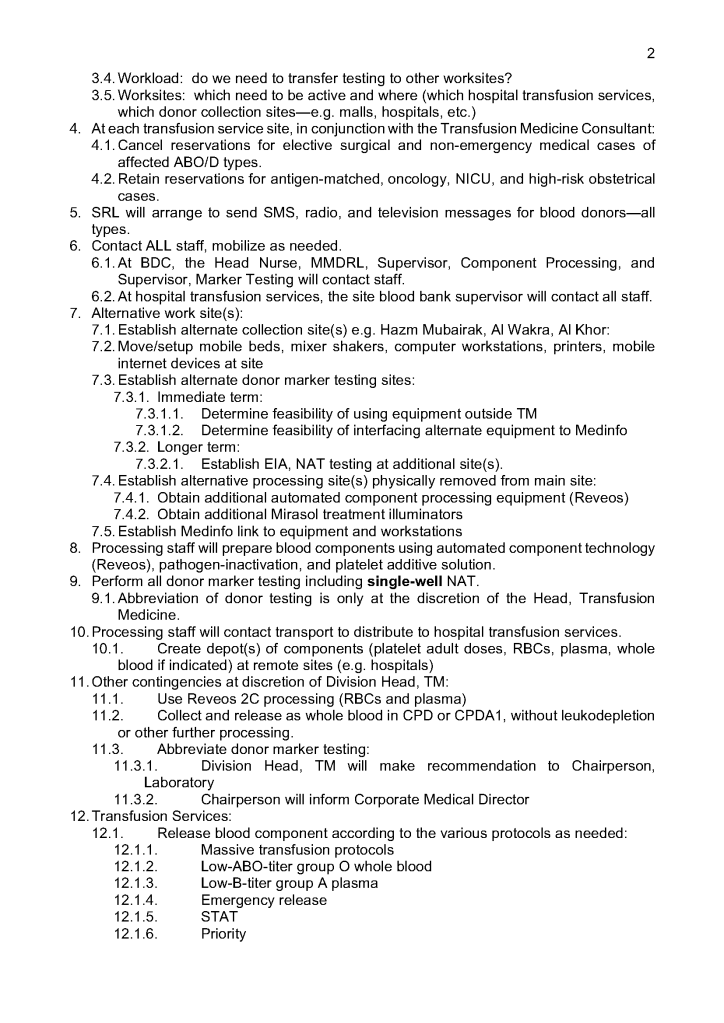
The direct antiglobulin test DAT may be the first or last place that a delayed hemolytic transfusion reaction can be detected.  In my practice, I always performed it the first time I encountered a patient with a positive DAT.  If the subsequent DAT testing is of the same strength and there is no change in the clinical status of the patient, then I might empirically repeat the elution after 14 days, i.e. just when new antibody emergence may be detected.

In summary, my criteria for elution after a positive DAT are:

  1. First patient encounter with a positive DAT
  2. At least 14 days since the previous elution
  3. DAT strength has increased since the previous exam (at least 1+ increase in strength in either IgG or C3)
  4. Patient shows evidence of hemolysis
  5. Suspected cases of drug-related hemolysis
  6. Transfusion Medicine physician specifically orders it otherwise

In the software processes, the following parameters were recorded:

  1. Technique of elution (acid glycine, dichloromethane, digitonin, ether, etc.)
  2. Number of washes (too many may remove the antibody from the RBCs)
  3. Last wash result (must be negative to accept conclusion)
  4. Manufacturer of the elution kit (if any)
  5. Elution result based on panel testing

Note:

  1. All indeterminate or positive eluates would trigger an antibody identification.
  2. All results would be reviewed by me or the covering Transfusion Medicine physician.  A comment would be entered into the results that could be viewed by the clinician either directly from Medinfo or through the hospital information system.

If the DAT was only positive for complement, it was up to the Transfusion Medicine Consultant to decide whether to proceed with elution.  Personally, I would usually proceed because the eluate is more concentrated and may occasionally detect an antibody that was not noted in the patient’s plasma.

The attached Medinfo workflow shows the process designed by me for use at HMC Doha.

Software Processes for the Antibody Screen

Based on the previous software post, I use the antiglobulin test algorithms to construct the antibody screen ABS, namely an INDIRECT antiglobulin test, i.e. incubate reagent red cells with the donor or patient’s plasma and then perform the DAT.  At HMC Doha and at NGHA in Riyadh, we mainly used three cell screens (no pooled cells for donors). The reactions could be machine-read (we had the interface) but the interpretation of the specificities found was done manually.

Donor ABS:

We screened all donors for irregular antibodies.  I disqualified most donor with non-negative screens from donation (my personal preference).  However, for nonspecific antibodies, I might elect to discard the current collection and then reassess the donor’s status at the next encounter.  Not everyone would agree with this most restrictive approach but I would not use the platelets or plasma in such situations.  I also did not use the donor RBCs, even though they were in SAGM—but I could elect to override this decision in Medinfo if there were a rare blood group (e.g. r’r’).

Example #1 (following) shows a sample donor ABS process:

Patient ABS:

Excluding emergency release, if the patient did not qualify for the electronic (computer) crossmatch, then the AHG crossmatch was required.  A three-cell antibody screen including R1R1, R2R2, and rr RBCs was used that usually included cells homozygous for the Kell, Duffy, Kidd, MNS antigens.  For any case with a non-negative antibody screen, either donor or patient, an antibody identification was performed.

Note that I did not use any other software to make antibody identifications.  I required my technologists to be proficient in identifying basic and intermediate-level testing.  The actual antigen makeup of each lot number of antibody screen or identification panel was NOT stored in Medinfo.  We scanned the antibody screen and panel workups and could store those in Medinfo.

Example #2 (following) shows a sample patient ABS process:

Patient ABS Fix for Interface Regression Caused by HIS:

Regretfully, with a software update from the hospital information system HIS vendor, a major regression occurred.  It would not discard results from Medinfo if more than one antibody result (e.g. anti-E and anti-c) was sent back.  We could see the results in Medinfo, but those outside Transfusion Medicine could not see antibody results.  The entire interface for antibody identification had to be rewritten so that the HIS would see each result uniquely and thus all results could be sent back to it.

Regression Example:

Anti-Kell sent from Medinfo:  one antibody result, HIS would store and show this result.

Anti-E and anti-c sent from Medinfo:  No antibody results shown, both results kicked out.

Regression Fix:

Anti-E sent as Method Type1-Antibody 1 and anti-c sent as Method Type 1-Antibody 2:  both results displayed in HIS.

Example #3 (following) shows the regression fix.

Software Processes–Direct Antiglobulin Test

Tests and Reagents:

There are many variations for this most important test.  In the very least, this consists of:

  1. Screening polyspecific AHG for detecting IgG and/or complement
  2. If positive, reflex monospecific tests to distinguish IgG from C3 reactivity

There are many kinds of reagents:

  1. Immunoglobulin:  whole molecule IgG, monospecific gamma heavy chain, monospecific alpha heavy chain, monospecific mu heavy chain
  2. Complement:  C3d, C3c, C3b, C5, etc

Regretfully, some of the monospecific are not really monospecific (e.g. whole molecule IgG detects both heavy and light chains and thus may detect IgG and give weaker results for IgM or even IgA.)

Read More »

Processes and Software Building 13: Validation of Electronic Crossmatch

The electronic/computer crossmatch is vital to the hospital blood bank’s operation.  It allows us to reduce unnecessary work and redeploy a very limited, precious workforce.  As demonstrated in the previous post, it has many rules for current and previous testing and historical transfusion records.

This is NOT a one-time validation:  it must be repeated to check for regression errors when updating the software version, regardless if there are any changes to its logic.  It required many Super-Users to perform:

  1. A test environment distinct from the live was used.
  2. Patients had to be created and specific test results entered to match the algorithm below.
  3. Donors had to be created and components made (including testing, production, release, inter-depot transfer)
  4. Hospital blood bank had to receive the created units and enter them into active stock (and repeat the ABO/D testing to do this)

This is a sample validation plan created by me and used at HMC Doha for the Medinfo Hematos IIG software:

  1. Special Electronic Crossmatch Testing
    1. Make 100 patients:
    2. 60 patients matching electronic crossmatching criteria:
      1. 2 ABO/D determinations, one current within 72 hours
      2. Second determination from history or second current sample
      3. No ABO/D typing discrepancies
      4. Negative antibody screen
      5. No history of antibodies
    3. 40 patients with contraindications to electronic crossmatch:
      1. 10 with history of antibody
      2. 10 with current antibody
      3. 10 without 2 ABO/D determinations
      4. 10 with emergency release
    4. Try to release RBC unit without further testing in each case.

Super Users had to capture screen shots of the transactions and send them to me as Division Head, Transfusion Medicine/LIS for review and acceptance.

Criteria for Acceptability:

  1. All tested processes must complete without error, including recognition of ABO/D discrepancies as such.
  2. System only allows computer release (electronic crossmatch) in those cases meeting computer-crossmatch criteria as shown in the following interim policy.

INTERIM POLICY:  ELECTRONIC (COMPUTER) CROSSMATCH

Revised Date:  1/2/18

Principle:

In selected patient categories, no classical crossmatch may be required for release of RBC components.  The criteria are specified here as applicable in our Medinfo Hematos IIG computer system HIIG.

Policy:

  1. An electronic crossmatch without antiglobulin or immediate-spin phase testing may be used for the following patient categories:
    1. The current ABO/D type matches the historical ABO/D type.
    2. The ABO/D type (forward and reverse) is clearly defined without any discrepancies.
    3. Two determination of the ABO/D group must be made:
      1. One from a current specimen (within the past 72 hours)
      2. The second by one of the following methods:
        1. Testing a second current specimen
        2. Comparison with previous records of ABO/D typing
        3. Retesting the same specimen
    4. The current antibody screen is negative
    5. There is no history of RBC antibodies or a non-negative antibody screen.
  2. General computer system safeguards:
    1. The system contains the donor unit number, component name, confirmed ABO/D typing, two unique recipient identifiers, recipient ABO/D, antibody screen typing, and interpretation of compatibility
    2. A method exists to verify correct entry of data before release of blood or blood components.
    3. The system contains logic to alert the user to discrepancies between donor ABO/D group on the unit label and those determined by blood confirmatory tests and to ABO incompatibility between the recipient and donor unit.
  3. HIIG will enforce the above rules.

References:

  1. HIIG Workflow 1004, Patient Testing, 2013
  2. Section 5.16, Standards for Blood Banks and Transfusion Services, Current Edition, AABB, Bethesda, MD, USA
  3. FDA Guidance for Industry:  Computer Crossmatch (Computer Analysis of the Compatibility between the Donor’s Cell Type and the Recipient’s Serum or Plasma Type), April, 2011

Processes and Software Building 12: Electronic (Computer) Crossmatch

As much as 90% of the RBC component allocation can be performed without an actual crossmatch test—AHG or immediate-spin provided that certain criteria are met.

Enforcing these rules, however, can be cumbersome unless one has blood bank software that verifies that each rule is met.  In the Medinfo patient module, the transfusion history database is checked automatically.  If the rules are met, then Medinfo allows the selection (allocation) of RBC units without performing a crossmatch test.  Otherwise, it will check to see if the AHG crossmatch has been done within the past 3 days.  If not, it will prompt for new crossmatch testing with a new specimen.  If the situation is urgent, one can go to Emergency Mode and release components without the crossmatch.

The following is the latest document I prepared on this process before leaving HMC.  Please note that there was an extensive validation before this was activated for patient use.

INTERIM POLICY:  ELECTRONIC (COMPUTER) CROSSMATCH

Revised Date:  1/2/18

Principle:

In selected patient categories, no classical crossmatch may be required for release of RBC components.  The criteria are specified here as applicable in our Medinfo Hematos IIG computer system HIIG.

Policy:

  1. An electronic crossmatch without antiglobulin or immediate-spin phase testing may be used for the following patient categories:
    1. The current ABO/D type matches the historical ABO/D type.
    2. The ABO/D type (forward and reverse) is clearly defined without any discrepancies.
    3. Two determination of the ABO/D group must be made:
      1. One from a current specimen (within the past 72 hours)
      2. The second by one of the following methods:
        1. Testing a second current specimen
        2. Comparison with previous records of ABO/D typing
        3. Retesting the same specimen
    4. The current antibody screen is negative
    5. There is no history of RBC antibodies or a non-negative antibody screen.
  2. General computer system safeguards:
    1. The system contains the donor unit number, component name, confirmed ABO/D typing, two unique recipient identifiers, recipient ABO/D, antibody screen typing, and interpretation of compatibility
    2. A method exists to verify correct entry of data before release of blood or blood components.
    3. The system contains logic to alert the user to discrepancies between donor ABO/D group on the unit label and those determined by blood confirmatory tests and to ABO incompatibility between the recipient and donor unit.
  3. HIIG will enforce the above rules.

References:

  1. HIIG Workflow 1004, Patient Testing, 2013
  2. Section 5.16, Standards for Blood Banks and Transfusion Services, Current Edition, AABB, Bethesda, MD, USA
  3. FDA Guidance for Industry:  Computer Crossmatch (Computer Analysis of the Compatibility between the Donor’s Cell Type and the Recipient’s Serum or Plasma Type), April, 2011

Processes and Software Building 11: Middleware and Truth Tables

I try never to forget that in most cases, the simplest solution is the best.  This applies to software as well.  The ideal situation is to have one interface to the blood bank software.

In many laboratory softwares, there is a middleware to interpret the raw data as it comes out of the equipment which may reformat it and interpret it.  This approach means that you have to have one interface then middleware and then finally the software.

Inevitably, both the middleware and the laboratory software will need updating.  Can you assume that they will still work after either or both are updated?  Will there be regression errors?

A good example of regression errors is the Microsoft Windows Feature Update (sometimes referred to as the Update from Hell!).  Previously working functionality gets broken, data can be lost, etc.

In Medinfo, you store a truth table of possible results and interpretations.  Medinfo will directly read the machine interface data, interpret it according to the rules you make.  The data can be numeric or alphanumeric or both.  Each test, each equipment can have its own unique rules if necessary.

In my opinion, it is best to avoid middleware if your blood bank software can perform this function directly.  When you upgrade it, it is much less likely to show errors—and you only have to deal with one vendor.  Can you be certain that the middleware vendor and the blood bank software vendor will work well together to resolve any issues?

The following are some examples of truth tables, i.e. the rules for interpretation and disposition of interface results actually used at HMC Doha during my tenure there:

Example 1:  Blood Component Production Truth Table

Production can only proceed if the volumes are within the specified ranges.  This is very important if you are going to perform pathogen-inactivation since the ultraviolet illuminator requires a specific range, even more so if you are adding Mirasol (riboflavin) and PAS (platelet additive solution).


Example 2: ABO/D Antigen Typing:

One manufacturer’s requirements:

Example 3:  Complicated D Typing Algorithm:

The acceptable range for automatic interpretation is much more complicated for D typing with the Ortho Vision MAX and uses 3 different monoclonal cocktails:

Example 4:  Direct Antiglobulin Test Algorithm:

Both alphanumeric and numeric results are used.

Example 5:  Four-Cell Antibody Screen:

Truth table for interpretation requires both alphanumeric and numeric results:


Conclusion:

If you are fortunate to have a dedicated blood bank software, you may not need middleware.  Otherwise, you may need to use it for linking to general laboratory systems.  Hopefully, your vendors will cooperate with each other.

To Be Continued:

2/7/20

Processes and Software Building 10: Hospital Blood Bank/Transfusion Services Overview

The following post is based on my experience 2011-2020 at HMC through 16/4/20:

I have had many posts about the Blood Donor Center from registration, collection, processing, testing, and dispatch (inter-depot transfer).  The hospital transfusion service or hospital blood bank continues the process on selection of the appropriate blood component for the patient.  Specifically, it:

  1. Verifies the ABO/D type of RBCs and ABO type of plasma components received
  2. Physically examines each unit checking for leaks, labelling errors, etc.
  3. Receives into stock the various components
  4. Performs basic type and screen (group and save) testing of the patient including ABO/D type and antibody screen
  5. Identifies antibodies if the antibody screen is non-negative
  6. Performs direct antiglobulin test and elution if positive
  7. Modifies components (thawing, aliquoting, irradiating, washing, pooling)—although in some sites, these latter functions may be performed in the Blood Donor Center
  8. Performs compatibility testing and selects the appropriate method (electronic, immediate-spin, antiglobulin phase crossmatch)
  9. Releases blood components to outside staff (nurses, doctors, etc. as allowed by the local authority)
  10. Investigates transfusion reactions

When I was at HMC which included many hospital blood banks, we standardizes our methodologies/processes as much as possible, but we still had some differences based on the equipment at each site.  When we built the blood bank computer system, we had to build a specific process for each test, taking into account the methodology and the type of reagents used.  We used the manufacturer’s recommendations when establishing the criteria for each test.

There were manual and multiple automated tests, e.g. for ABO/D typing.  Rules were established when automated release was allowed and when a manual review was necessary.  Complicated cases were referred to the transfusion medicine physician for review and comment.

In our system, all tests could be ordered and performed from all sites.  Transfusion medicine physicians could review all work from all sites.  For technologists, they were restricted to the sites they worked or supervised except to review results.

All patient results across the entire system from the current and previous system were available and could be used to make/enforce rules.

In general, certain categories of results were referred to the transfusion medicine physician for review, but any test could reviewed by him/her, especially if a clinician requested it.  Everything was documented in the software.

Component modification (thawing, aliquoting, irradiating, pooling, washing) processes were the same at all sites AND the blood donor center.  Each modification changed the ISBT designation of the component, a new ISBT label was printed, and the outdate of the components were updated.

Antibody workups were still performed manually, but direct antiglobulin tests could be  manual or automated.  In each case,  review with an interpretative comment was made by the transfusion medicine physicians and might include recommendations for selection and use of components.  Rules enforced by the software could be made to enforce these recommendations.

To Be Continued:

1/7/20

Processes and Software Building 9: Enforcing GMP

Enforcing Good Manufacturing Process Through A Dedicated Blood Bank Software

Blood components are a drug and like medications must be consistently produced and follow Good Manufacturing Practices GMP.  The following system that I set up for HMC Doha Qatar blood collection and processing is an example of the impact of Medinfo donor software on enhancing our safety and GMP compliance.  In earlier posts, I provided the Medinfo flowcharts for these processes.

This is an outline of the processes I built in conjunction with the Medinfo software engineers:

  1. Registration:
    1. Read the barcode on the specified picture ID (usually a Qatar Residency/Citizen card).
      1. Retrieve the prospective donor’s demographics in English and Arabic from the Ministry of Interior.
      2. Check the donor deferral database (Qatar has only one), defer if contraindicated according to the rules built into Medinfo.
    2. Choose the type of donation (apheresis or whole blood;  volunteer, directed, or autologous).
    3. Print a consent form and ISBT specimen labels for the donation.
  2. Pre-Collection Screening:
    1. Perform the donor questionnaire on-line in English or Arabic:  this has contingent fields and could exceed 60 questions depending on the answers provided.
    2. Proceed to donor physical exam (vital signs and arm check).
  3. Collection:
    1. Collect the whole blood or apheresis component and specimen tubes:  determine if the collection meets the volume requirement and time limit.
    2. Send the specimens for donor marker and donor immunohematology testing.
    3. Send the raw components for processing.
  4. Donor Marker Testing:
    1. Perform NAT, EIA, and LIA marker testing according to algorithms defined in Medinfo.
    2. Perform follow-up reflex marker testing according to Medinfo criteria.
  5. Component Processing:
    1. Process the raw whole blood in the Reveos machine into PRBCs, leukodepleted plasma, and buffy coat platelets.
    2. Filter/leukodeplete the RBCs.
    3. If marker test results pass:
      1. Pool the buffy coat platelets according to the platelet yield index for a yield of 2.4E11/dose.
      2. Add platelet additive solution PAS and pathogen inactivate (Mirasol).
      3. Pathogen inactivate the whole-blood-derived plasma.
      4. Divide the apheresis plasma into 200-250 ml aliquots and pathogen inactivate.
    4. Divide the apheresis platelets to provide a yield of 2.4E11 in each dose, then pathogen-inactivate (PAS had been added at the time of the apheresis collection).
  6. Donor Immunohematology Testing:
    1. Perform ABO/D testing and antibody screen (identification if positive):
    2. If antibody screening positive, discard the component.
      1. If ABO discrepancy, send for manual review and approval, otherwise discard.
  7. Labelling, Storage, and Transfer:
    1. If all criteria were met, attach the final ISBT label (this can only be printed based on the acceptance of each component).
    2. Place the components into storage (37C, 1-6C, or <= minus 18C).
    3. Distribute to the hospital blood banks using Inter-Depot Transfer function.

I emphasize that only if all criteria across all areas pass is the final ISBT label printed.  Medinfo is not a label printing program.  It enforces the rules ruthlessly.  My technical staff tell me that it is merciless—as it should be for patient safety.

Attachments:  None—please refer to earlier posts regarding collection, processing, donor testing, and inter-depot transfer.

28/6/20

Processes and Software Building 8: Reveos and Mirasol

Automated Component Processing:  Reveos and Mirasol Pathogen-Inactivation

The production instruments have more complicated interfaces than the testing equipment discussed in the previous post:

In the collection area (on-site or remote), the cvolume of the whole blood and collection time are recorded in Medinfo and based on the rules, production may only occur within specified volume and collection time.  Otherwise, Medinfo will block further processing.

The ISBT unit number of the whole blood units are read by the Reveos.  Only those units passing the collection criteria will proceed to separation.

In about 20 minutes, the Reveos machine will simultaneously process four units of whole blood into packed RBCs, leukodepleted plasma, buffy coat platelets, and residual buffy coat.  The volumes of the RBCs, plasma, and platelets are recorded in Reveos.  For the platelets, the platelet yield index is also provided.

Within Medinfo, these parameters are compared to criteria of acceptability according to the manufacturer.  Volumes for the platelets and plasma must be within certain ranges to permit pooling and pathogen inactivation and additive solution.  Medinfo will not permit these subsequent procedures if the values are out of range and the intermediate components will be discarded.

Here is a sample of Reveos acceptable ranges for component volumes:

E4207 – Whole Blood CPD 450 mL

Volume Consequences

< 400 mL Discard

400 – 500 mL OK

> 500 mL Discard

E5259 – Leukodepleted Packed Red Blood Cells

Volume Consequences

< 230 mL Discard

230 – 330 mL OK

> 330 mL Discard

E2807 – Platelets Concentrate 20-24°C

Volume Consequences

< 20 mL Discard

20 – 55 mL OK

> 55 mL Manual decision

E2555 – FP24:  Plasma Frozen <= 24h

Volume Consequences

< 170 mL Discard

170 – 360 mL OK

> 360 mL Manual decision

All these production parameters are permanently stored in Medinfo as part of the production record of that unit.  The actual location (bucket) of the whole blood unit in the Reveos is also available.

RBCs are manually leukodepleted and the final volumes recorded in Medinfo based on weight.  Based on the platelet yield index, platelets are pooled and the final volume recorded.   Those permissible volumes are next treated with platelet additive solution PAS and then pathogen inactivated.  The acceptable volumes are based on the process used, e.g. platelets in plasma versus platelets in PAS.

How a sophisticated blood bank software like Medinfo enforces good manufacturing process at all stage of production will be a future topic.

To Be Continued:

26/6/20

Processes and Software Building 7: Interfaces 2

Blood Bank instruments may perform tests and release test results in a numerical or alphanumeric format or both.  For example, nucleic acid and enzyme immunoassay may release a qualitative result (e.g. positive, reactive, borderline/grayzone, negative, nonreactive).  Alternatively, the machine may release the signal to cutoff ratio (S/CO) as a numeric result.

Blood bank software may use either kind of result on which to base interpretative rules for acceptability of the donor.  The qualitative result criteria are based on the quantitative SC/O but the equipment automatically interprets this.  The S/CO ratio of 1 is the cut-off point.  Thus a value of 0.99 is negative and the value 1.01 is positive.  But is it really so clear-cut since the difference between the two is so small?  Thus, some people have added the term grayzone for values close to but below the cutoff.  Could a value of 0.95 be an early infection?

I personally prefer to see the actual cutoff but use the manufacturer’s criteria for interpretation.  As a physician, it is good to review the S/CO on serial exams.  If a borderline or grayzone result becomes positive, then perhaps the original result indicated early infection.  The question still remains, what is the grayzone?  0.95 to 0.99, 0.90 to 0.99, etc.  Some accrediting schema have not used grayzone for interpretation.

With Medinfo’s blood bank software, I could chose either option or both—or at least store the S/CO as a nonreported result for subsequent review.  I could even chose, test by test, in a series between reporting either S/CO or the qualitative result.

Semiquantitative results, e.g. in {0, 1+, 2+, 3+, 4+} are qualitative and could also include mixed field (mf) and hemolyzed (h).  I showed examples of this with ABO/D antigen typing in a previous post—see attachment.

On the contrary, the results from blood production equipment may include parameters such as time of preparation, original volume, final volumes for each component, platelet yield index as an indirect measure of platelet count.  When there is pooling, the final total volume is critical to determine if pathogen-inactivation procedures and platelet additive solution can be used.  This is a much more complicated interface.

The blood production equipment interface issues will be considered in a future post.

Attachment:

ABO/D sample typing process in Medinfo

To Be Continued:

24/6/20